

months - Vertical Calendar
forYou inc. Productivity iPhoneiPadiPod touch
months - Vertical Calendar is a free Productivity app for iPhone and iPad by forYou inc. Requires iOS 18.0. Updated October 18, 2026.
- Price
- Free
- on the App Store
- Size
- 66 MB
- Age 4+
- Updated
- Oct 18
- 2026 · v2.0.1
Screenshots
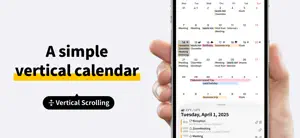


About months - Vertical Calendar
Make schedule management smarter and more enjoyable. This "Calendar" app is designed not just to manage your daily tasks, but to be an app you’ll actually want to open every day. We have pursued a refined design and comfortable usability that feels great to the touch. With our unique vertical scroll, you can view your schedule for months ahead without worrying about turning pages or month boundaries. No prior subscription required. Please try the full features for one week. There is no automatic billing after the free period ends. You will only be charged if you decide you want to keep using it and subscribe manually. It is a completely risk-free way to find out if this is the right calendar for you. If the usability and design fit your style, we believe this will become your go-to calendar app for years to come. Key Features - A "Calendar" that shows Monthly and Daily plans at a glance Say goodbye to flipping through months. Our simple, easy-to-use design allows you to scroll vertically through your timeline freely. You can view the entire month's overview and detailed daily schedules on a single screen. This intuitive visibility ensures you never miss an appointment—even those that cross over into the next month. - Optimized for One-Handed Use Designed for comfort, all main operation buttons are placed at the bottom of the screen. This layout allows for natural, one-handed navigation, making schedule management efficient and stress-free, even on larger smartphones. - One-Tap Easy Search Because you use it every day, searching should be instant. Your frequent search terms and history are saved and can be pinned for quick access. Once set, you can access the information you need with just one tap, making daily planning smoother than ever. - Full Support for Dark Mode, Widgets, Dynamic Type & New iOS Features Enjoy a unified, beautiful look with Dark Mode support for both the app icon and widgets. Our widgets are now more powerful, displaying more information and allowing interactive operations. Plus, Dynamic Type automatically adjusts font sizes based on your OS settings. We’ve packed the app with new features to comprehensively improve your user experience. - Integrated Weather Forecast Check the weather and temperature right alongside your schedule. Based on your current location, the latest forecast is displayed within the calendar, helping you plan your day more conveniently. - Free for 1 Week! Try it thoroughly first Choosing a calendar app that fits your lifestyle is important. That’s why we offer a 1-week free trial. Take your time to test all the features and usability before deciding whether to subscribe. There is no automatic charge, so you can explore risk-free to see if it suits your planning style. — Privacy policy https://months.jp/policy/ Apple's Standard License Agreement https://www.apple.com/legal/internet-services/itunes/dev/stdeula/
What’s new
Version 2.0.1 · Updated October 18, 2026
months now supports iPhone Duo. ・Fixed minor display issues on iPhone Duo.
App privacy
The developer, forYou inc., reported these privacy practices to Apple.
Data Not Collected
The developer does not collect any data from this app.
Alternatives to months - Vertical Calendar
Looking for apps like months - Vertical Calendar? Here are 6 similar apps on the App Store. The highest rated is Tempo Calendar: Daily Planner (5.0/5), and all 6 are free to download.
-
 Month View Calendar
4.7
Month View Calendar
4.7
-
 CalCal|Simple Calendar
4.5
CalCal|Simple Calendar
4.5
-
 Tempo Calendar: Daily Planner
5.0
Tempo Calendar: Daily Planner
5.0
-
 Simple Calendar - Calendar
1.0
Simple Calendar - Calendar
1.0
-
 Calendar Vertical & Monthly
4.4
Calendar Vertical & Monthly
4.4
-
 Caly - Calendar & Widgets
4.6
Caly - Calendar & Widgets
4.6
| App | Rating | Price | Last updated | Compare |
|---|---|---|---|---|
| months - Vertical Calendar | – | Free | October 18, 2026 | |
| Month View Calendar | 4.7 / 5 (3) | Free | Aug 13, 2026 | Compare |
| CalCal|Simple Calendar | 4.5 / 5 (4) | Free | Oct 26, 2026 | Compare |
| Tempo Calendar: Daily Planner | 5.0 / 5 (10) | Free | Oct 28, 2026 | Compare |
| Simple Calendar - Calendar | 1.0 / 5 (1) | Free | Dec 17, 2024 | Compare |
| Calendar Vertical & Monthly | 4.4 / 5 (7) | Free | Dec 27, 2025 | Compare |
| Caly - Calendar & Widgets | 4.6 / 5 (84) | Free | Oct 26, 2026 | Compare |