

Timing Task
斯群 郑 Productivity iPhoneiPadiPod touch
Timing Task is a free Productivity app for iPhone and iPad by 斯群 郑. Rated 5.0/5 from 1 ratings. Requires iOS 14. Updated April 13, 2026.
- Rating
- 5.0
- 1 ratings
- Price
- Free
- on the App Store
- Size
- 25 MB
- Age 4+
- Updated
- Apr 13
- 2026 · v1.1
Screenshots

About Timing Task
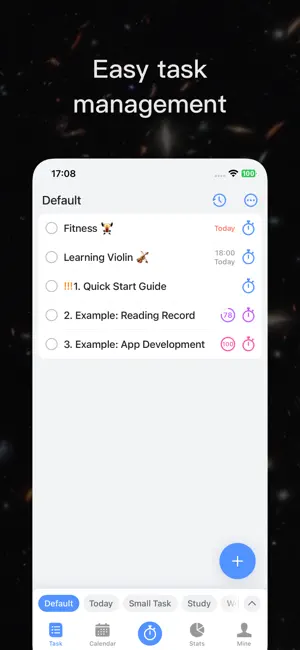
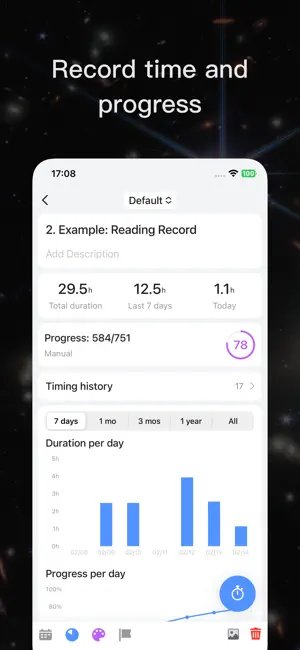
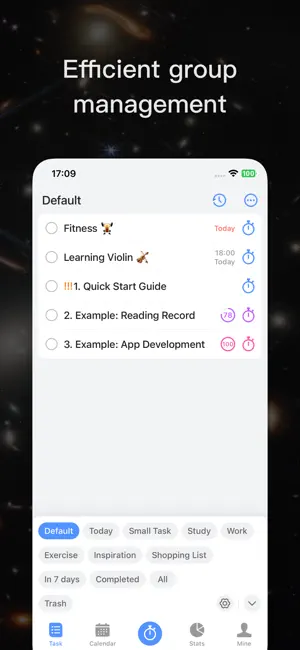
This app helps you efficiently manage tasks, time, and progress, recording every effort, clearly displaying progress, providing real-time feedback, helping you plan tasks and track time, making each day more organized and efficient. Main Features: 1. Create Tasks ▸ Task Management: Add titles and descriptions for each task, set completion status, and help you clearly plan each piece of work. ▸ Reminder Settings: Set task reminder times, supporting recurring reminders, to help you schedule your time scientifically and complete each goal on time. ▸ Progress Settings: Set goal progress values and update the progress bar in real-time to clearly present the completion ratio of tasks, making every step of progress clear at a glance. The progress bar is not only intuitive feedback but also a companion that motivates you to keep moving forward. ▸ Categorization and Prioritization: Group tasks, use color coding and priority settings to quickly distinguish and locate tasks, efficiently manage them. 2. Add Timing ▸ Record Time and Effort: Add timing for each task to record your time investment, making the accumulation of time a mark of your growth. ▸ Timing Content: Record the associated task, current progress, start and end time, duration, and description, helping you fully understand the meaning and results of each timing entry. ▸ Statistics and Charts: Through detailed data statistics and visual charts, intuitively display your task progress and time distribution, helping you review past time investments, gain insights into time usage, and provide clearer guidance for future planning. 3. Group Management ▸ Efficient Grouping: Task groups are located at the bottom of the homepage, allowing quick switching and expansion for easy viewing, making task categorization smooth and effortless. ▸ Customizable Groups: Create and adjust groups based on your needs to easily manage different types of tasks and keep everything organized. 4. Calendar and Statistics ▸ Calendar View: Display tasks by day, helping you easily review the past and plan for the future. ▸ Statistics View: Multi-perspective statistics of tasks and durations, helping you fully grasp your time investment and results. 5. Additional Features ▸ iCloud Sync: Automatically sync task data, allowing you to view and edit from multiple devices anytime, anywhere, without worrying about data loss. Supports iPhone, iPad, Mac. ▸ Export to Excel: One-click export of all task data for in-depth analysis, backup, and visual results. Summary: Whether it’s planning tasks, recording time, or tracking progress, our app is dedicated to helping you manage each day more efficiently, making every effort clearly visible and bringing you closer to your goals. Start your growth journey now! Terms of Service: https://ginkgeek.com/go/timingTask/terms?lang=en&title=termsOfServiceTitle&content=termsOfServiceContent Pricing Terms: https://ginkgeek.com/go/timingTask/terms?lang=en&title=pricingTermsTitle&content=pricingTermsContent Privacy Policy: https://ginkgeek.com/go/timingTask/terms?lang=en&title=privacyPolicyTitle&content=privacyPolicyContent
What’s new
Version 1.1 · Updated April 13, 2026
Fixed some known bugs and optimized the user experience.
App privacy
The developer, 斯群 郑, reported these privacy practices to Apple.
Data Not Collected
The developer does not collect any data from this app.
Alternatives to Timing Task
Looking for apps like Timing Task? Here are 6 similar apps on the App Store. The highest rated is Presently - The Now Calendar (5.0/5), and all 6 are free to download.
-
 PlanTodo - Task from Plan
-
 橙子计划:计划清单 自律打卡 todo番茄钟 提醒备忘录
-
 Triculator
-
 Presently - The Now Calendar
5.0
-
 Doing - time tracker
-
 Effortslog
| App | Rating | Price | Last updated | Compare |
|---|---|---|---|---|
| Timing Task | 5.0 / 5 (1 rating) | Free | April 13, 2026 | |
| PlanTodo - Task from Plan | – | Free | Oct 13, 2026 | Compare |
| 橙子计划:计划清单 自律打卡 todo番茄钟 提醒备忘录 | – | Free | Oct 23, 2025 | Compare |
| Triculator | – | Free | Jun 11, 2026 | Compare |
| Presently - The Now Calendar | 5.0 / 5 (2) | Free | Dec 7, 2025 | Compare |
| Doing - time tracker | – | Free | Jan 27, 2026 | Compare |
| Effortslog | – | Free | Sep 27, 2024 | Compare |
Compare Timing Task with the top alternatives: ratings, updates, ASO score and keyword gaps →