

Vault – Open Source Backup
Bad Bundle Limited Productivity iPhoneiPadiPod touch
Vault – Open Source Backup is a free Productivity app for iPhone and iPad by Bad Bundle Limited. Requires iOS 27.0. Updated October 21, 2026.
- Price
- Free
- on the App Store
- Size
- 81 MB
- Age 4+
- Updated
- Oct 21
- 2026 · v2.2
Screenshots


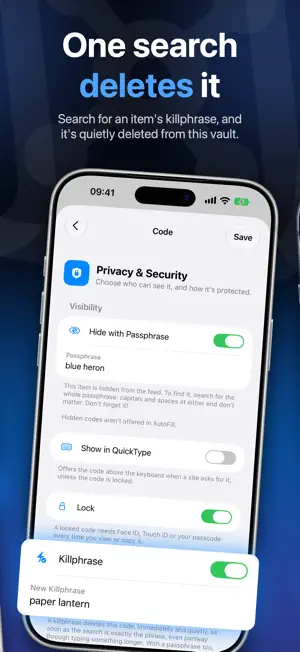

About Vault – Open Source Backup
Vault keeps the secrets you can't afford to lose: seed phrases, private keys and private notes, and your two-factor codes too. It has no servers, no accounts and no analytics, it makes no network requests, and it's open source. It's also built for the moment someone makes you unlock it. RECOVERY PHRASES AND PRIVATE KEYS • Keep the seed phrases for your crypto wallets, checked against the BIP39, SLIP-39, Electrum and Monero word lists as you type. • Keep private keys: WIF and extended keys (xprv), raw hex keys and Nostr keys, checked where they have a checksum, and PGP and SSH private keys. • Phrases and keys are always encrypted and locked, masked until you tap them, hidden while the screen is recorded or shared, and can't be copied. • Vault keeps your keys, never your funds: it signs nothing and makes no network requests. IF YOU'RE MADE TO UNLOCK IT • App Lock keeps Vault behind Face ID, Touch ID or your passcode, and hides it in the app switcher. • An App Lock Password encrypts the whole vault on your iPhone. Vault asks for it after Face ID or your passcode, and makes you wait longer after each wrong one. • A duress password opens a separate vault instead of your real one. • Hidden items only appear when you search for their passphrase. • A killphrase quietly deletes an item from this vault as soon as it's searched for. • If you turn it on, 10 wrong passwords in a row erase every vault on the iPhone. BACKUPS YOU CONTROL • Save an encrypted PDF backup to print or keep wherever you like. Restore it from the file, or by scanning its QR codes. • Or have Vault save a fresh encrypted backup whenever your items change, to a folder you choose, such as one in iCloud Drive. • Move your vault to another iPhone, iPad or Mac by scanning QR codes, with no file saved. PRIVATE BY DESIGN • No servers, no accounts, no sync, no analytics and no network requests. • Hide While Recording covers Vault while the screen is recorded, mirrored or shared. • Apple's keyboard learns nothing you type in Vault. • Open source: the code is on GitHub, with a security model that lists every promise Vault makes, and its limits. NOTES AND 2FA CODES • Write notes in plain text or Markdown, tag them, and find anything with instant search. • Lock any item behind Face ID, Touch ID or your passcode, and encrypt a note with a password of its own. • Add a code by scanning its QR code, or type in its secret. Time-based (TOTP) and counter-based (HOTP) codes both work. • Tap a code to copy it. Copies are cleared from the clipboard after a minute by default, and only reach your other devices if you allow it. • Fill codes into apps and websites with AutoFill, and see them in widgets on the Home Screen and Lock Screen. • Turn on Show in Spotlight to find a code by its site's name. Vault is free on iPhone, iPad and the Mac, with no ads and no in-app purchases.
What’s new
Version 2.2 · Updated October 21, 2026
Vault keeps private keys now, as well as recovery phrases: WIF and extended private keys (xprv, zprv and others), hex keys, Nostr nsec keys, and PGP, SSH and PEM private keys. Like a recovery phrase, a private key is always encrypted and locked, masked until you tap it, and never copied. - Made for iPhone Duo: the lock screen lines up on the outer screen, and on the inner screen, partly folded, nothing sits across the crease. - Recovery phrases and private keys now come first when you add an item, and Help has a new page about each. - Vault runs with Apple's Enhanced Security, which makes memory bugs in it much harder to exploit.
App privacy
The developer, Bad Bundle Limited, reported these privacy practices to Apple.
Data Not Collected
The developer does not collect any data from this app.
Alternatives to Vault – Open Source Backup
Looking for apps like Vault – Open Source Backup? Here are 6 similar apps on the App Store. The highest rated is FileShield: Private Vault (5.0/5), and all 6 are free to download.
-
 FileShield: Private Vault
5.0
FileShield: Private Vault
5.0
-
 TinyCld
-
 PearCal: P2P Calendar
5.0
PearCal: P2P Calendar
5.0
-
 Tie Tracker
5.0
Tie Tracker
5.0
-
 Mailbux
5.0
Mailbux
5.0
-
 OpenAirScan
2.7
OpenAirScan
2.7
| App | Rating | Price | Last updated | Compare |
|---|---|---|---|---|
| Vault – Open Source Backup | – | Free | October 21, 2026 | |
| FileShield: Private Vault | 5.0 / 5 (3) | Free | Jul 1, 2026 | Compare |
| TinyCld | – | Free | Jul 17, 2026 | Compare |
| PearCal: P2P Calendar | 5.0 / 5 (3) | Free | Oct 15, 2026 | Compare |
| Tie Tracker | 5.0 / 5 (2) | Free | Aug 11, 2026 | Compare |
| Mailbux | 5.0 / 5 (1) | Free | Oct 9, 2026 | Compare |
| OpenAirScan | 2.7 / 5 (3) | Free | Sep 14, 2026 | Compare |