

FocusMinny: Productivity Coach
Epsiiilon Ltd. Productivity iPhoneiPadiPod touch
FocusMinny: Productivity Coach is a free Productivity app for iPhone and iPad by Epsiiilon Ltd. Rated 5.0/5 from 5 ratings. Requires iOS 16.4.
- Rating
- 5.0
- 5 ratings
- Price
- Free
- on the App Store
- Size
- 95 MB
- Age 4+
- Updated
- Oct 19
- 2026 · v3.0.1
Screenshots
About FocusMinny: Productivity Coach
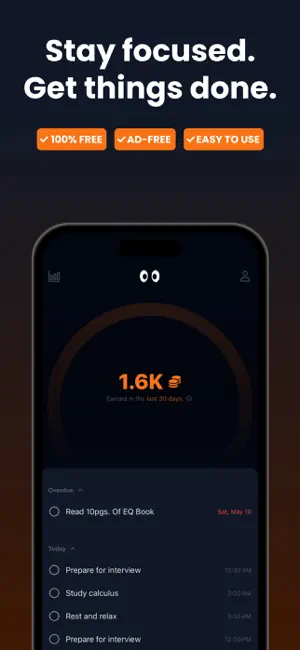
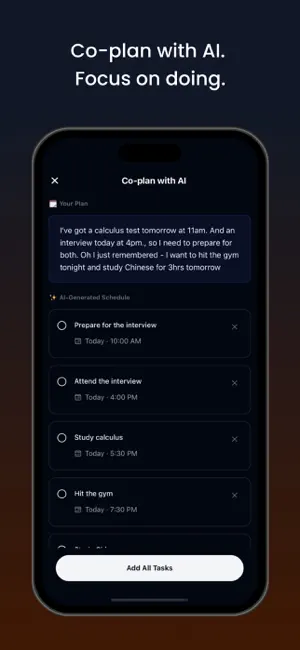
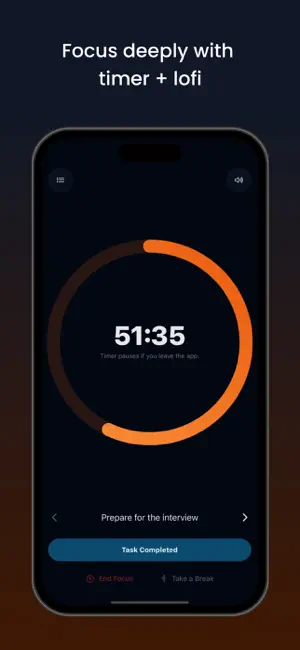
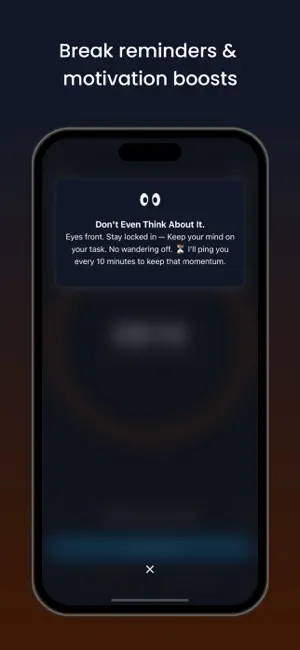
You know what you need to do. You just keep not starting. FocusMinny is a focus timer and planner for study, work, personal projects, and daily habits. It helps you turn “I should do this” into a real plan: choose one task, give it a time and a length, then start it. No huge list. No gold stars for opening an app. Just one clear promise and an honest record of what happened. MAKE ONE CLEAR PROMISE What are you doing? When will you do it? How long will you give it? FocusMinny helps you make that decision before the moment you need to start. When the time comes, your task is waiting. Start a focus session with one tap instead of spending ten minutes deciding what to do. If you miss it, it does not quietly disappear. Move it to another time, mark it done, or say what got in the way. Your plans should tell the truth about your day. A FOCUS TIMER WITH A REASON A timer is useful when you know exactly what you are doing. FocusMinny keeps the task in front of you while the timer runs, so you are not just watching minutes go by. Use a short session to get started. Take a break when you need one. Choose silence or brown noise to cover the room. When time is up, say whether the work is actually done or whether you need more time. START SMALL. KEEP GOING. You do not need a perfect morning or a five-hour study plan. Start with 15 minutes. Make a promise you can keep. If the work takes longer, make a new plan with what you now know instead of pretending you will do everything at once. FOR THE WORK YOU KEEP PUTTING OFF FocusMinny is made for the task that keeps moving to tomorrow: • Study for an exam or finish coursework • Write the first draft, not just the outline • Start the coding task or design work you keep avoiding • Make progress on a side project • Read, practise, or build a daily routine • Protect a block of deep work from a busy day It works for students, professionals, creators, and anyone who wants to stop making plans they do not follow. WHAT YOU GET FREE • Write and schedule promises for the work you need to do • Get reminders when a promise is due • Start 15-minute, 30-minute, or 1-hour focus sessions • Move unfinished promises instead of losing them • Get a short daily message based on your own plans • See what is due today • Use brown noise while you work FOCUSMINNY PRO Pro is for when you want more help before, during, and after a focus session. PLAN WITH MINNY Tell Minny what is on your plate. She helps you work out what to do next and gives you a plan you can change before you commit to it. Take a photo of a handwritten list, notebook page, or whiteboard instead of typing everything out. When you have too much to do, Minny helps turn it into a few realistic promises instead of a packed plan you will never use. Change, remove, or keep every suggestion before it is added to your day. GET HELP WHILE YOU WORK Minny can check in during a session. Ask for help when you are stuck, distracted, tempted to quit, or unsure what to do next. She is there to help you get back to the work, not keep you talking. SEE YOUR FULL RECORD See how often you keep your promises, how much focused time you put in, when you work best, where you usually stop, and what you have actually finished. Your record includes your recent weeks, your best hours, your usual quit points, and your session history. Use it to spot the simple things that make a difference: a time of day that works, a session that is too long, or the work you keep avoiding. Then make the next promise better. MAKE THE APP FIT YOUR DAY Choose any session length. Repeat promises for habits, weekdays, or specific days. Pick seven extra sounds: rain, ocean, forest, café, fireplace, library, and instrumental. THE DIFFERENCE Most focus apps count minutes. FocusMinny also asks whether you did the work you said you would do. That is the point. Make the promise. Start the timer. Keep your word—or be honest and make a better plan next time. Red pen, not gold stars.
Ratings & reviews
5.0
5 ratings
What’s new
Version 3.0.1 · Updated October 19, 2026
Bug fixes
App privacy
The developer, Epsiiilon Ltd., reported these privacy practices to Apple.
Data Linked to You
The following data, which may be collected and linked to your identity, may be used for the following purposes:
- Contact Info: Name, Email Address
Used for: Product Personalization, App Functionality
Alternatives to FocusMinny: Productivity Coach
Looking for apps like FocusMinny: Productivity Coach? Here are 6 similar apps on the App Store. The highest rated is Dotomo AI Task Reminder (5.0/5), and all 6 are free to download.
-
 Dotomo AI Task Reminder
5.0
Dotomo AI Task Reminder
5.0
-
 Cardz - Reinvented Bookmarks
5.0
Cardz - Reinvented Bookmarks
5.0
-
 Do It - Productivity Manager
5.0
Do It - Productivity Manager
5.0
-
 Schedule Planner - To Do List
5.0
Schedule Planner - To Do List
5.0
-
 TaskNavi: AI Task Planner
5.0
TaskNavi: AI Task Planner
5.0
-
 Wisme | Build Habits Together
5.0
Wisme | Build Habits Together
5.0
| App | Rating | Price | Last updated | Compare |
|---|---|---|---|---|
| FocusMinny: Productivity Coach | 5.0 / 5 (5 ratings) | Free | October 19, 2026 | |
| Dotomo AI Task Reminder | 5.0 / 5 (1) | Free | Jan 26, 2025 | Compare |
| Cardz - Reinvented Bookmarks | 5.0 / 5 (5) | Free | Jul 18, 2026 | Compare |
| Do It - Productivity Manager | 5.0 / 5 (3) | Free | Jul 21, 2025 | Compare |
| Schedule Planner - To Do List | 5.0 / 5 (4) | Free | Mar 19, 2026 | Compare |
| TaskNavi: AI Task Planner | 5.0 / 5 (3) | Free | May 23, 2025 | Compare |
| Wisme | Build Habits Together | 5.0 / 5 (10) | Free | Oct 9, 2026 | Compare |