

ScanPro: PDF Scanner & OCR
CHINAR MAHMUDOVA KORUK Business iPhoneiPadiPod touch
ScanPro: PDF Scanner & OCR is a free Business app for iPhone and iPad by CHINAR MAHMUDOVA KORUK. Rated 5.0/5 from 3 ratings. Requires iOS 17.0.
- Rating
- 5.0
- 3 ratings
- Price
- Free
- on the App Store
- Size
- 73 MB
- Age 4+
- Updated
- Sep 13
- 2026 · v2.0.1
Screenshots


About ScanPro: PDF Scanner & OCR
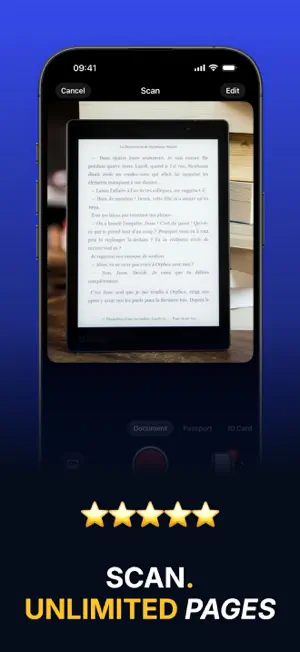
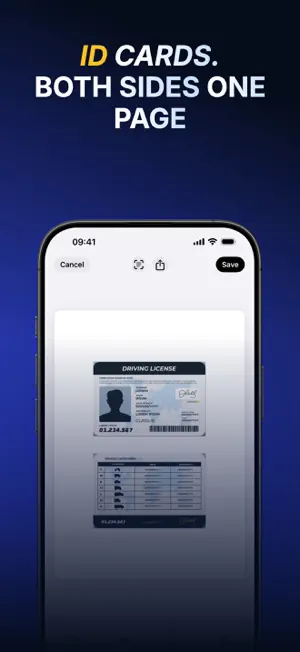
Your iPhone already has a scanner in it. ScanPro turns it into one that makes clean, sharp PDFs — of a contract, a receipt, a passport, your ID, or the whole stack of paper on your desk. Hold the camera over the page and wait — ScanPro takes the shot itself, finds the edges, straightens it and turns it into a PDF you can sign, rename, find by the words on it and send — in seconds, without a computer. ----- ◆◆◆ WHY YOU'LL LOVE IT ◆◆◆ • Real scans, not photos: edges detected, perspective corrected, colours cleaned up • Hands-free: the shutter fires by itself once the page is held still • Sign with your finger and drag the signature exactly where it belongs • Pull the text out of any scan and paste it wherever you need it • Everything stays on your device — nothing is ever uploaded • Find any document by the words printed on it, even months later ----- SCAN – Documents, passports and ID cards, front and back on one page – Automatic edge detection and cropping, or set the corners yourself – Add pages from the camera, your photo library, or a PDF in Files – Auto capture: hold the phone still over a page and it scans itself, sheet after sheet EDIT – Drag pages to reorder them, delete the ones you don't want – Crop, rotate and pick from nine looks: colour, greyscale and high-contrast black & white – Nothing is destroyed — the original photo stays untouched, so you can always change your mind SIGN – Draw your signature once and reuse it on any document – Move it, resize it, recolour it, and place one on every page that needs it EXTRACT TEXT – Turn a scan into text you can copy, edit and send – Dozens of recognition languages – Edit the result before you use it ORGANIZE & SHARE – Collections keep contracts, receipts and school papers apart – Search your whole library by name or by the text on the pages – Grid or list view, sorted by name, date or size – Share by AirDrop, Messages, email or any other app — or send a copy locked with a password – Save pages to Photos as images – New scans name themselves after the title on the first page – Merge several documents into a single PDF – Lock the app with Face ID, Touch ID or your passcode ----- SCANPRO PRO Scanning, cropping, filters, rotating and sharing are free. PRO adds unlimited pages per document, ID card scanning, signatures, editing saved documents, drafts, saving to Photos, password-protected sharing, extra collections, text extraction from the whole document and App Lock. Pay only for as long as you need PRO. ----- Support Contact: [email protected] Terms of Use: https://akoruk.github.io/apps/scanner/terms.html Privacy Policy: https://akoruk.github.io/apps/scanner/privacy.html
What’s new
Version 2.0.1 · Updated September 13, 2026
Thanks for using the app! This update brings: • Faster, smoother performance throughout the app • A cleaner, easier-to-use interface • Fixes for the issues you reported
App privacy
The developer, CHINAR MAHMUDOVA KORUK, reported these privacy practices to Apple.
Data Not Linked to You
The following data, which may be collected but is not linked to your identity, may be used for the following purposes:
- Diagnostics: Crash Data
Used for: Analytics, App Functionality
Alternatives to ScanPro: PDF Scanner & OCR
Looking for apps like ScanPro: PDF Scanner & OCR? Here are 6 similar apps on the App Store. The highest rated is ScanBig (5.0/5), and 4 of the 6 are free to download.
-
 TwiBlock
4.7
-
 Business Card Organizer & Scan
3.2
-
 SnapNote Pro
-
 Transcriptor
2.0
-
 AI Image Translator
3.8
-
 ScanBig
5.0
| App | Rating | Price | Last updated | Compare |
|---|---|---|---|---|
| ScanPro: PDF Scanner & OCR | 5.0 / 5 (3 ratings) | Free | September 13, 2026 | |
| TwiBlock | 4.7 / 5 (3) | Free | Oct 1, 2024 | Compare |
| Business Card Organizer & Scan | 3.2 / 5 (9) | Free | Oct 29, 2024 | Compare |
| SnapNote Pro | – | 1.99 USD | Feb 19, 2026 | Compare |
| Transcriptor | 2.0 / 5 (1) | 5.99 USD | Feb 18, 2025 | Compare |
| AI Image Translator | 3.8 / 5 (4) | Free | Mar 30, 2026 | Compare |
| ScanBig | 5.0 / 5 (1) | Free | Jul 30, 2026 | Compare |