

Fax from iPhone - send files
Hermine Matevosyan Productivity iPhoneiPadiPod touch
Fax from iPhone - send files is a free Productivity app for iPhone and iPad by Hermine Matevosyan. Rated 4.9/5 from 13 ratings. Requires iOS 17.6.
- Rating
- 4.9
- 13 ratings
- Price
- Free
- on the App Store
- Size
- 26 MB
- Age 4+
- Updated
- Jul 6
- 2026 · v1.4.2
Screenshots



About Fax from iPhone - send files
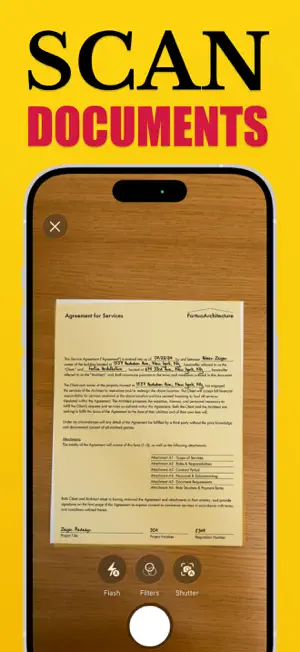
Fax from iPhone or iPad without looking for a fax machine. RocketFax helps you scan, import, preview, send, receive, and track faxes in one simple app. Use it when a business, clinic, school, bank, insurer, government office, or real estate agent still needs documents by fax. Send documents in a few taps Add a PDF, photo, scanned page, or document from Files. Enter the recipient's fax number, review the final fax, and send it from your device. RocketFax keeps the flow focused so you can finish quickly and move on. Receive faxes with a dedicated number Choose a fax number for incoming documents and use RocketFax as your mobile fax inbox. Received faxes appear in the app as PDFs, ready to open, share, export, or keep for your records. Built-in document scanner Turn paper forms, letters, receipts, IDs, signed pages, and handwritten notes into fax-ready documents with your camera. Scan multiple pages, combine files, and prepare everything before sending. Cover pages and drafts Create a clean cover page when your fax needs sender details, recipient details, subject, or a short message. Draft support helps you come back later without losing your documents, recipient, or cover page work. Preview before sending Check pages before they leave your device. RocketFax lets you review the document, page count, recipient, and delivery details so mistakes are easier to catch before you send. Track fax status Keep sent faxes in History and follow their status from queued to sending to delivered or failed. Push notifications can help you know when a fax status changes. Useful for everyday fax needs RocketFax is made for people who need to send real documents fast: medical forms, insurance paperwork, legal documents, signed contracts, school forms, invoices, claims, tax documents, applications, authorizations, and business records. Why RocketFax - Send faxes from iPhone or iPad - Receive faxes in a dedicated inbox - Choose a dedicated fax number - Scan paper documents with the camera - Import PDFs, photos, and document files - Add cover pages when needed - Preview documents before sending - Save drafts and resume later - Track fax delivery status - Open, share, export, or resend documents Subscription RocketFax offers auto-renewable subscription options for fax service access. Pricing and subscription details are shown in the app and on the App Store purchase sheet before confirmation. You can manage or cancel your subscription in your Apple ID account settings. By using RocketFax, you agree to our Privacy Policy and Terms of Use: Privacy Policy: https://rocketfax-acedb.web.app/privacy_policy.html Terms of Use: https://rocketfax-acedb.web.app/terms.html Payment will be charged to your Apple ID account at confirmation of purchase. Subscription renews automatically unless auto-renew is turned off at least 24 hours before the end of the current period. Your account will be charged for renewal within 24 hours before the end of the current period. Subscriptions may be managed and auto-renewal may be turned off in Account Settings after purchase.
Ratings & reviews
4.9
13 ratings
What’s new
Version 1.4.2 · Updated July 6, 2026
RocketFax just got a serious upgrade. Sending and receiving faxes now feels cleaner, faster, and easier to follow from start to finish. Scan documents, preview your fax, send with confidence, and track delivery right from your history. We also polished the app throughout, improved reliability, and fixed issues to make faxing smoother when it matters. Have suggestions or need help? Contact our 24/7 support anytime from the app.
App privacy
The developer, Hermine Matevosyan, reported these privacy practices to Apple.
Data Not Collected
The developer does not collect any data from this app.
Alternatives to Fax from iPhone - send files
Looking for apps like Fax from iPhone - send files? Here are 6 similar apps on the App Store. The highest rated is Fax App – Send & Receive Faxes (5.0/5), and 5 of the 6 are free to download.
-
 Fax App – Send & Receive Faxes
5.0
Fax App – Send & Receive Faxes
5.0
-
 SendFax - Fax from Phone
3.0
SendFax - Fax from Phone
3.0
-
 Faxer.me
5.0
Faxer.me
5.0
-
 Fax App - Send FAX from Phone
5.0
Fax App - Send FAX from Phone
5.0
-
 Task Timer - To Do Alert
-
 Minimilistly
| App | Rating | Price | Last updated | Compare |
|---|---|---|---|---|
| Fax from iPhone - send files | 4.9 / 5 (13 ratings) | Free | July 6, 2026 | |
| Fax App – Send & Receive Faxes | 5.0 / 5 (3) | Free | Jul 30, 2026 | Compare |
| SendFax - Fax from Phone | 3.0 / 5 (2) | Free | Sep 30, 2025 | Compare |
| Faxer.me | 5.0 / 5 (3) | Free | Sep 3, 2026 | Compare |
| Fax App - Send FAX from Phone | 5.0 / 5 (1) | Free | Jul 9, 2025 | Compare |
| Task Timer - To Do Alert | – | 3.99 USD | Mar 25, 2025 | Compare |
| Minimilistly | – | Free | May 21, 2026 | Compare |