

Signature Creator: Signing app
CRECODE IT PROFESSIONALS (Private) LTD Productivity iPhoneiPadiPod touch
Signature Creator: Signing app is a free Productivity app for iPhone and iPad by CRECODE IT PROFESSIONALS (Private) LTD. Rated 4.5/5 from 2 ratings.
- Rating
- 4.5
- 2 ratings
- Price
- Free
- on the App Store
- Size
- 27 MB
- Age 4+
- Updated
- Jan 20
- 2026 · v1.8
Screenshots


About Signature Creator: Signing app
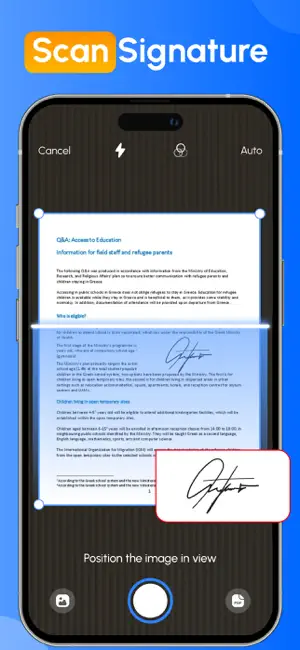
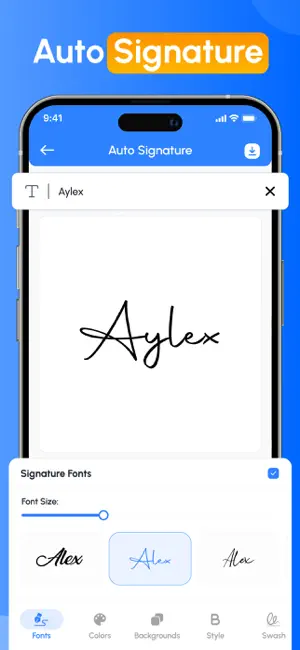
Forget the hassle of printing, scanning, and complicated e signature app processes! With the Signature Maker app, you can sign any document file in just a few clicks, easy and stress-free. Just tap or click to sign with your finger. Easily add your e signature app, dates, and any other text to your document, then instantly create a signed PDF that's ready to share or store. No more paperwork, no more delays, just a quick and secure signature at your fingertips. This app provides the user with the easiest way to sign PDF or document without the need of any physical paper and pen.signature creator & Signature Maker app gives you all the features you need for your everyday signature needs. Key Features of Sign Maker App - Create handwritten signatures with a custom autograph editor - Scan your signature directly from your device camera. - Auto-sign your document by just entering your name in the text box provided. - Customise your signature with unique backgrounds to make it more enhanced. - Adjust colour, size, rotation and style to design the perfect digital signature. - Save your official signature to reuse in multiple Documents. Simplify your workflow with Fill by reusing commonly used signatures or text. Customise your signature text for quick access. See How Signature Maker Works to Simplify Your Life - Import documents from your device. - Add a e signature app to your given document. - Save your file and share it wherever you want This document and PDF signer saves your valuable time. It is also very useful for users who want to create their own digital signature using the autograph signature creator tool. Want to build your own electronic signature feature, this is the perfect solution for anyone who needs a reliable e-signature tool. Apart from this, this app also allows you to reuse your old signature. Our Benefits ◉ Create your name in style and sign it in your personal or professional document. ◉ Sign your official contracts with just a single tap on your mobile screen. ◉ Create your own signature without the need for pen or paper Just scan, fill out any form, sign, and send quickly to others. ◉ Transfer files to multiple recipients in a variety of ways, such as direct downloads of files in other formats, or sharing folders. ◉ The Signature Maker app gives you the flexibility to share your completed files when needed. ◉ Invites Your Families, Friends or colleagues to fill & sign document files in seconds. Close your important deals with the easiest and fastest process that requires a signature. Get things done quickly, safely and hassle-free, so you can focus on what matters most. From personal autographs to professional document signing, the app offers everything you need. You can also import the related image of your signature creator into a PDF or document file using the Signature Maker app. Download the Signature Maker app now! And easily create your own electronic signatures and easily share signed documents on all social media platforms. Privacy policy: https://crecode.uk/privacy-policy/ Terms of use: https://crecode.uk/terms-of-use/
What’s new
Version 1.8 · Updated January 20, 2026
– Improved app performance and stability – Updated visual elements to improve overall user experience – UI enhancements for a smoother and more polished experience – Minor bug fixes and performance enhancements
App privacy
The developer, CRECODE IT PROFESSIONALS (Private) LTD, reported these privacy practices to Apple.
Data Used to Track You
The following data may be used to track you across apps and websites owned by other companies:
- Identifiers: User ID
- Usage Data: Product Interaction
Data Not Linked to You
The following data, which may be collected but is not linked to your identity, may be used for the following purposes:
- Identifiers: User ID, Device ID
- Usage Data: Product Interaction
- Diagnostics: Crash Data, Performance Data
Used for: Third-Party Advertising, Developer’s Advertising or Marketing, Analytics
Alternatives to Signature Creator: Signing app
Looking for apps like Signature Creator: Signing app? Here are 6 similar apps on the App Store. The highest rated is Signature Maker - e Sign App (5.0/5), and all 6 are free to download.
-
 Sign AI - Signature Maker App
4.5
Sign AI - Signature Maker App
4.5
-
 Signature Generator - SignIt
-
 Electronic Signature Scanner
-
 Signature Maker - e Sign App
5.0
Signature Maker - e Sign App
5.0
-
 Signature Maker: Scan&Sign PDF
-
 Sign Pdf Documents: Esign App
4.3
Sign Pdf Documents: Esign App
4.3
| App | Rating | Price | Last updated | Compare |
|---|---|---|---|---|
| Signature Creator: Signing app | 4.5 / 5 (2 ratings) | Free | January 20, 2026 | |
| Sign AI - Signature Maker App | 4.5 / 5 (62) | Free | Oct 7, 2026 | Compare |
| Signature Generator - SignIt | – | Free | Jul 1, 2026 | Compare |
| Electronic Signature Scanner | – | Free | Oct 21, 2026 | Compare |
| Signature Maker - e Sign App | 5.0 / 5 (5) | Free | Sep 8, 2026 | Compare |
| Signature Maker: Scan&Sign PDF | – | Free | Nov 5, 2025 | Compare |
| Sign Pdf Documents: Esign App | 4.3 / 5 (10) | Free | Sep 17, 2026 | Compare |