

Find Braille – Braille Reader
koyari Utilities iPhoneiPadiPod touch
Find Braille – Braille Reader is a free Utilities app for iPhone and iPad by koyari. Requires iOS 15.6. Updated August 7, 2026.
- Price
- Free
- on the App Store
- Size
- 59 MB
- Age 4+
- Updated
- Aug 7
- 2026 · v1.2.2
Screenshots



About Find Braille – Braille Reader
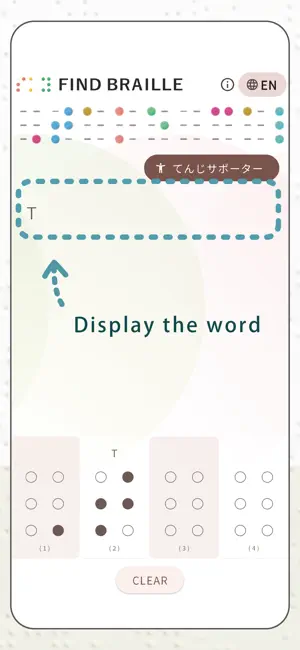
Have you ever wondered what braille says? Find Braille lets you enter braille by tapping the dots on the screen and instantly see the text. It’s useful when you find braille in products, foods, books, signs, or even in games. Features: • Tap braille dots to read the text • Simple and easy to use • Great for learning braille This app does not use the camera. Instead, you enter braille manually by tapping the dots. ● How Braille Works 'Braille' is a character that is expressed by a combination of six dots. Any character or symbol can be written using a combination of 'six dots'. ● How To Use 1. The 'six dots' displayed at the bottom are one Braille. 2. Tap the Braille. That's it. - Do not press the dot too hard; tap gently. - Press the 'CLEAR' button to clear all tapped the dots. - In some cases, unintended conversions may occur. In that case, please press the 'CLEAR' button to reset it. ● When to Use This App When you find Braille on products, food, or other items When you find Braille on a train When Braille appears in a game In an elevator etc. ● Supported Languages English (EN) Spanish (ES) French (FR) Japanese (JP) Portuguese (PT) Italian(IT), You can switch languages using the button on the top right. We plan to add more languages in the future. ● What About 'Braille Supporter (Subscription)' We are looking for 'Braille Supporter' to help maintain and develop this app. By subscribing, you can enjoy benefits too such as the ability to input unlimited amounts of Braille characters continuously and No ads. If you agree with our efforts, please subscribe. - Billing system : Your Apple ID will be charged. ● How to unsubscribe Subscription will automatically renew unless canceled 24 hours before the end of the period. To cancel automatic updates, follow the steps below. 1. Select [ Subscription ] from the device settings. 2. Select [ Find Braille ], and then Cancel - Even if you cancel your contract midway through, you can still use the benefits until the last day of the period. ● Terms of Use https://koyari.jp/braille/en/terms-en/ ● Apple Terms of Use (EULA) https://www.apple.com/legal/internet-services/itunes/dev/stdeula/ ● Privacy policy https://koyari.jp/braille/en/privacy-policy-en/ ● Customer support Email: [email protected] Please contact us if you have any questions or requests. ~ For Braille to be widely used ~ Since we started developing this app, We have realized that the environment surrounding Braille is expanding and narrowing. The number of Braille users is quite small compared to the population, and Braille notation in the city has not spread widely, and we feel that the number is decreasing. With the development of digital devices, image recognition and speech translation have also appeared. What we asked people who actually use Braille : 'If I miss the audio, it is difficult to go back and listen to it again.' 'If it's written in Braille, it's easy to read it back a while ago.' 'Braille is convenient because I can read it at my own pace' 'I thought it would be a problem if Braille disappeared because things that I didn't want people around me to hear can be overheard if I use audio.' Braille is very useful, but we realized that if the number of Braille users remained small, they would forever be treated as a minority. A sighted people who can read Braille, People who want to use Braille in daily life, We created this 'Find Braille' app in an effort to increase the number of people like this. Furthermore, in order to make Braille popularization activities more sustainable, we are also recruiting 'Braille Supporters (subscription)'. First of all, we want you to use this app and enjoy it. What is written in braille? Why not try using it as if you were trying to solve a secret code? ● Try to decipher We are adding braille images of short pieces of text to this web site. https://koyari.jp/braille/en/everyday-en/
What’s new
Version 1.2.2 · Updated August 7, 2026
We've improved the dark mode experience in this update.
App privacy
The developer, koyari, reported these privacy practices to Apple.
Data Not Linked to You
The following data, which may be collected but is not linked to your identity, may be used for the following purposes:
- Usage Data: Advertising Data
- Purchases: Purchase History
Used for: Third-Party Advertising, Analytics, App Functionality
Alternatives to Find Braille – Braille Reader
Looking for apps like Find Braille – Braille Reader? Here are 6 similar apps on the App Store.
-
 TenjiScan - Braille OCR Reader
-
 すぐそこチャイム
-
 MBraille
-
 Coin Toss Pro
-
 Seal by Kyoto Makotoya
-
 Audio Recorder & Converter
| App | Rating | Price | Last updated | Compare |
|---|---|---|---|---|
| Find Braille – Braille Reader | – | Free | August 7, 2026 | |
| TenjiScan - Braille OCR Reader | – | Free | Oct 21, 2026 | Compare |
| すぐそこチャイム | – | Free | Jan 2, 2026 | Compare |
| MBraille | – | Free | Jul 22, 2026 | Compare |
| Coin Toss Pro | – | 0.99 USD | Jul 10, 2024 | Compare |
| Seal by Kyoto Makotoya | – | Free | Jul 23, 2026 | Compare |
| Audio Recorder & Converter | – | 0.99 USD | Dec 8, 2025 | Compare |