

CheckBiz360
Encodebiz SL Productivity iPhoneiPadiPod touch
CheckBiz360 is a free Productivity app for iPhone and iPad by Encodebiz SL. Rated 4.5/5 from 2 ratings. Requires iOS 15.0. Updated October 23, 2026.
- Rating
- 4.5
- 2 ratings
- Price
- Free
- on the App Store
- Size
- 45 MB
- Age 17+
- Updated
- Oct 23
- 2026 · v1.10.0
Screenshots


About CheckBiz360
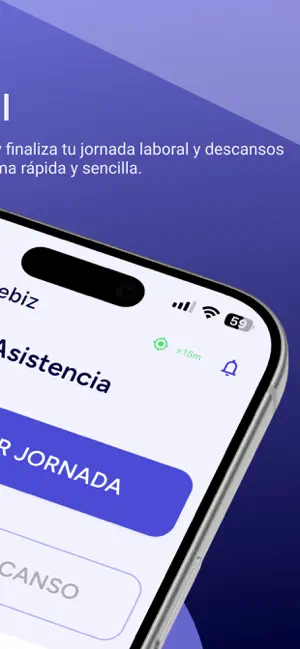
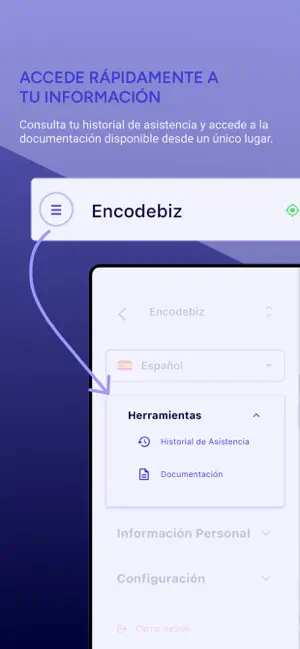
WHAT IS CHECKBIZ360 CheckBiz360 is EncodeBiz's field operations management platform: for companies with people spread across sites, projects, services or clients' premises. Where other systems only record entries and exits, CheckBiz360 brings workdays, tasks, documents and materials together in one place and turns them into information to act on: who is in, what was done, what was reviewed and what it costs. It is not a digital time clock: it is the tool a company uses to keep its operation under control. THE PROBLEM IT SOLVES When the work is spread out, the information should not be. Job reports that arrive late, calls to find out what was done, work nobody reviews, hours paid without knowing which tasks they went to. HOW IT IS BUILT • THE WEB BACK OFFICE, from any browser. Managers set up sites and people, configure schedules, assign tasks, review and validate the work, hand out documents, keep track of materials and check costs and alerts. • THIS APP, in the pocket of the person working. It is the field side. YOUR OPERATIONS MANAGER IN CLAUDE OR CHATGPT Managers can connect the company to their Claude or ChatGPT and ask for things in their own words: how today is going and who is missing, who can cover a job, building the whole team's week, moving a task or adding new people. The assistant does it in CheckBiz360 with their permissions, shows what it is about to do, and saves nothing without confirmation. WHAT THIS APP DOES CLOCKING IN • Entry, exit and breaks from your phone. • Location validated against your site's geofence or the job's own, and, depending on the setup, biometric verification. • Remote clocking in where your company allows it, and manual workday requests when something went wrong. • Your own record history, as regulations require. • Before closing your workday, the app tells you if your shift hasn't ended or you still have a task in progress. TASKS • Yours, with status, priority, planned start and deadline. Today's at the top, ready to start. • Start, pause, resume and complete them from the list itself or from the home screen. • Notes and photo or video evidence, which your manager validates or rejects with a reason. • Every job with its location: the distance in view and the map to get there. • If you run a team, your tasks appear separately from the team's, and you can filter by person. DOCUMENTS AND SIGNATURE • Your company's documents, to read and download, with read receipts where required. • Signed confirmation from your phone, with your fingerprint, PIN or password: a record of who signed, when, and which version they received. MATERIALS (with the Inventory add-on) • What you have been issued, with its documentation, and what is at your site. • You confirm or reject each issue from your phone, signed. • You declare what you use on each task or during your workday, so materials are accounted for just like the work. SCHEDULES AND ALERTS • Your shift for the day, split shifts, public holidays and days off. • If your company organises your day by tasks, clocking in starts and completes each job. • Alerts for new tasks, validations, rejections, material issues and your workday. • Incidents to support from the app. WHAT HAPPENS WITH WHAT YOU RECORD Every clock record, task, signature and consumption feeds your company's dashboard: who is in and who is missing at each site, which tasks are going wrong, late arrivals and records outside the geofence, cost per hour and per workday, which materials were used and who has them, and the per-person workday report in line with Spanish RDL 8/2019, with every change traceable. WHO IT IS FOR For work that happens away from an office: home care, cleaning across sites, maintenance, installations, construction, events. It works for any company that needs to know who worked, when, where and on what, and be able to prove it. CheckBiz360 is part of a service contracted by the company: you need an account provided by your employer to use the app.
What’s new
Version 1.10.0 · Updated October 23, 2026
What's new in version 1.10.0 • New "My calendar": see your work days, days off, public holidays and vacations month by month. • Request vacation or leave from the app. We'll notify you as soon as it's approved or declined. • If today is a non-working day, you'll now see why: vacation, leave or the name of the holiday. • Improvements and bug fixes.
App privacy
The developer, Encodebiz SL, reported these privacy practices to Apple.
Data Linked to You
The following data, which may be collected and linked to your identity, may be used for the following purposes:
- Location: Precise Location
- Contact Info: Email Address, Name, Other User Contact Info
- Identifiers: User ID, Device ID
Used for: Product Personalization, App Functionality, Other Purposes
Data Not Linked to You
The following data, which may be collected but is not linked to your identity, may be used for the following purposes:
- Diagnostics: Crash Data, Performance Data, Other Diagnostic Data
Used for: App Functionality
Alternatives to CheckBiz360
Looking for apps like CheckBiz360? Here are 6 similar apps on the App Store. The highest rated is SwipeRed Doors (5.0/5), and all 6 are free to download.
-
 SwipeRed Doors
5.0
-
 Work Time Counter
-
 FormSign: Fill & Sign PDF
-
 Inkdrop - Markdown Notes
4.0
-
 Eventsquid QR Check-In App
4.0
-
 TaskFire : To-Do List & Tasks
4.3
| App | Rating | Price | Last updated | Compare |
|---|---|---|---|---|
| CheckBiz360 | 4.5 / 5 (2 ratings) | Free | October 23, 2026 | |
| SwipeRed Doors | 5.0 / 5 (1) | Free | Sep 19, 2026 | Compare |
| Work Time Counter | – | Free | Apr 17, 2024 | Compare |
| FormSign: Fill & Sign PDF | – | Free | Oct 17, 2026 | Compare |
| Inkdrop - Markdown Notes | 4.0 / 5 (43) | Free | Oct 22, 2026 | Compare |
| Eventsquid QR Check-In App | 4.0 / 5 (5) | Free | Aug 13, 2026 | Compare |
| TaskFire : To-Do List & Tasks | 4.3 / 5 (1,520) | Free | Oct 13, 2026 | Compare |
Compare CheckBiz360 with the top alternatives: ratings, updates, ASO score and keyword gaps →