

Grogo: Healthier Screen Time
Grogo Inc. Lifestyle iPhoneiPadiPod touch
Grogo: Healthier Screen Time is a free Lifestyle app for iPhone and iPad by Grogo Inc. Rated 4.8/5 from 20 ratings. Requires iOS 16.0.
- Rating
- 4.8
- 20 ratings
- Price
- Free
- on the App Store
- Size
- 189 MB
- Age 4+
- Updated
- Sep 29
- 2026 · v2.0.3
Screenshots


About Grogo: Healthier Screen Time
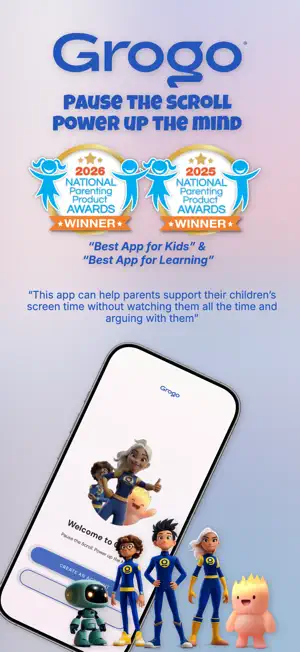
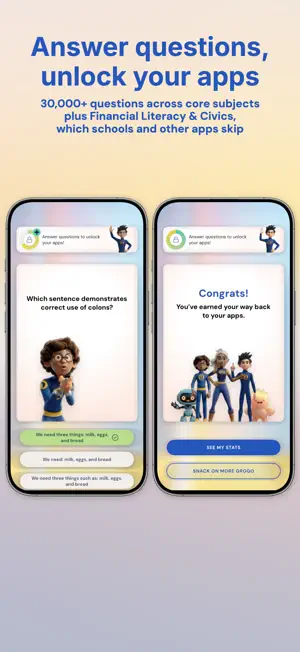
Pause the scroll. Power up the mind. What matters most is not how much screen time kids get, but whether that time makes them smarter and healthier. Grogo interrupts endless scrolling with short, brain-boosting questions your child answers to earn their apps back. Two-time NAPPA Award winner. 2026 Best App for Kids. 2025 Best App for Learning. WHY GROGO IS DIFFERENT Grogo sets the standard for productive pauses. It is the only app that combines timed screen interruption, adaptive microlearning, and kid-friendly design in one. Patent-pending. And Grogo is the only app teaching kids both Financial Literacy and Civic Life. Parental control apps ignore them. Schools barely touch them. Grogo makes them part of daily screen time. You choose which apps get interrupted, how often, and what your child studies. Setup takes minutes, right on your child's device. Less conflict. More learning. Happier kids. HOW GROGO WORKS • Your child gets a 5-minute heads-up before every break, so they are never caught off guard. • When the break starts, Grogo pauses only the apps you selected. • You decide what stays available, and you can set phone, messages, and emergency services so they are never interrupted. • Your child answers a short set of grade-appropriate questions to unlock their apps until the next break. • More than 30,000 questions, verified for accuracy and grade-appropriateness. • Pause Grogo any time for homework or dinner and leave school apps out of it entirely. BUILT FOR GRADES 2 THROUGH 12 Set your child's starting grade and pick their subjects: Financial Literacy and Civic Life, plus Math, Science, History, English, and Pop Culture. Difficulty adapts up or down by subject based on how they answer. Always challenging, never punishing. THE SCIENCE Short sessions spaced through the day, known as microlearning, build lasting memory far better than cramming. And research links interrupting continuous scrolling to better behavior, focus, and emotional wellbeing in children. IT WORKS, AND KIDS ACTUALLY LIKE IT "It's non-punitive, engaging and designed to build both knowledge and confidence." Beth Anderson, Educator and CEO, Core Learning Foundation "Grogo not only helps your child get extra learning, it improves their self-esteem and helps them develop better screen habits." Tom Kersting, Psychotherapist, Author of Raising Healthy Teenagers "This app just changed my whole life. I like EVERYTHING!" Henry, 3rd grade PRIVACY No personally identifiable information about your child is collected. Progress is tracked by username only, and we never sell your data. WATCH THEM GROW Your dashboard shows progress by subject, including the grade level of their questions climbing over time. Their dashboard shows how many breaks and correct answers they have completed each day. SETTING IT UP 1. Download Grogo on your child's device and create your parent account. 2. Set their grade level and choose their subjects. 3. Choose which apps Grogo pauses and how often: every 15, 30, or 45 minutes. 4. Then download Grogo on your own phone and sign in to follow their progress and change settings remotely. ALL FAMILY ACCESS • One plan for the whole family • Unlimited child profiles • Unlimited devices • All seven subjects • Parent and child dashboards Grogo offers auto-renewing subscriptions. Payment is charged to your Apple Account at confirmation of purchase. Your subscription renews automatically unless it is canceled at least 24 hours before the end of the current period. Manage or cancel your subscription in your Apple Account Settings. Privacy Policy: https://grogo.com/privacy-policy Terms of Use: https://grogo.com/terms-and-conditions
Ratings & reviews
4.8
20 ratings
What’s new
Version 2.0.3 · Updated September 29, 2026
Grogo interrupts endless scrolling with short, brain-boosting questions your child answers to earn their apps back. New: start your 7-day free trial on the annual plan. Setting up payment at the start means Grogo keeps working the moment your trial ends, with no interruption for your child and nothing for you to remember. New: a smoother setup flow on your child's device, four sample questions so you can see the real thing before you commit, and a QR code that gets the parent app onto your phone in seconds. Thanks for helping us make screen time better.
App privacy
The developer, Grogo Inc., reported these privacy practices to Apple.
Data Used to Track You
The following data may be used to track you across apps and websites owned by other companies:
- Identifiers: Device ID
- Usage Data: Product Interaction, Advertising Data, Other Usage Data
Data Linked to You
The following data, which may be collected and linked to your identity, may be used for the following purposes:
- Contact Info: Email Address, Name
- Identifiers: User ID
- Diagnostics: Crash Data, Performance Data, Other Diagnostic Data
Used for: App Functionality
Data Not Linked to You
The following data, which may be collected but is not linked to your identity, may be used for the following purposes:
- Identifiers: Device ID
- Usage Data: Product Interaction, Advertising Data, Other Usage Data
Used for: Third-Party Advertising, Analytics
Alternatives to Grogo: Healthier Screen Time
Looking for apps like Grogo: Healthier Screen Time? Here are 6 similar apps on the App Store. The highest rated is BoxRay: Home Inventory (5.0/5), and all 6 are free to download.
-
 Alteration Finder
4.4
Alteration Finder
4.4
-
 Destan: Relationship & Dating
1.0
Destan: Relationship & Dating
1.0
-
 BoxRay: Home Inventory
5.0
BoxRay: Home Inventory
5.0
-
 Parental Control App: Mobicip
3.3
Parental Control App: Mobicip
3.3
-
 Parental Control BrightCanary
4.4
Parental Control BrightCanary
4.4
-
 MyObits: Obituary Listings
4.6
MyObits: Obituary Listings
4.6
| App | Rating | Price | Last updated | Compare |
|---|---|---|---|---|
| Grogo: Healthier Screen Time | 4.8 / 5 (20 ratings) | Free | September 29, 2026 | |
| Alteration Finder | 4.4 / 5 (17) | Free | Mar 23, 2025 | Compare |
| Destan: Relationship & Dating | 1.0 / 5 (2) | Free | Jun 21, 2025 | Compare |
| BoxRay: Home Inventory | 5.0 / 5 (4) | Free | Feb 13, 2025 | Compare |
| Parental Control App: Mobicip | 3.3 / 5 (1,930) | Free | Oct 7, 2026 | Compare |
| Parental Control BrightCanary | 4.4 / 5 (1,632) | Free | Sep 4, 2026 | Compare |
| MyObits: Obituary Listings | 4.6 / 5 (417) | Free | Apr 29, 2026 | Compare |