

Parental Control BrightCanary
Tacita, Inc. Lifestyle iPhoneiPadiPod touch
Parental Control BrightCanary is a free Lifestyle app for iPhone and iPad by Tacita, Inc. Rated 4.4/5 from 1,663 ratings. Requires iOS 16.0.
- Rating
- 4.4
- 1.6K ratings
- Price
- Free
- on the App Store
- Size
- 208 MB
- Age 4+
- Updated
- Oct 28
- 2026 · v3.41
Screenshots


About Parental Control BrightCanary
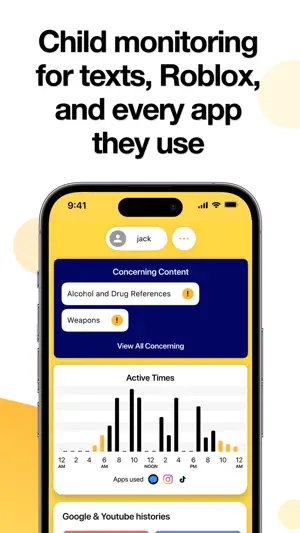
Parental control and child monitoring app BrightCanary monitors Roblox, text message, YouTube, Google, SnapChat, and any app your child uses. Advanced technology scans what your child types and messages, and alerts you if they encounter something concerning, giving you access and insights into their well-being and what they’re experiencing. With BrightCanary, you can: - Monitor every app they use, including Roblox, Snapchat, Discord, text messages, and more - Get alerts about bullying, explicit messages, or drug references - Connect your child’s Google account to supervise YouTube and search PROTECT YOUR KIDS — AND YOUR TIME Easy-to-read summaries and insights based on the APA’s emotional communication guidelines. CHOOSE THE TYPE OF MONITORING THAT’S RIGHT FOR YOUR FAMILY Understand what your child is typing and messaging in all the apps they use, with real-time updates and summaries. This is monitoring on your terms: you can read summaries for peace of mind, or view full transcripts if an alert needs your attention. EASY TO INSTALL AND USE Install the secure Keyboard on your child’s device and start monitoring every app they use in just minutes. Once you’re all set up, our parental controls take care of the rest, supervising their activity so you know when you need to get involved. Google, YouTube, and Text Message Plus require connecting your child’s accounts. HELPS YOU STAY CONNECTED With BrightCanary, you can stay engaged with your child’s interests. Our AI parenting coach gives you instant tips on talking to your kid about things like concerning videos and cyberbullying. BRIGHTCANARY IS PRIVATE, ENCRYPTED, AND SECURE Our data is encrypted to ensure both your and your child's privacy is protected. All account login information stays on the parent’s phone, and we use military-grade encryption to protect your personal information. WORKS GREAT WITH APPLE'S TOOLS Apple Screen Time does a great job of setting limits on which apps kids can use and for how long. BrightCanary’s parental controls fill in the gaps by helping you understand what they’re seeing and messaging in apps and and texts. WHAT PARENTS ARE SAYING ABOUT BRIGHTCANARY “My child has severe depression so it’s important that I monitor her for safety reasons. Your app has essentially helped us save her life. I can’t thank you enough for everything you are doing with this amazing app. Please know how much of an incredible difference you are making for us as a family. Thank you!” — Maya, mom of 1 “The app monitors for adult content in messages and any concerning content in search, without me having to look through my son’s phone. Which has helped me find the right balance between trust and safety. Highly recommend it!” — Linda, mom of 2 "A 13 year old from a nearby middle school died in his bedroom after taking what he thought was a muscle relaxant. It turned out to be a counterfeit that was laced and he ordered it like a pizza through a social media app. Parents, we need to supervise. This app is the best one I’ve found to do that. And it monitors DMs." — Donna, mom of 2 SUBSCRIPTION DETAILS Payment will be charged to your iTunes account. Your subscription automatically renews unless auto-renew is turned off at least 24-hours before the end of the current subscription period. Your account will be charged for renewal within 24-hours prior to the end of the current subscription period. Automatic renewals will cost the same price you were originally charged for the subscription. You can turn off auto-renewal at any time by going to your Account Settings on the App Store after purchase. Privacy Policy: https://www.brightcanary.io/privacy.html Terms of Use: https://www.brightcanary.io/terms.html Support: [email protected]
Ratings & reviews
4.4
1.6K ratings
What’s new
Version 3.41 · Updated October 28, 2026
Minor bug fixes and performance improvements.
App privacy
The developer, Tacita, Inc., reported these privacy practices to Apple.
Data Used to Track You
The following data may be used to track you across apps and websites owned by other companies:
- Identifiers: Device ID
- Usage Data: Advertising Data
Data Linked to You
The following data, which may be collected and linked to your identity, may be used for the following purposes:
- Contact Info: Email Address
- Purchases: Purchase History
- Usage Data: Product Interaction
- Identifiers: User ID
Used for: Developer’s Advertising or Marketing, Analytics, Product Personalization, App Functionality
Data Not Linked to You
The following data, which may be collected but is not linked to your identity, may be used for the following purposes:
- Identifiers: Device ID
- Usage Data: Advertising Data
- Diagnostics: Crash Data, Performance Data, Other Diagnostic Data
Used for: Third-Party Advertising, Developer’s Advertising or Marketing, App Functionality
Alternatives to Parental Control BrightCanary
Looking for apps like Parental Control BrightCanary? Here are 6 similar apps on the App Store. The highest rated is Waffle: Shared Journal (4.6/5), and all 6 are free to download.
-
 Parental Control App - OurPact
4.4
Parental Control App - OurPact
4.4
-
 Qustodio Parental Control App
4.2
Qustodio Parental Control App
4.2
-
 Canopy - AI Online Safety App
3.8
Canopy - AI Online Safety App
3.8
-
 Waffle: Shared Journal
4.6
Waffle: Shared Journal
4.6
-
 MMGuardian Parental Control
4.3
MMGuardian Parental Control
4.3
-
 Parental Controls by Ohana
4.1
Parental Controls by Ohana
4.1
| App | Rating | Price | Last updated | Compare |
|---|---|---|---|---|
| Parental Control BrightCanary | 4.4 / 5 (1,663 ratings) | Free | October 28, 2026 | |
| Parental Control App - OurPact | 4.4 / 5 (36,731) | Free | Jun 27, 2026 | Compare |
| Qustodio Parental Control App | 4.2 / 5 (9,583) | Free | Oct 9, 2026 | Compare |
| Canopy - AI Online Safety App | 3.8 / 5 (1,655) | Free | May 25, 2026 | Compare |
| Waffle: Shared Journal | 4.6 / 5 (10,712) | Free | Oct 23, 2026 | Compare |
| MMGuardian Parental Control | 4.3 / 5 (1,075) | Free | Aug 5, 2026 | Compare |
| Parental Controls by Ohana | 4.1 / 5 (326) | Free | Oct 27, 2026 | Compare |