

Retime: Study Timer & Planner
Ryo Iida Education iPhoneiPadiPod touch
Retime: Study Timer & Planner is a free Education app for iPhone and iPad by Ryo Iida. Rated 5.0/5 from 1 ratings. Requires iOS 17.0.
- Rating
- 5.0
- 1 ratings
- Price
- Free
- on the App Store
- Size
- 30 MB
- Age 4+
- Updated
- Oct 12
- 2026 · v2.22.0
Screenshots


About Retime: Study Timer & Planner
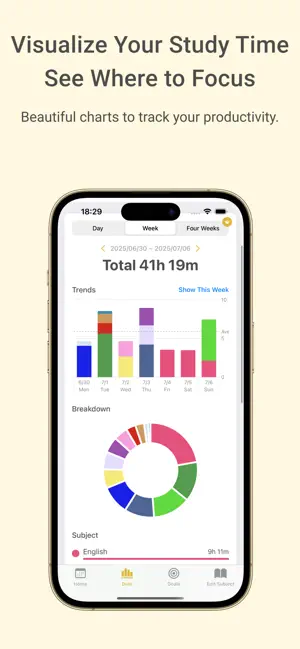
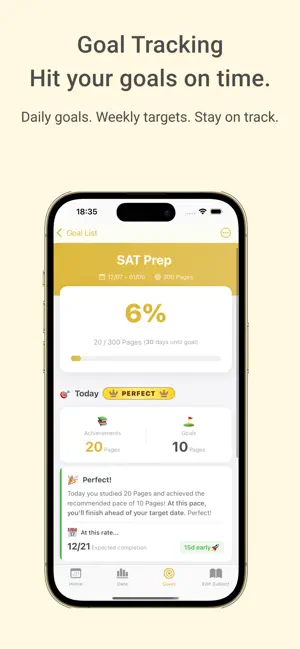
You're studying hard, but can't see any progress. You make a plan, but somehow it always falls apart. That feeling of "working hard but getting nowhere" — Retime changes that. Retime is a study management app for serious learners, bringing together a timer, task management, and learning analytics in one place. "Plan → Focus → Record → Analyze" Complete this entire cycle in a single app. Your daily efforts become visible through graphs and numbers. Students preparing for exams, professionals studying for certifications, language learners, building a reading habit—— Retime is here for anyone who is serious about reaching their goals. Feature ① Task Management and Timer, Unified ・Manage daily tasks with a weekly calendar. Swipe smoothly between weeks ・Link tasks to your timer to accurately record what you studied and for how long ・Set up recurring tasks to automatically create your daily study routine ・Drag and drop to reschedule tasks with ease ・One glance at your to-do list tells you exactly what to study today Feature ② Track Whether You're On Pace with Study Goals ・Set concrete goals like "finish 300 pages of this textbook by [date]" ・Automatically compare your recommended daily pace against your actual progress ・A predicted completion date is always shown, so you know at a glance whether you'll make it in time ・Manage multiple goals simultaneously — exam prep, certifications, reading, and more Feature ③ Exam Countdown & Mock Exam Score Tracking ・Register your exam dates and see remaining days updated in real time ・Log your mock exam and practice test scores by subject ・Visualize your score trends with charts to see how much you've improved Feature ④ Block Distracting Apps During Study Sessions ・Block apps like social media, YouTube, and games while you study ・Effective for breaking phone addiction ・Blocking is active only while the timer is running, so the quality of your study time goes up Feature ⑤ Two Timer Modes: Pomodoro & Count-Up ・Use the Pomodoro timer to alternate between focused work and breaks, maximizing productivity ・Use the count-up timer to freely measure and log your study time ・Supports Dynamic Island and Lock Screen Live Activity — always keep an eye on your timer ・Check today's study time at a glance with the home screen widget ・Stay focused with background sounds like alpha waves, brown noise, rain, and ocean waves Feature ⑥ Visualize Study Time to Stay Motivated ・View weekly and monthly study time trends in graph form ・See a subject-by-subject breakdown to understand where your time is going ・Browse your full session history in a timeline view ・Watching your efforts pile up keeps the motivation going Feature ⑦ Customize to Make It Yours ・Set your own subject names and colors ・Change the app's theme color to match your style Suitable for every learning scenario — students, professionals studying for certifications, language learners, and anyone building a reading habit. Start recording a little every day, and keep moving toward your goal.
What’s new
Version 2.22.0 · Updated October 12, 2026
New Features & Improvements - You can now view per-subject study trends as a graph from the Study Data screen. - Background music is now downloaded on demand, which reduces the app’s install size. BGM is downloaded the first time you use it. Bug Fixes - Fixed a layout issue in the mini progress display when there are many focus/break sessions. Thank you for using the app. We’ll keep working to make it better.
App privacy
The developer, Ryo Iida, reported these privacy practices to Apple.
Data Used to Track You
The following data may be used to track you across apps and websites owned by other companies:
- Usage Data: Product Interaction, Advertising Data, Other Usage Data
Data Not Linked to You
The following data, which may be collected but is not linked to your identity, may be used for the following purposes:
- Usage Data: Product Interaction, Advertising Data, Other Usage Data
- Diagnostics: Crash Data, Performance Data, Other Diagnostic Data
Used for: Third-Party Advertising, Analytics, Product Personalization, App Functionality
Alternatives to Retime: Study Timer & Planner
Looking for apps like Retime: Study Timer & Planner? Here are 6 similar apps on the App Store. The highest rated is StuLOG (4.9/5), and all 6 are free to download.
-
 勉強計画と復習管理 - 勉強記録・勉強時間グラフ
-
 最強の勉強分析・記録SNS - StudyLegends
-
 Study Plan Maker
3.0
Study Plan Maker
3.0
-
 StuLOG
4.9
StuLOG
4.9
-
 Stackd: Study Timer & Tracker
-
 自動で勉強スケジュールを作成 べんすけ2
| App | Rating | Price | Last updated | Compare |
|---|---|---|---|---|
| Retime: Study Timer & Planner | 5.0 / 5 (1 rating) | Free | October 12, 2026 | |
| 勉強計画と復習管理 - 勉強記録・勉強時間グラフ | – | Free | Sep 28, 2026 | Compare |
| 最強の勉強分析・記録SNS - StudyLegends | – | Free | Aug 2, 2025 | Compare |
| Study Plan Maker | 3.0 / 5 (2) | Free | Feb 18, 2026 | Compare |
| StuLOG | 4.9 / 5 (7) | Free | May 23, 2024 | Compare |
| Stackd: Study Timer & Tracker | – | Free | Oct 5, 2026 | Compare |
| 自動で勉強スケジュールを作成 べんすけ2 | – | Free | May 29, 2026 | Compare |