

Stackd: Study Timer & Tracker
Nene Nakagawa Education iPhoneiPadiPod touch
Stackd: Study Timer & Tracker is a free Education app for iPhone and iPad by Nene Nakagawa. Requires iOS 18. Updated October 5, 2026.
- Price
- Free
- on the App Store
- Size
- 3 MB
- Age 4+
- Updated
- Oct 5
- 2026 · v1.4
Screenshots
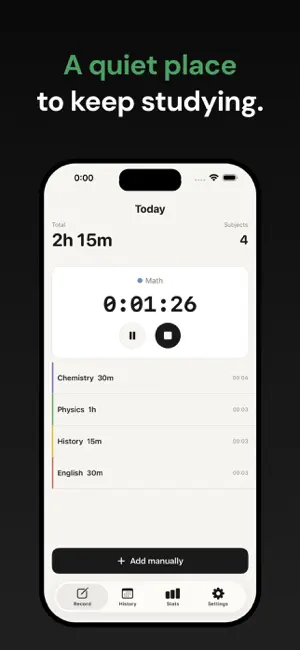
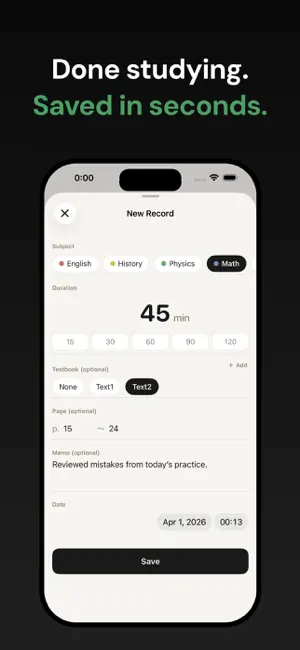
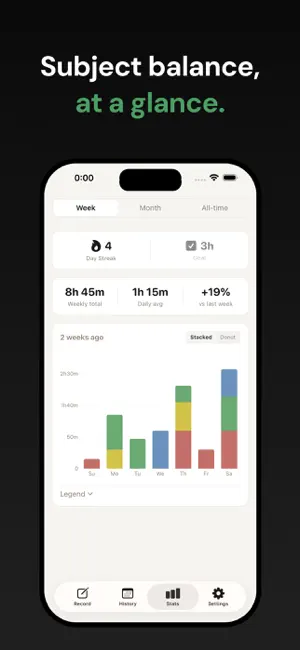
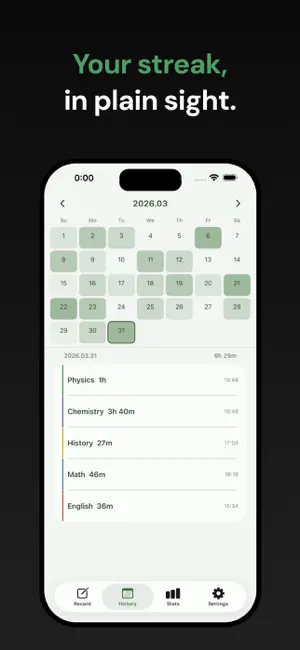
About Stackd: Study Timer & Tracker
This is a simple study timer app that allows you to record and manage your study time by subject. Simply measure your time with the timer and save it. You can also log sessions manually or add entries for past dates. You can record everything together, including subjects, study materials, pages, and notes. You can view the big picture of your studies by checking your subject balance with weekly graphs and reviewing your progress streaks on the calendar. No ads, no social media features, and no account registration required. All data is saved on your device, so there are no privacy concerns. Perfect for anyone who wants to focus on learning, from exam preparation to certifications and language studies. [Main Features] - 3 timer modes (Stopwatch, Countdown, Pomodoro) - Management of subjects, materials, pages, and notes - Weekly graphs to check subject balance (bar chart & donut chart) - Calendar to visualize study days with color-coding - Display of consecutive study days (streaks) - Daily study reminder - Backup and data export functions [Stackd Pro (One-time purchase)] - Monthly graphs and cumulative line graphs - Setting weekly goals and checking achievement rates - 9 color themes - Home screen and lock screen widgets - Real-time timer display on the Lock Screen
What’s new
Version 1.4 · Updated October 5, 2026
【New】 Pro users can now see their active timer in real time on the Lock Screen. ・Stopwatch and countdown: Shows the subject name and elapsed/remaining time ・Pomodoro: Shows the total session time ・When you pause the timer in the app, the Lock Screen display pauses as well ※Due to an iOS limitation, the Lock Screen cannot display transitions between work and break periods in real time for Pomodoro, so it shows the total session time. Work/break transitions and the end of the session are announced by notifications. To see detailed progress, please open the app. 【Change】 Study records are now assigned to the start date instead of the end date. For example, if you start studying at 11:00 PM on Oct 3 and finish at 1:00 AM on Oct 4, the record will be assigned to Oct 3. ・Records that span midnight will not appear in the “Today” list on the Record tab. You can find them in the History tab under their start date. ・The “Date” field on the record screen is now labeled “Start Date & Time.” ・Existing timer records were saved with a date and time close to when the timer ended. If you want to correct the date of a record that spans midnight, open the record and edit its start date and time.
App privacy
The developer, Nene Nakagawa, reported these privacy practices to Apple.
Data Not Collected
The developer does not collect any data from this app.
Alternatives to Stackd: Study Timer & Tracker
Looking for apps like Stackd: Study Timer & Tracker? Here are 6 similar apps on the App Store. The highest rated is YPT - Study Group (4.7/5), and all 6 are free to download.
-
 Study Tracker - Deluxe
-
 StudyLog – Study Tracker
4.0
StudyLog – Study Tracker
4.0
-
 Study Timer & Time Tracker
4.2
Study Timer & Time Tracker
4.2
-
 Estudylog - Study Tracker
4.5
Estudylog - Study Tracker
4.5
-
 FLIP - Focus Timer for Study
4.5
FLIP - Focus Timer for Study
4.5
-
 YPT - Study Group
4.7
YPT - Study Group
4.7
| App | Rating | Price | Last updated | Compare |
|---|---|---|---|---|
| Stackd: Study Timer & Tracker | – | Free | October 5, 2026 | |
| Study Tracker - Deluxe | – | Free | Sep 17, 2026 | Compare |
| StudyLog – Study Tracker | 4.0 / 5 (5) | Free | Oct 8, 2026 | Compare |
| Study Timer & Time Tracker | 4.2 / 5 (26) | Free | Sep 17, 2026 | Compare |
| Estudylog - Study Tracker | 4.5 / 5 (51) | Free | Oct 7, 2026 | Compare |
| FLIP - Focus Timer for Study | 4.5 / 5 (896) | Free | Sep 3, 2026 | Compare |
| YPT - Study Group | 4.7 / 5 (1,726) | Free | Aug 24, 2026 | Compare |