

MBMimic
Harpo Education iPhoneiPadiPod touch
MBMimic is a free Education app for iPhone and iPad by Harpo. Requires iOS 15.6. Updated September 18, 2026.
- Price
- Free
- on the App Store
- Size
- 8 MB
- Age 4+
- Updated
- Sep 18
- 2026 · v1.24
Screenshots
About MBMimic
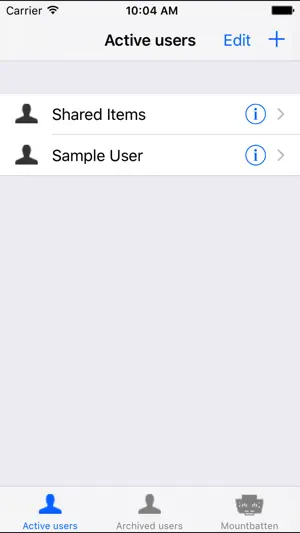
The MBMimic is a program to use with the new Mountbatten Brailler devices that are Bluetooth enabled. The MBMimic serves the teachers, parents or blind users that want to: - chat with a Mountbatten Brailler user using his/her iOS device, - collect files from Mountbatten Brailler memory for reviewing or editing, - emboss files using the Mountbatten Brailler, - upload files to the Mountbatten Brailler. The app is designed to be accessible for visually impaired users. The MBMimic connects to one of Mountbatten Braillers available near your iOS device. List of users with subfolders allows for organizing the files in a school situation. Users can be archived to a separate list. The files imported from a connected Mountbatten Brailler can be moved between user folders, viewed, edited and shared. Requirements: - new Bluetooth enabled Mountbatten Brailler Plus, Mountbatten Brailler Pro and Mountbatten Brailler Learning System. - low-power Bluetooth 4 that can be found in iPhone 4S, 3rd generation iPad, iPad Mini and iPod 4th generation or newer devices. Important information for new users: Connecting MBMimic to Mountbatten Brailler Before you beginning connecting MBMimic to a Mountbatten Brailler, please make sure that the Brailler is turned on and paper is loaded. 1. When you turn the Mountbatten on, the Bluetooth® Smart module gets automatically activated. After two seconds the BT module sends a serial number request to the Mountbatten. 2. NO pairing is necessary. Your Mountbatten will not be listed in the Bluetooth Settings on your iDevice. 3. Run MBMimic on your iDevice. 4. In MBMimic tap on the Mountbatten tab at the bottom of the screen of your iOS device. The program will be looking for any active Mountbatten in the vicinity. After a list appears, select the unit you want to connect to. A connection screen will show up saying "Connecting to Mountbatten" 5. You should hear the Mountbatten beep several times and after a few seconds, your MBMimic will connect with the brailler. Tap Done and you will be taken to the home screen
What’s new
Version 1.24 · Updated September 18, 2026
- Restored file translation options - not to be used with the MB Tutor devices.
App privacy
The developer, Harpo, reported these privacy practices to Apple.
Data Not Collected
The developer does not collect any data from this app.
Alternatives to MBMimic
Looking for apps like MBMimic? Here are 6 similar apps on the App Store. The highest rated is Quick and Easy ECC (5.0/5), and all 6 are free to download.
-
 Talking Typer
4.0
Talking Typer
4.0
-
 CVI Complexity Sequences
-
 Quick and Easy ECC
5.0
Quick and Easy ECC
5.0
-
 ObjectiveEd Games
3.7
ObjectiveEd Games
3.7
-
 BrailleBuzz
3.9
BrailleBuzz
3.9
-
 Astro Adventure Balls
2.0
Astro Adventure Balls
2.0
| App | Rating | Price | Last updated | Compare |
|---|---|---|---|---|
| MBMimic | – | Free | September 18, 2026 | |
| Talking Typer | 4.0 / 5 (11) | Free | Apr 22, 2024 | Compare |
| CVI Complexity Sequences | – | Free | Apr 30, 2024 | Compare |
| Quick and Easy ECC | 5.0 / 5 (2) | Free | Aug 19, 2026 | Compare |
| ObjectiveEd Games | 3.7 / 5 (17) | Free | Mar 23, 2026 | Compare |
| BrailleBuzz | 3.9 / 5 (7) | Free | Aug 26, 2026 | Compare |
| Astro Adventure Balls | 2.0 / 5 (1) | Free | Feb 28, 2025 | Compare |
Compare MBMimic with the top alternatives: ratings, updates, ASO score and keyword gaps →