

SnapPage - Web Page Capture
Shahzad Ahsan Utilities iPhoneiPadiPod touch
SnapPage - Web Page Capture is a free Utilities app for iPhone and iPad by Shahzad Ahsan. Requires iOS 15.0. Updated November 15, 2024.
- Price
- Free
- on the App Store
- Size
- 5 MB
- Age 17+
- Updated
- Nov 15
- 2024 · v1.0.2
Screenshots
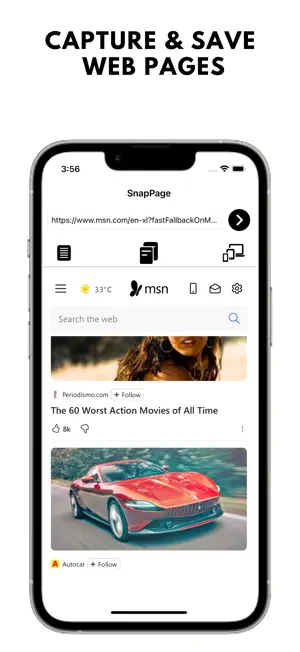

About SnapPage - Web Page Capture
SnapPage - Web Page Capture is the ultimate solution for capturing and saving web pages in both PDF and image formats. Designed for users who need quick and reliable access to their online content, SnapPage lets you easily capture entire web pages, regardless of length, with just a tap. Whether you're browsing an important research document, a lengthy article, or a web page you want to revisit later, SnapPage ensures that you can save it for offline use, future reference, or easy sharing. Key Features: Full Page Capture: Save entire web pages as high-quality PDFs or images. Perfect for archiving content for offline reading or sharing important resources. Visible Area Capture: Quickly capture only the visible section of a webpage if you don't need the whole page. Annotate Your Screenshots: Use our built-in editor to add notes, highlights, stickers, and more to your screenshots before saving them. Custom User-Agent Selection: View pages exactly how they appear on different devices by changing the user agent to iPhone or desktop. Export & Share: Easily export saved content as PDFs or images. Share files via email, cloud storage (Google Drive, Dropbox), or directly through social media apps. Organize Your Files: Organize your saved pages in folders for easy access. Categorize your captures for work, study, or personal use. Multilingual Support: Available in multiple languages, so you can enjoy SnapPage no matter where you are. Save to Photos: Store captured images directly to your device’s gallery for easy access and further use. Who Should Use SnapPage? Students & Researchers: Ideal for capturing lengthy research papers, academic articles, or online resources for offline review or annotation. Professionals: Save important documents, web designs, or work-related articles for easy sharing and future access. Casual Users: Capture online shopping pages, recipes, or any web content you want to keep for later. Why Choose SnapPage? Easy to Use: SnapPage's intuitive interface makes capturing web pages a breeze, even for non-tech-savvy users. High-Quality Output: Save your captures in high resolution, ensuring clear and precise rendering every time. Frequent Updates: We’re constantly adding new features and improving the user experience based on feedback from our community. Upcoming Features: Cloud Syncing: Automatically sync your captures to the cloud so you can access them from any device. Customizable Themes: Personalize SnapPage with light and dark mode themes for a more comfortable browsing experience. Batch Capture: Capture multiple web pages simultaneously with our batch capture feature (coming soon). Developer's Note: Developed by MyAppsDaily, SnapPage is designed to make saving web content as efficient as possible. At MyAppsDaily, we listen closely to our users’ feedback to ensure we deliver the best possible experience. We are always working on improvements, so if you have suggestions, feel free to contact us through the app’s support section or leave us a review. Stay tuned for more updates and new features!
What’s new
Version 1.0.2 · Updated November 15, 2024
Improvements
App privacy
The developer, Shahzad Ahsan, reported these privacy practices to Apple.
Data Used to Track You
The following data may be used to track you across apps and websites owned by other companies:
- Location: Coarse Location
- Identifiers: Device ID
- Usage Data: Product Interaction, Advertising Data
- Diagnostics: Crash Data, Performance Data
Data Linked to You
The following data, which may be collected and linked to your identity, may be used for the following purposes:
- Location: Coarse Location
- Identifiers: Device ID
- Usage Data: Product Interaction, Advertising Data
- Diagnostics: Performance Data
Used for: Third-Party Advertising
Data Not Linked to You
The following data, which may be collected but is not linked to your identity, may be used for the following purposes:
- Diagnostics: Crash Data
Used for: Third-Party Advertising
Alternatives to SnapPage - Web Page Capture
Looking for apps like SnapPage - Web Page Capture? Here are 6 similar apps on the App Store. The highest rated is Screen Memo - webcap (5.0/5), and all 6 are free to download.
-
 SanpSave - webPage Screenshot
1.0
SanpSave - webPage Screenshot
1.0
-
 Screen Memo - webcap
5.0
Screen Memo - webcap
5.0
-
 PDF Convert - web to pdf
4.0
PDF Convert - web to pdf
4.0
-
 Screenshot PRO Screenshots App
4.1
Screenshot PRO Screenshots App
4.1
-
 StitchShot - ScreenShotCapture
4.4
StitchShot - ScreenShotCapture
4.4
-
 Stitch It: Long Screenshot
4.4
Stitch It: Long Screenshot
4.4
| App | Rating | Price | Last updated | Compare |
|---|---|---|---|---|
| SnapPage - Web Page Capture | – | Free | November 15, 2024 | |
| SanpSave - webPage Screenshot | 1.0 / 5 (1) | Free | Jun 4, 2026 | Compare |
| Screen Memo - webcap | 5.0 / 5 (4) | Free | Sep 15, 2026 | Compare |
| PDF Convert - web to pdf | 4.0 / 5 (8) | Free | Apr 17, 2026 | Compare |
| Screenshot PRO Screenshots App | 4.1 / 5 (899) | Free | Oct 15, 2026 | Compare |
| StitchShot - ScreenShotCapture | 4.4 / 5 (374) | Free | May 29, 2026 | Compare |
| Stitch It: Long Screenshot | 4.4 / 5 (2,707) | Free | Oct 15, 2026 | Compare |