

ConfIoT
Golden M Inc. Utilities iPhoneiPadiPod touchMac
ConfIoT is a free Utilities app for iPhone and iPad by Golden M Inc. Requires iOS 15.0. Updated September 5, 2026.
- Price
- Free
- on the App Store
- Size
- 90 MB
- Age 17+
- Updated
- Sep 5
- 2026 · v2026.9.48
Screenshots


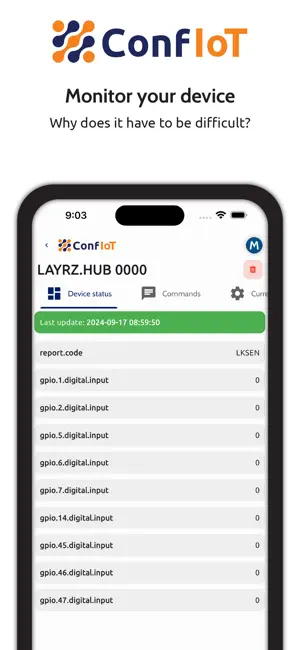
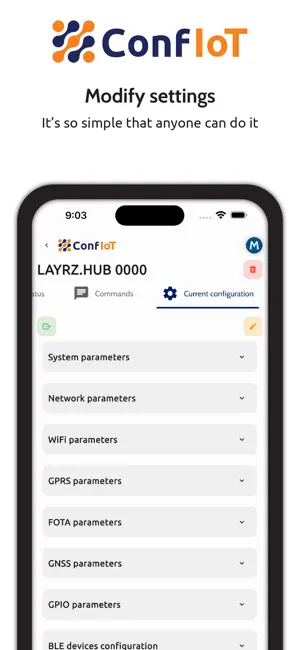
About ConfIoT
With ConfIoT, setting up your devices has never been easier. Whether you're a tech novice or an expert, the user-friendly interface ensures a smooth process. Just connect a compatible device, follow the guided steps, and you’re done. No complex setup required!
What’s new
Version 2026.9.48 · Updated September 5, 2026
- Zigbee devices whose bound device can no longer be resolved (because it was deleted, or belongs to another account) are no longer stuck: you can rebind them to a freshly created device, or remove them from the network. - Every Zigbee device now shows its IEEE address on its row, in its details header and in the Peripherals tab, even when the interview never finished and no name or model is known yet. - The Flash tool can now update a Blefier 1 or 2 over its serial/USB connection, downloading the firmware branch and build directly, the same way Hub firmware already works. No separate desktop tool needed. - Fixed a device appearing twice in the list when it joined while permit-join was open. - Bind and removal results now update on their own within about a minute, instead of only after leaving and reopening the Peripherals tab. - Fixed a device disappearing from its hub's Peripherals tab for up to 10 minutes after an unrelated device was deleted elsewhere in the account. - Fixed the permit-join toggle briefly flickering back on right after being turned off. - A second tap on "Link" while the first bind is still running is now ignored, so it can no longer create two devices and leave one orphaned. - Fixed the Widgets tab of a Zigbee device sometimes showing only the link-quality card instead of its real sensors and controls. - The API token is no longer written to the diagnostics log. - On Android, the keyboard no longer covers the field you're typing in, the peripheral picker's save button no longer gets pushed off-screen on narrow phones, and the unsaved-changes indicator no longer overlaps the save button. - Several texts that always appeared in English (search, cancel and save, Wi-Fi permission messages, the device model label) are now translated. - Fixed a crash that could happen while writing to the diagnostics log under heavy Zigbee traffic.
App privacy
The developer, Golden M Inc., reported these privacy practices to Apple.
Data Not Linked to You
The following data, which may be collected but is not linked to your identity, may be used for the following purposes:
- Location: Precise Location, Coarse Location
- User Content: Photos or Videos
- Identifiers: Device ID
Used for: App Functionality
Alternatives to ConfIoT
Looking for apps like ConfIoT? Here are 6 similar apps on the App Store. The highest rated is ID-Firewall: Family Identity (5.0/5), and all 6 are free to download.
-
 ID-Firewall: Family Identity
5.0
ID-Firewall: Family Identity
5.0
-
 One by JBA
-
 i88R
i88R
-
 DeviceCheck Key Pair
-
 Crowd Energy Device Config
-
 Device Setup
| App | Rating | Price | Last updated | Compare |
|---|---|---|---|---|
| ConfIoT | – | Free | September 5, 2026 | |
| ID-Firewall: Family Identity | 5.0 / 5 (1) | Free | Oct 23, 2026 | Compare |
| One by JBA | – | Free | Apr 23, 2025 | Compare |
| i88R | – | Free | Dec 25, 2023 | Compare |
| DeviceCheck Key Pair | – | Free | Dec 2, 2025 | Compare |
| Crowd Energy Device Config | – | Free | Aug 25, 2024 | Compare |
| Device Setup | – | Free | Mar 26, 2024 | Compare |
Compare ConfIoT with the top alternatives: ratings, updates, ASO score and keyword gaps →