

ID-Firewall: Family Identity
Brian Werle Utilities iPhoneiPadiPod touch
ID-Firewall: Family Identity is a free Utilities app for iPhone and iPad by Brian Werle. Rated 5.0/5 from 1 ratings. Requires iOS 15.1.
- Rating
- 5.0
- 1 ratings
- Price
- Free
- on the App Store
- Size
- 39 MB
- Age 4+
- Updated
- Oct 23
- 2026 · v1.9.0
Screenshots



About ID-Firewall: Family Identity
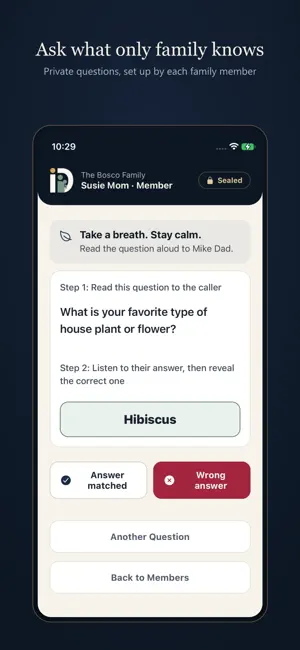
ID-Firewall helps families verify identity during suspicious phone calls before sharing money, codes, or personal information. Caller ID and familiar voices can be spoofed. ID-Firewall gives your family a simple verification process built around private questions only real family members should know. How it works: 1. An admin creates a family group and shares an invite code. 2. Each member stores private verification questions and answers. 3. During a suspicious call, open the app, choose the family member, and use a question to confirm identity before taking action. Features: • Private family verification questions and answers • Calm step-by-step verification flow for urgent calls • Reality Check message option to confirm whether a family member is really calling • History logs for past checks and verifications • Family management with admin controls and optional extra seats Use ID-Firewall when a caller claims an emergency, asks for money or gift cards, requests passwords or verification codes, or pressures you to act immediately. Privacy first: ID-Firewall does not record or analyze voices. It is designed to help families pause, verify, and protect the people they love. Important: ID-Firewall is a supplemental safety tool. It does not automatically block calls or guarantee protection from fraud or identity theft. Subscription Information: ID-Firewall offers auto-renewable subscriptions. Admin Subscription: $9.99/year (includes 7-day free trial). Required to create a family group and invite up to 5 members. Family members join for free using an invite code. Invite Add-on Packs (optional, separate In-App Purchase): Expand your family group beyond 5 members. Available in packs of +5, +10, +15, +20, or +25 additional invite slots, starting at $9.99/year. Payment is charged to your Apple ID account at confirmation of purchase. Subscriptions automatically renew unless canceled at least 24 hours before the end of the current subscription period. Your account will be charged for renewal within 24 hours prior to the end of the current period. You can manage and cancel your subscriptions in your device Account Settings. Terms of Use: https://id-firewall.com/terms-of-service Privacy Policy: https://id-firewall.com/privacy-policy
What’s new
Version 1.9.0 · Updated October 23, 2026
New look: ID-Firewall has a fresh design and a new logo. - Clearer Settings, with a link to manage your subscription - History grouped by day - Easier PIN entry and friendlier messages - Security improvements and bug fixes
App privacy
The developer, Brian Werle, reported these privacy practices to Apple.
Data Linked to You
The following data, which may be collected and linked to your identity, may be used for the following purposes:
- Purchases: Purchase History
- Contact Info: Email Address, Name, Phone Number
- Identifiers: User ID, Device ID
Used for: App Functionality
Data Not Linked to You
The following data, which may be collected but is not linked to your identity, may be used for the following purposes:
- Usage Data: Product Interaction
- Diagnostics: Crash Data
Used for: Analytics, App Functionality
Alternatives to ID-Firewall: Family Identity
Looking for apps like ID-Firewall: Family Identity? Here are 6 similar apps on the App Store. The highest rated is RF Signal Detector - ReFi (4.8/5), and all 6 are free to download.
-
 NetGo: Firewall Admin & Alerts
-
 Booster - Proxy Utility & Tool
-
 Japan Visa ID Photo 1-Tap
-
 OniNetwork: Network Analyzer
-
 SafeDNS
-
 RF Signal Detector - ReFi
4.8
| App | Rating | Price | Last updated | Compare |
|---|---|---|---|---|
| ID-Firewall: Family Identity | 5.0 / 5 (1 rating) | Free | October 23, 2026 | |
| NetGo: Firewall Admin & Alerts | – | Free | Oct 13, 2026 | Compare |
| Booster - Proxy Utility & Tool | – | Free | Sep 3, 2026 | Compare |
| Japan Visa ID Photo 1-Tap | – | Free | Jul 17, 2026 | Compare |
| OniNetwork: Network Analyzer | – | Free | Sep 8, 2026 | Compare |
| SafeDNS | – | Free | Jun 10, 2025 | Compare |
| RF Signal Detector - ReFi | 4.8 / 5 (18) | Free | Oct 21, 2026 | Compare |