

Lisly: AI Real Estate Listing
Funi AI Inc. Productivity iPhoneiPadiPod touch
Lisly: AI Real Estate Listing is a free Productivity app for iPhone and iPad by Funi AI Inc. Requires iOS 16.0. Updated October 17, 2026.
- Price
- Free
- on the App Store
- Size
- 119 MB
- Age 12+
- Updated
- Oct 17
- 2026 · v2.0.4
Screenshots
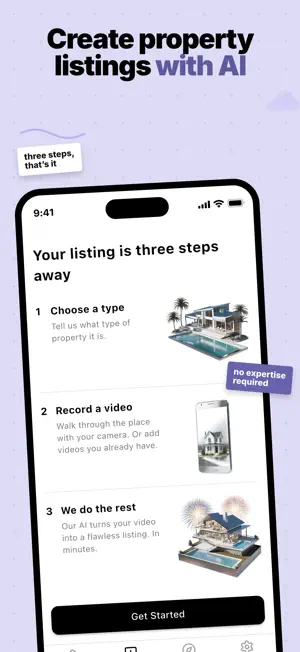


About Lisly: AI Real Estate Listing
Open your camera, walk through the property, and let Lisly do the rest. In minutes you have a listing that's ready to publish, and the photos, words and creatives you need to market it. How it works 1. Say what you're listing. Home or commercial, for sale or for rent. 2. Record a walkthrough with your phone, or add videos you already have. 3. Lisly builds the listing. Read it, change anything, publish. What you get - Professional photos pulled from your video and grouped room by room - A written description you can edit, in the tone you pick - A full feature set, laid out the way property data usually is - Posts, emails and messages written for each channel - Image and video creatives in a range of styles - A property website for the listing - An AI agent package you can hand to other tools AI photo editing Stage an empty room. Swap the furniture or take it out. Change the sky, turn on the lights, clear a reflection. One tap each, on any photo in the listing. Works where you work Lisly speaks 22 interface languages and writes listings in 105. Property types follow the country you are listing in, across 174 countries. Who it is for Agents and small offices who want a portfolio online quickly. Owners and landlords listing on their own. Subscription Creating listings needs a Lisly Pro subscription. Pro comes as a weekly or a monthly plan, and each plan includes credits. One listing uses 50 credits. Subscribers can buy extra credit packs. Payment is charged to your Apple Account when you confirm the purchase. Your subscription renews automatically unless you turn off auto-renew at least 24 hours before the current period ends. Manage or cancel it in your App Store account settings. Terms of Use (EULA): https://www.apple.com/legal/internet-services/itunes/dev/stdeula/ Terms of Service: https://lisly.ai/terms-of-service Privacy Policy: https://lisly.ai/privacy-policy
What’s new
Version 2.0.4 · Updated October 17, 2026
Funi Listing is now Lisly. Your listings and your credits carry over. The name changed because the app did. It started as a way to write a listing. It now records the walkthrough, pulls the photos, writes the words, and builds the creatives and the website that go with it. Listing anywhere - Create listings for 174 countries. Property types follow the country you list in, so a listing in Germany, New Zealand or Japan reads the way listings read there. Funi Listing knew the US and Canada. - Use the app in 22 languages, right-to-left ones included. Listings are still written in the language you pick for your account. Recording - Record with an ultra-wide lens. The camera opens at 0.5x on phones that have it, so small rooms fit in the frame. - Add a video from a link, and record up to 8 minutes in total. Photos - Edit photos with AI: stage an empty room, swap or remove furniture, remove an object, change the sky, turn on the lights, light the fireplace, put a screen on the TV, clear a reflection, renew the lawn, fix small blemishes, or run an enhancement pass. 12 edits, one tap each, and the original always stays. - Add your own photos, up to 10 at a time, straight from your phone. Download any photo back to your gallery. Words - Write more descriptions. Ask for a new one in a different tone, length or copywriting style, then set the one you like as primary. - Get the features right. The feature form follows the RESO Data Dictionary, the real estate industry's data standard. Add features, pick from the standard options, or type your own values. - Read the transcription: everything the AI heard and saw in your walkthrough. Fix what it got wrong. - Write for every channel. Social media captions for Facebook, Instagram, LinkedIn and X, plus emails, SMS and WhatsApp messages and blog posts, in the tone you choose. Creatives - Make image creatives in 45 styles, with formats for Instagram, Facebook and the rest. Put yourself in the picture with your headshot or a full-body shot. - Make video creatives in 4 styles that bring a photo to life, 4 to 10 seconds long, with sound. Website and export - Publish a property website. Each listing gets its own page at forsale.so or forrent.so, in the listing's language, with the photos grouped by room, the features, a map and your contact details. - Export an AI agent package: the listing as RESO data, the photos and the description, plus instructions and skills a desktop AI assistant can follow to post it wherever you list. Working together - Save your contact details once: name, phone, email, headshot, full-body shot and brokerage logo. Drop them into the website, the creatives and the content. - Share a listing with someone and let them edit it, or keep it read-only. - Set a list price in any currency. Change the location after the listing is made. - Browse Discover: sample listings, with the walkthrough video that made them. - Report anything the AI produced, from the screen it's on. Credits - Lisly Pro is a weekly or monthly plan that includes credits. One listing uses 50 credits. Subscribers can buy extra credit packs.
App privacy
The developer, Funi AI Inc., reported these privacy practices to Apple.
Data Linked to You
The following data, which may be collected and linked to your identity, may be used for the following purposes:
- Purchases: Purchase History
- Contact Info: Email Address, Name, Physical Address, Phone Number
- Identifiers: User ID, Device ID
- Usage Data: Product Interaction, Other Usage Data, Advertising Data
- Location: Coarse Location, Precise Location
- Diagnostics: Crash Data, Performance Data, Other Diagnostic Data
- Other Data: Other Data Types
- User Content: Photos or Videos, Audio Data, Other User Content
Used for: Developer’s Advertising or Marketing, Analytics, Product Personalization, App Functionality
Alternatives to Lisly: AI Real Estate Listing
Looking for apps like Lisly: AI Real Estate Listing? Here are 6 similar apps on the App Store. The highest rated is Property Photo Notes (5.0/5), and all 6 are free to download.


| App | Rating | Price | Last updated | Compare |
|---|---|---|---|---|
| Lisly: AI Real Estate Listing | – | Free | October 17, 2026 | |
| AI Listing - Real Estate | – | Free | Oct 7, 2026 | Compare |
| RealtyAI | 4.0 / 5 (2) | Free | Oct 31, 2023 | Compare |
| Quoka.io | – | Free | Sep 14, 2026 | Compare |
| 7DaysPlan | – | Free | Jan 12, 2026 | Compare |
| Property Photo Notes | 5.0 / 5 (1) | Free | Oct 16, 2026 | Compare |
| Rockhood AI | 5.0 / 5 (2) | Free | Mar 3, 2026 | Compare |