

Quick Password Safe
MIFUMI YOSHIDA Utilities iPhoneiPadiPod touch
Quick Password Safe is a free Utilities app for iPhone and iPad by MIFUMI YOSHIDA. Requires iOS 15.6. Updated December 29, 2024.
- Price
- Free
- on the App Store
- Size
- 6 MB
- Age 4+
- Updated
- Dec 29
- 2024 · v1.9
Screenshots

About Quick Password Safe
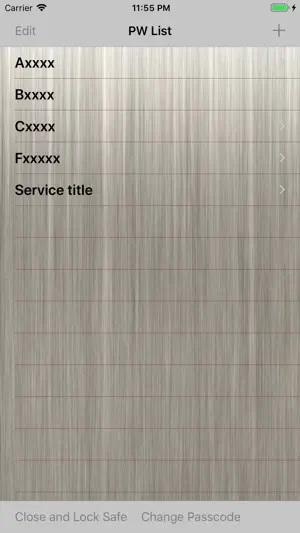
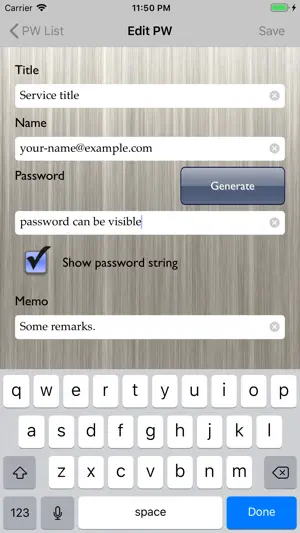
Manage Your Password More Easily And More Securely. This app safely keeps the password as a safe(cashbox). Recently, many accidents that are unauthorized access to accounts by the recycling of password have occurred. With the increase in IT service, in order not to disturb the daily life, we want to avoid that the account is stolen. However, to perform it, it becomes necessary to set a different password in each. That means, it is impossible to remember passwords with one's head. If you use this application, the app will remember your passwords, instead of you. FEATURES - It does not clearly display suddenly when viewing the password. (You can fine-tune the brightness of the character using the slider.) - It will return to its original position when you release your finger from the slider, it is suitable to browse secretly. - ID and password can also be used to copy. (Not recommended) - You can protect the app itself with a passcode. USAGE A. SETTING THE PROTECTION PASSCODE (1)If this is the first time, set the (any 4-digit) passcode to protect the app. (2)If you press [Change Passcode] button at the bottom of the [PW List] screen, the screen to change the passcode you set opens. (3)Set the passcode in the same way as the first. (4)When you stop using it, press the [Close And Lock] button to protect the app. (5)Enter the passcode in the startup screen when you use again. B. PASSWORD REGISTRATION (1)Press the [+] button in the [PW List] screen To open the create screen. (2)Fill PW information(such as a password, user ID), and press the [Save] button. (3)If you want to change the PW information, open the [Edit PW] screen by pressing the [Edit] button at the [PW Detail] screen. C. SEE PASSWORD (1)Tap the title of information you want to see in the [PW List] screen. (2)[PW Detail] screen is displayed, but the password is hidden. (3)Make sure the safety of your surroundings, and slide the slider to the right. Then password will gradually appear. D. PASSWORD DELETION (1)Press the [Edit] button on the [PW List] screen. (2)Tap the [-]icon of the PW that you want to delete, and then press the [Delete] button. (3)Press the [Done] button at the end.
What’s new
Version 1.9 · Updated December 29, 2024
- Adapted to iOS 18.
App privacy
The developer, MIFUMI YOSHIDA, reported these privacy practices to Apple.
Data Used to Track You
The following data may be used to track you across apps and websites owned by other companies:
- Identifiers: Device ID
Data Not Linked to You
The following data, which may be collected but is not linked to your identity, may be used for the following purposes:
- Identifiers: Device ID
Used for: Third-Party Advertising
Alternatives to Quick Password Safe
Looking for apps like Quick Password Safe? Here are 6 similar apps on the App Store. The highest rated is Offline Password Safe (5.0/5), and all 6 are free to download.
-
 Offline Password Safe
5.0
Offline Password Safe
5.0
-
 PwNote – Offline Password
-
 PassVault: Secure Password Hub
-
 MyFone.app
-
 NanoBattery
-
 HARD
HARD
| App | Rating | Price | Last updated | Compare |
|---|---|---|---|---|
| Quick Password Safe | – | Free | December 29, 2024 | |
| Offline Password Safe | 5.0 / 5 (1) | Free | May 1, 2026 | Compare |
| PwNote – Offline Password | – | Free | Aug 18, 2026 | Compare |
| PassVault: Secure Password Hub | – | Free | May 31, 2026 | Compare |
| MyFone.app | – | Free | Sep 8, 2026 | Compare |
| NanoBattery | – | Free | Jan 29, 2026 | Compare |
| HARD | – | Free | Aug 20, 2026 | Compare |