

PassVault: Secure Password Hub
Baris Batuhan Topal Utilities iPhoneiPadiPod touch
PassVault: Secure Password Hub is a free Utilities app for iPhone and iPad by Baris Batuhan Topal. Requires iOS 15.0. Updated May 31, 2026.
- Price
- Free
- on the App Store
- Size
- 42 MB
- Age 4+
- Updated
- May 31
- 2026 · v1.2.0
Screenshots


About PassVault: Secure Password Hub
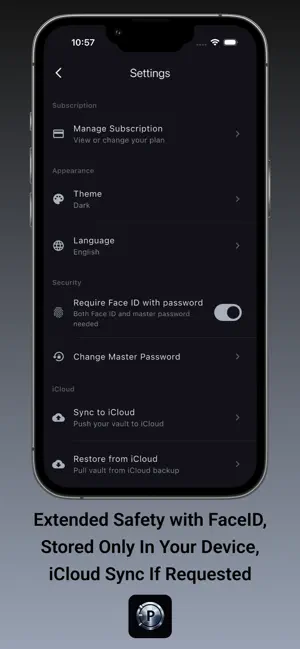
PassVault is the password manager that puts security and privacy first. Store, organize, and protect all your credentials with military grade encryption, entirely on your device. KEY FEATURES • Master Password Protection: Your vault is locked behind a master password that only you know. No account creation, no email required. • Face ID / Touch ID: Unlock your vault instantly with biometrics for fast, secure access. • AES-256-GCM Encryption: Every entry is encrypted with AES-256-GCM, the same standard used by governments and security agencies worldwide. Keys are derived using Argon2id, a modern password hashing algorithm. • Password Generator: Create strong, unique passwords with customizable length, character sets, and constraints. Never reuse a weak password again. • Smart Categories: Organize entries into General, Social, Email, Work, Finance, Shopping, and Entertainment categories for quick access. • iCloud Sync & Restore: Back up your encrypted vault to iCloud and restore it on any of your Apple devices. Your data stays encrypted in transit and at rest. • Light & Dark Themes: Choose the look that suits you, with full support for system appearance settings. • 30 Languages: PassVault speaks your language with full localization across 30 languages. SECURITY YOU CAN TRUST PassVault uses AES-256-GCM encryption paired with Argon2id key derivation. Your master password never leaves your device. There are no servers, no accounts, and no way for anyone, including us, to access your data. Every encryption and decryption operation happens locally on your device. PRIVACY BY DESIGN PassVault contains zero analytics, zero trackers, and zero advertising. We don't collect your data because we can't. There is no server infrastructure, no telemetry, and no third party SDKs. Your passwords are yours alone. TERMS OF USE PassVault is provided "as is" without warranty of any kind. You are solely responsible for maintaining the confidentiality of your master password. If you lose your master password, your vault cannot be recovered. By using PassVault, you agree that the developer is not liable for any data loss resulting from forgotten credentials, device failure, or misuse of the application. For the full End User License Agreement (EULA), please visit: https://www.apple.com/legal/internet-services/itunes/dev/stdeula/
App privacy
The developer, Baris Batuhan Topal, reported these privacy practices to Apple.
Data Used to Track You
The following data may be used to track you across apps and websites owned by other companies:
- Identifiers: Device ID
- Usage Data: Product Interaction, Advertising Data
Data Not Linked to You
The following data, which may be collected but is not linked to your identity, may be used for the following purposes:
- Identifiers: Device ID, User ID
- Usage Data: Product Interaction, Advertising Data
- Purchases: Purchase History
- Diagnostics: Crash Data, Performance Data, Other Diagnostic Data
Used for: Third-Party Advertising, App Functionality
Alternatives to PassVault: Secure Password Hub
Looking for apps like PassVault: Secure Password Hub? Here are 6 similar apps on the App Store.
-
 DocStore-Document Vault
-
 SecurePass AI: Password Gen
-
 101 Okey AI Scanner
-
 101 Hesaplama
-
 Verifiero
-
 Password Generator: Strong PIN
| App | Rating | Price | Last updated | Compare |
|---|---|---|---|---|
| PassVault: Secure Password Hub | – | Free | May 31, 2026 | |
| DocStore-Document Vault | – | Free | Apr 9, 2026 | Compare |
| SecurePass AI: Password Gen | – | Free | Apr 25, 2026 | Compare |
| 101 Okey AI Scanner | – | Free | Sep 15, 2026 | Compare |
| 101 Hesaplama | – | Free | Sep 26, 2026 | Compare |
| Verifiero | – | Free | Apr 14, 2025 | Compare |
| Password Generator: Strong PIN | – | Free | Aug 24, 2026 | Compare |