

ShareMe: WiFi File Transfer PC
Nandini Patel Utilities iPhoneiPadiPod touch
ShareMe: WiFi File Transfer PC is a free Utilities app for iPhone and iPad by Nandini Patel. Rated 3.6/5 from 5 ratings. Requires iOS 16.2.
- Rating
- 3.6
- 5 ratings
- Price
- Free
- on the App Store
- Size
- 40 MB
- Age 4+
- Updated
- Sep 28
- 2026 · v2.7
Screenshots


About ShareMe: WiFi File Transfer PC
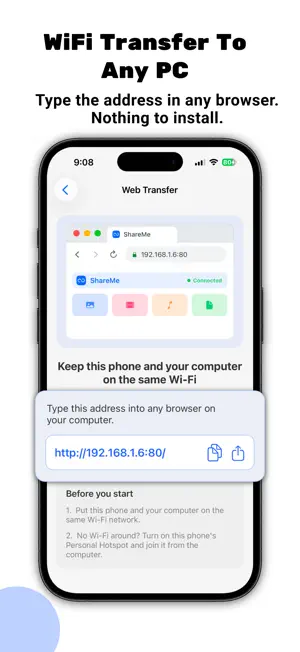
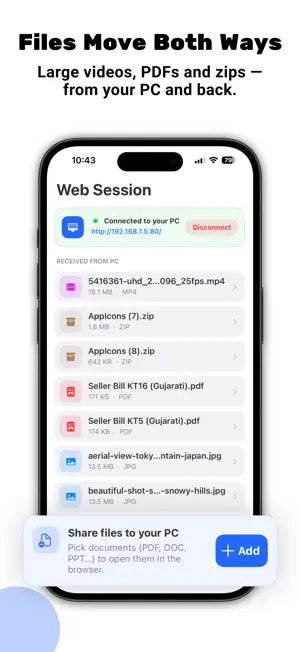
NOTHING TO INSTALL ON THE COMPUTER. THAT IS THE WHOLE IDEA. ShareMe turns your iPhone into a small web page. Open the browser that is already on your Windows PC, Mac, Linux machine or tablet, type in the address ShareMe shows you, and you are looking at your phone. No software on that computer. No cable. No account. No cloud. HOW WEB SHARE WORKS 1. Tap Web Share on the iPhone. It shows an address such as http://192.168.1.6 2. Type that address into the browser on your computer. Use http, not https. 3. The iPhone asks you to accept. Tap Accept. 4. Browse the phone's photos, videos, music and documents in the browser and download them at original size - or drag files from your desktop onto the page to send them to the iPhone. Both directions, one page, any computer where you are allowed to open a browser. Useful on a work machine where you cannot install anything. No Wi-Fi network in the room? Turn on Personal Hotspot, join it from the computer, and Web Share works exactly the same. IPHONE TO IPHONE, WITH NO INTERNET AT ALL Both phones need ShareMe. After that there is no router, no mobile data and no internet connection involved - only the Wi-Fi or Bluetooth radio being switched on. Photos, videos, music, contacts (.vcf) and documents (PDF, DOC, PPT, XLS, ZIP) move straight from one phone to the other. - The two phones find each other on their own. No QR code, no pairing code, no sign-in. - Received photos and videos save straight into your Photos app. - Preview everything that arrived inside the app, and swipe to delete what you do not want. - Cancel a transfer from either side, at any moment. FULL SIZE. NOT A COPY OF A COPY. Nothing is compressed and nothing is resized. A 4K video arrives as the same 4K video. Multi-gigabyte files are fine. Whole camera rolls are fine. WHAT IS FREE AND WHAT IS NOT iPhone-to-iPhone transfer is free and unlimited. Web Share gives you 2 free sessions; after that it needs a subscription. We are telling you here rather than after you install. The subscription is offered weekly, monthly or yearly, and the exact price in your currency is shown in the app before you buy anything. ShareMe is free to download and is supported by ads. PRIVACY Files travel from your device to the other device across your own local network. There is no ShareMe server in the middle, no cloud storage, no account and no sign-up. Nothing is uploaded anywhere, and nothing is kept after the transfer. WHAT SHAREME DOES NOT DO Better you know now than after installing: - No iPhone to Android, and no Android to iPhone. - No cloud storage and no online backup. - No USB or cable transfer. - No NAS, SMB or printing. TIPS THAT SAVE PEOPLE TIME - Put http:// in front of the address. Browsers assume https, and https will not connect. - Keep the phone and the computer on the same Wi-Fi, or use Personal Hotspot. - Keep ShareMe open on screen while a transfer is running. - If a phone does not appear, make sure both phones have ShareMe open on the transfer screen. SUBSCRIPTION TERMS Payment is charged to your Apple Account at confirmation of purchase. The subscription renews automatically unless it is cancelled at least 24 hours before the end of the current period, and your account is charged for renewal within 24 hours of the end of that period. You can manage or cancel a subscription in your Apple Account settings after purchase. Privacy Policy: https://sites.google.com/view/share-me-file-transfer/privacy-policy Terms of Use: https://sites.google.com/view/share-me-file-transfer/terms-of-use
Ratings & reviews
3.6
5 ratings
What’s new
Version 2.7 · Updated September 28, 2026
• Fixed an issue with Premium • Improved app performance
App privacy
The developer, Nandini Patel, reported these privacy practices to Apple.
Data Used to Track You
The following data may be used to track you across apps and websites owned by other companies:
- Diagnostics: Crash Data
Data Not Linked to You
The following data, which may be collected but is not linked to your identity, may be used for the following purposes:
- Diagnostics: Crash Data, Performance Data, Other Diagnostic Data
Used for: Analytics
Alternatives to ShareMe: WiFi File Transfer PC
Looking for apps like ShareMe: WiFi File Transfer PC? Here are 6 similar apps on the App Store. The highest rated is MeDrop: File Sharing (5.0/5), and all 6 are free to download.
-
 MeDrop: File Sharing
5.0
MeDrop: File Sharing
5.0
-
 Fast File Sharing App
-
 ShareMe - File Music Sharing
5.0
ShareMe - File Music Sharing
5.0
-
 Share Me: File Transfer App
4.5
Share Me: File Transfer App
4.5
-
 ShareMe - File sharing
4.3
ShareMe - File sharing
4.3
-
 Smart Switch・Data Transfer
4.8
Smart Switch・Data Transfer
4.8
| App | Rating | Price | Last updated | Compare |
|---|---|---|---|---|
| ShareMe: WiFi File Transfer PC | 3.6 / 5 (5 ratings) | Free | September 28, 2026 | |
| MeDrop: File Sharing | 5.0 / 5 (1) | Free | Sep 22, 2026 | Compare |
| Fast File Sharing App | – | Free | Mar 6, 2026 | Compare |
| ShareMe - File Music Sharing | 5.0 / 5 (1) | Free | Oct 20, 2026 | Compare |
| Share Me: File Transfer App | 4.5 / 5 (4) | Free | Aug 27, 2026 | Compare |
| ShareMe - File sharing | 4.3 / 5 (409) | Free | Jan 6, 2025 | Compare |
| Smart Switch・Data Transfer | 4.8 / 5 (5) | Free | Sep 3, 2026 | Compare |