

OCR : StudyHQ
Programmers Paradise LLC Utilities iPhoneiPadiPod touch
OCR : StudyHQ is a free Utilities app for iPhone and iPad by Programmers Paradise LLC. Rated 4.8/5 from 6 ratings. Requires iOS 15.5.
- Rating
- 4.8
- 6 ratings
- Price
- Free
- on the App Store
- Size
- 85 MB
- Age 12+
- Updated
- Aug 19
- 2026 · v1.3.4
Screenshots


About OCR : StudyHQ
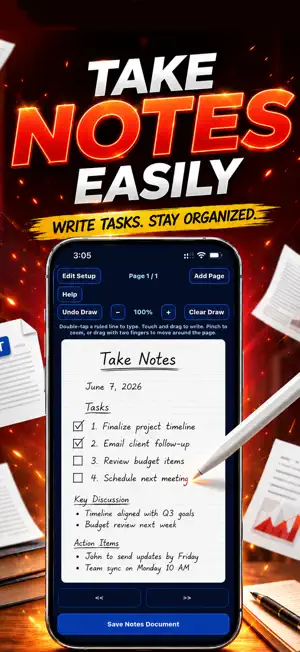
Your notes should do more than sit in a document. StudyHQ is a document organizer that can turn your notes into flashcards you can review before your next quiz. StudyHQ is a scan-to-PDF and note-taking system, as well as a document organizer. It is designed to organize the notes you create and the flashcards you generate so you can find information quickly when you need it. StudyHQ is designed to solve several common problems within a single app. With limited time to study, you may need a quicker way to prepare. StudyHQ includes a quick-scanning system and a document attachment system that let you store your materials in a robust document management system. More importantly, StudyHQ can use those materials to generate a set of timed question-and-answer flashcards for study. You can accept the complete batch or review and edit each card before accepting the batch. With a busy life and important deadlines to meet, a reminder system can also be very helpful. StudyHQ also includes a reminder system that lets you create reminders for important material you need to review. Notifications can alert you even when the app is not open, while the built-in calendar tracks your reminders. This feature can help you avoid missing important review dates and other time-sensitive tasks. The ability to take notes directly within the app is another important feature. At times, you may want to create structured notes that resemble notebook paper when using physical paper is not practical. For example, you may need to communicate a concept to a friend or classmate. StudyHQ gives you a structured way to continue taking notes. Its academic note pages resemble ruled notebook paper and support both stylus writing and keyboard entry. This is where StudyHQ’s built-in Take Notes system can help. There are three note-taking modes within the app: Academic, Personal, and Professional. Academic Notes supports stylus mode, allowing you to write or draw over ruled lines that resemble real notebook paper while also using the keyboard to type within the lines. The Academic note-taking mode also includes helpful writing and mathematical symbols. Professional and Personal Notes include selected word-processing symbols and support both clean, keyboard-based note creation and stylus-pen input. Whichever type of document you choose to create, it is automatically placed in the document organizer. The document organizer encrypts your documents and includes manual search filtering, along with quick filters such as All, Today, and 7 Days. You can also attach existing pdf documents and images, store multi-page files, and keep important records easier to locate when they are needed. Key Features: • Scan documents into organized PDF files • Create class, professional, and personal notes • Use stylus support for academic notebook-style notes • Type notes on ruled notebook-style pages • Add writing and math symbols to notes • Export notes and scans as PDF documents • Share through available device options • Attach existing PDF documents and images • Store and retrieve multi-page documents • Generate Flash Cards or Flashcards • Search and filter saved records • Use portrait or landscape viewing • Add highlights, annotations, and sticky notes • Protect documents with encryption • Use optional biometric access protection StudyHQ is built for students, professionals, small business owners, and everyday users who need a better way to manage notes, scanned documents, PDFs, and important records from their phone. Whether you are scanning paperwork, creating notebook-style notes, saving class material, organizing business records, or keeping personal documents in one place, StudyHQ helps turn important information into organized documents you can find again. Terms of Use: https://www.apple.com/legal/internet-services/itunes/dev/stdeula/ Privacy Policy: https://www.theprogrammersparadise.com/#/privacy
Ratings & reviews
4.8
6 ratings
What’s new
Version 1.3.4 · Updated August 19, 2026
Enhanced the stylus writing experience, bringing digital note-taking closer to the feel of writing in real life.
App privacy
The developer, Programmers Paradise LLC, reported these privacy practices to Apple.
Data Not Collected
The developer does not collect any data from this app.
Alternatives to OCR : StudyHQ
Looking for apps like OCR : StudyHQ? Here are 6 similar apps on the App Store. The highest rated is PDF Doctor - Scan, Edit & Sign (5.0/5), and 5 of the 6 are free to download.
-
 CoreCaption
-
 FiberView Pro
4.0
FiberView Pro
4.0
-
 Roonmatrix
-
 X WhiteGate
1.0
X WhiteGate
1.0
-
 Battery Core
-
 PDF Doctor - Scan, Edit & Sign
5.0
PDF Doctor - Scan, Edit & Sign
5.0
| App | Rating | Price | Last updated | Compare |
|---|---|---|---|---|
| OCR : StudyHQ | 4.8 / 5 (6 ratings) | Free | August 19, 2026 | |
| CoreCaption | – | Free | Apr 21, 2026 | Compare |
| FiberView Pro | 4.0 / 5 (4) | 5.99 USD | May 11, 2026 | Compare |
| Roonmatrix | – | Free | Jan 3, 2026 | Compare |
| X WhiteGate | 1.0 / 5 (1) | Free | Feb 26, 2026 | Compare |
| Battery Core | – | Free | Feb 5, 2026 | Compare |
| PDF Doctor - Scan, Edit & Sign | 5.0 / 5 (1) | Free | Aug 31, 2026 | Compare |
Compare OCR : StudyHQ with the top alternatives: ratings, updates, ASO score and keyword gaps →