

PDF Doctor - Scan, Edit & Sign
Jenesh Napit Utilities iPhoneiPadiPod touch
PDF Doctor - Scan, Edit & Sign is a free Utilities app for iPhone and iPad by Jenesh Napit. Rated 5.0/5 from 1 ratings. Requires iOS 17.0.
- Rating
- 5.0
- 1 ratings
- Price
- Free
- on the App Store
- Size
- 16 MB
- Age 4+
- Updated
- Aug 31
- 2026 · v1.1
Screenshots



About PDF Doctor - Scan, Edit & Sign
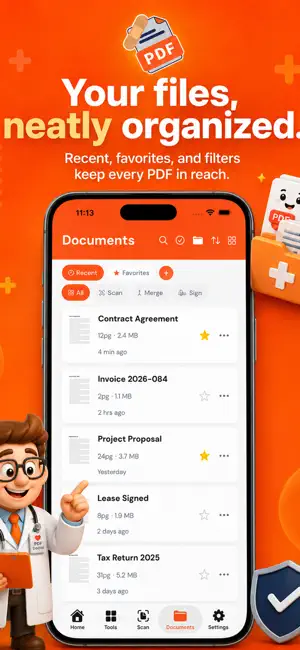
PDF Doctor is the all in one PDF toolkit for your iPhone. Scan documents, convert photos, edit pages, add signatures, merge files, and get things done with +25 professional tools built right in. Whether you are a student scanning lecture notes, a professional signing contracts on the go, or anyone who needs quick document conversion, PDF Doctor gets it done in seconds. SCAN DOCUMENTS Use your iPhone camera to scan paper documents with automatic edge detection. Receipts, contracts, notes, IDs: capture them all as crisp, clear PDFs. CONVERT PHOTOS TO PDF Select one or multiple photos from your library and convert them into a single, polished PDF with one tap. Supports JPG, PNG, HEIC, and all standard image formats. +25 PROFESSIONAL PDF TOOLS More than just a converter. PDF Doctor is a complete PDF toolkit: • Merge multiple PDFs into one document • Compress PDFs to reduce file size • Split PDFs by page range • Add page numbers, headers & footers • Add watermarks (text, draggable, tiled) • Password protect sensitive documents • Sign with draw or typed signatures • Rotate, crop, and resize pages • OCR text extraction from scanned pages • Extract images from any PDF • Redact sensitive information • Convert URLs to PDF • Compare two PDFs side by side • And more EDIT BEFORE YOU SAVE Rearrange pages with drag and drop, rotate, delete unwanted pages, or add more. Get your document exactly right before exporting. ORGANIZE WITH FOLDERS Keep your documents organized with custom color coded folders. Star favorites for quick access. Search, rename, duplicate, or move documents effortlessly. ICLOUD SYNC Your documents sync automatically across all your devices. Start on your iPhone, continue on your iPad. Your PDF library is always up to date. SHARE ANYWHERE Export your PDFs via email, AirDrop, Messages, or any app that accepts files. Import photos and PDFs from other apps directly via the share sheet. HOW IT WORKS 1. Choose your source: Camera, Photos, or Files 2. Edit and arrange your pages 3. Save, share, or apply any of +25 tools Designed for simplicity. No account required. No uploads to external servers. Your documents stay on your device and in your iCloud. PRIVACY FIRST Your PDFs never leave your device unless you choose to share them. No account required, no uploads to external servers, and no ads - ever. We collect anonymous usage analytics to improve the app, never the contents of your documents. Subscription auto renews unless cancelled at least 24 hours before the end of the current period. Payment will be charged to your Apple ID at confirmation of purchase. Manage subscriptions in Settings > Apple ID > Subscriptions. Privacy Policy: https://www.napitventures.com/apps/pdf-doctor/privacy Terms of Use: https://www.napitventures.com/apps/pdf-doctor/terms Terms of Use (EULA): https://www.apple.com/legal/internet-services/itunes/dev/stdeula/
What’s new
Version 1.1 · Updated August 31, 2026
Dark Mode is here. PDF Doctor now follows your system appearance, with a palette tuned for readability in low light. Full Dynamic Type support. Every screen scales with your preferred text size, including the largest accessibility sizes. Improved contrast throughout for easier reading, plus a cleaner app icon presentation and refreshed visuals. Various fixes and refinements under the hood.
App privacy
The developer, Jenesh Napit, reported these privacy practices to Apple.
Data Not Linked to You
The following data, which may be collected but is not linked to your identity, may be used for the following purposes:
- Identifiers: Device ID
- Usage Data: Product Interaction
Used for: Analytics
Alternatives to PDF Doctor - Scan, Edit & Sign
Looking for apps like PDF Doctor - Scan, Edit & Sign? Here are 6 similar apps on the App Store. The highest rated is Boat Fuel Gauge & Timer (5.0/5), and all 6 are free to download.
-
 PDF Converter - Sign & Scan
-
 ScanAI: PDF & Document Scanner
-
 Sakani Plus
-
 Boat Fuel Gauge & Timer
5.0
Boat Fuel Gauge & Timer
5.0
-
 Remora: Fast Clean & Protect
-
 Convert Photo to PDF: PixToPDF
| App | Rating | Price | Last updated | Compare |
|---|---|---|---|---|
| PDF Doctor - Scan, Edit & Sign | 5.0 / 5 (1 rating) | Free | August 31, 2026 | |
| PDF Converter - Sign & Scan | – | Free | Mar 14, 2026 | Compare |
| ScanAI: PDF & Document Scanner | – | Free | Sep 17, 2026 | Compare |
| Sakani Plus | – | Free | Jan 13, 2026 | Compare |
| Boat Fuel Gauge & Timer | 5.0 / 5 (1) | Free | Oct 14, 2026 | Compare |
| Remora: Fast Clean & Protect | – | Free | Sep 29, 2026 | Compare |
| Convert Photo to PDF: PixToPDF | – | Free | Apr 9, 2026 | Compare |