

Sync with S3
Pixegram, LLC Productivity iPhoneiPadiPod touch
Sync with S3 is a free Productivity app for iPhone and iPad by Pixegram, LLC. Rated 1.0/5 from 1 ratings. Requires iOS 15.6. Updated December 15, 2025.
- Rating
- 1.0
- 1 ratings
- Price
- Free
- on the App Store
- Size
- 27 MB
- Age 4+
- Updated
- Dec 15
- 2025 · v1.7
Screenshots

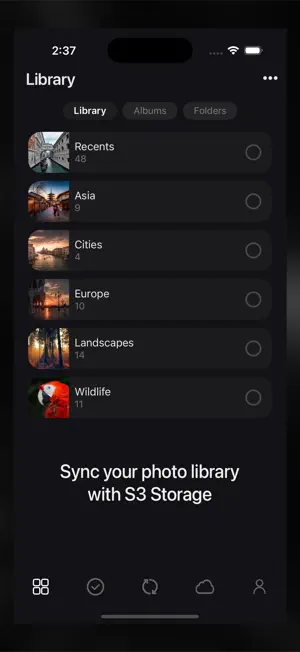


About Sync with S3
Sync for S3 synchronizes your phone’s photo library, including the album and folder hierarchy, to your S3 storage. For users who like to organize their photos into folders and albums, Sync will also - Sync automatically creates folders and albums you may have created in your phone’s photo library on S3 storage. - Uploads the video component for Live Photos. - Uploads the edited versions of photos and videos. - Mirror or backup your photo library. - Synchronize your entire photo library or only certain folders and albums. In summary, each time you run Sync, it will make sure any changes to your phone’s photo library are updated on your S3 storage, overwriting, renaming, uploading, and deleting items on your S3 storage if needed. Sync will also NEVER delete any photos from your phone. Sync performs a ONE-WAY sync only, making your S3 storage match your phone’s photo library. Any changes made on your S3 storage will not be synced to your phone, rather, the changes on your S3 storage will simply be overwritten the next time you run a Sync. Free Plan The free plan is limited to syncing up to 3 top-level folders and albums and up to 200 photos. Premium Plan Our affordable premium plan removes all restrictions and unlocks access to all future features. Subscription Pricing and Terms - Annual or monthly subscription billing will start immediately after you subscribe and will auto-renew each year or month. - Subscriptions will automatically renew unless canceled at least one day before the renewal date within 24 hours before the end of the current period. Payment will be charged to your Apple ID account at the confirmation of purchase. You can manage and cancel your subscription by going to your account settings in the App Store. - Subscriptions are non-refundable, so please choose this option carefully. - Please refer to the In-App Purchases section for pricing. Terms of Use — https://www.apple.com/legal/internet-services/itunes/dev/stdeula Privacy Policy — https://sync.photosplus.app/privacy.php
What’s new
Version 1.7 · Updated December 15, 2025
We’ve made it easier to select and filter your photos and videos with new smart albums, alongside the existing Recents album. The Recents album still includes all your photos and videos, while the new smart albums let you filter by Photos, Videos, Live Photos, RAW Images, Edited, Favorites, Screenshots, and Hidden items.
App privacy
The developer, Pixegram, LLC, reported these privacy practices to Apple.
Data Not Collected
The developer does not collect any data from this app.
Alternatives to Sync with S3
Looking for apps like Sync with S3? Here are 6 similar apps on the App Store. The highest rated is S3 Client - Files location (4.8/5), and all 6 are free to download.
-
 Sync: File Backup & Cloud Sync
3.8
-
 S3 Client - Files location
4.8
-
 G Cloud Backup
2.2
-
 FTP Client - Files location
4.5
-
 MobiDrive Cloud Storage & Sync
4.7
-
 Phone Drive: File Manager
4.7
| App | Rating | Price | Last updated | Compare |
|---|---|---|---|---|
| Sync with S3 | 1.0 / 5 (1 rating) | Free | December 15, 2025 | |
| Sync: File Backup & Cloud Sync | 3.8 / 5 (27) | Free | Sep 10, 2026 | Compare |
| S3 Client - Files location | 4.8 / 5 (56) | Free | Oct 20, 2026 | Compare |
| G Cloud Backup | 2.2 / 5 (74) | Free | Apr 30, 2026 | Compare |
| FTP Client - Files location | 4.5 / 5 (37) | Free | Oct 21, 2026 | Compare |
| MobiDrive Cloud Storage & Sync | 4.7 / 5 (566) | Free | Sep 17, 2026 | Compare |
| Phone Drive: File Manager | 4.7 / 5 (1,816) | Free | Oct 20, 2026 | Compare |
Compare Sync with S3 with the top alternatives: ratings, updates, ASO score and keyword gaps →