

DICOM-Shot
Life Sciences Computing Corporation Medical iPhoneiPadiPod touch
DICOM-Shot is a paid Medical app for iPhone and iPad by Life Sciences Computing Corporation. Rated 1.0/5 from 1 ratings. Requires iOS 17.6.
- Rating
- 1.0
- 1 ratings
- Price
- 7.99 USD
- on the App Store
- Size
- 3 MB
- Age 17+
- Updated
- Sep 2
- 2026 · v2.0.4
Screenshots
About DICOM-Shot
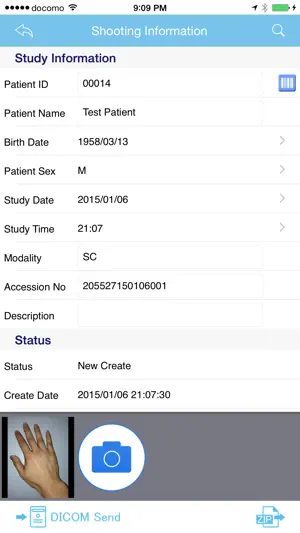
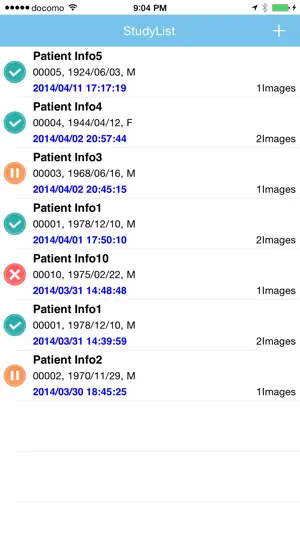
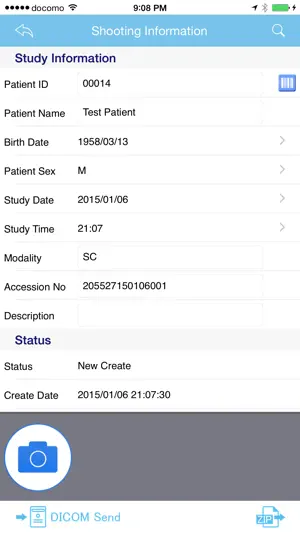
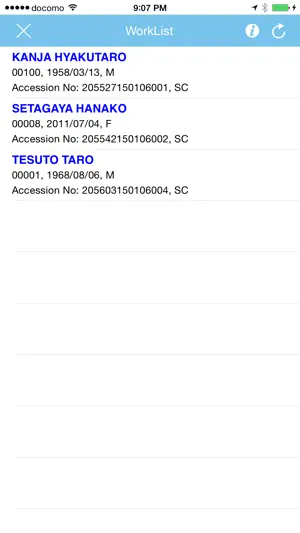
To be sent to the DICOM server the images taken with iPhone, DICOM-Shot is a simplified modality application to be able to carry easily. 1) Enter patient information 2) Shot with iPhone camera the affected area 3) Tap the Send button Just these three steps, you can be sent to the DICOM server the captured images. Because if you use the DICOM-Shot application, in the same way as DICOM images images captured by the camera, you will be able to manage DICOM server, It is an application very useful to a centralized management of hospital image. If PACS server that supports the DICOM communication protocol, since it is possible to be sent, the destination server does not choose the server. ※Transfer Syntax: Implicit VR Little Endian ■ Instructions for use 1) Application after installation, and then enter the configuration information and "Server Settings" and "Client Settings" from the Settings. ※ The server configuration information, please contact the server administrator. 2) Tap the top right of the inspection list the "+" button to register the new inspection. 3) Enter the information of the patient. - When you tap the search button, you can use the MWM Server. - It will be filled in automatically if you tap any WorkList. 4) Tap the camera button to activate the camera, take the affected area. 5) Tap the "DICOM send" button to send the image to the DICOM server. ※ If it takes a long time to image sending, you can change the image size options in the Settings. ■ Custom URL Scheme dicom-shot:// ■ Notes - Requires a Wi-Fi environment to the clinic. - There is a need for a separate PACS server that supports the DICOM communication protocol. - Employees shall use, please follow the security policy of the clinic. - The search conditions to the MWM Server, I find in the "Setting modality" and "sutdy date of the day." It is also possible to search by entering the patient ID. - it is compressed in ZIP DICOM images, to send the file to the apps Dropbox, OneDrive, such as Osirix HD. - If you want to delete the data on the inspection list, when you swipe a list of target, "Delete" button will appear, please tap. - If patient name appears to be garbled, please make the item of Specific Character Set in Settings options to "ISO_IR 192". The problem may be resolved. - If you want to keep the results of the MWM server, click the add offline button (icon at the bottom left) on the worklist window. You can refer to it from the offline information display button on the shooting information window, which is convenient when you move to an environment where you cannot connect to the MWM server. - Due to improved iOS security, the first DICOM communication "DICOM-Shot would like to find and connect to devices on your local network." Press "OK" to allow DICOM-Shot Apps to connect to the network. ■ Contact Us If you have any questions, please contact the following email address. 【[email protected]】
What’s new
Version 2.0.4 · Updated September 2, 2026
Improvements to communication processing
App privacy
The developer, Life Sciences Computing Corporation, reported these privacy practices to Apple.
Data Not Collected
The developer does not collect any data from this app.
Alternatives to DICOM-Shot
Looking for apps like DICOM-Shot? Here are 6 similar apps on the App Store.
-
 Dicompass Camera 2
-
 MediShot - DICOM Camera
-
 INFINITT CU 3.0
-
 LiveShot2
-
 DICOM Camera
-
 axSuisse – Vaccine Passport
| App | Rating | Price | Last updated | Compare |
|---|---|---|---|---|
| DICOM-Shot | 1.0 / 5 (1 rating) | 7.99 USD | September 2, 2026 | |
| Dicompass Camera 2 | – | Free | Jun 11, 2026 | Compare |
| MediShot - DICOM Camera | – | Free | Oct 4, 2026 | Compare |
| INFINITT CU 3.0 | – | Free | Jun 17, 2026 | Compare |
| LiveShot2 | – | Free | Sep 3, 2026 | Compare |
| DICOM Camera | – | Free | Dec 5, 2024 | Compare |
| axSuisse – Vaccine Passport | – | Free | Oct 14, 2026 | Compare |
Compare DICOM-Shot with the top alternatives: ratings, updates, ASO score and keyword gaps →