

ContactsDelete: Bulk Cleaner
Yunus Gunduz Utilities iPhoneiPadiPod touch
ContactsDelete: Bulk Cleaner is a free Utilities app for iPhone and iPad by Yunus Gunduz. Rated 1.0/5 from 1 ratings. Requires iOS 16.0.
- Rating
- 1.0
- 1 ratings
- Price
- Free
- on the App Store
- Size
- 5 MB
- Age 4+
- Updated
- Oct 15
- 2026 · v2.2.1
Screenshots
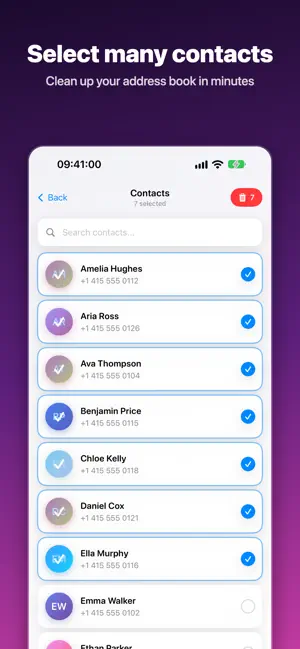
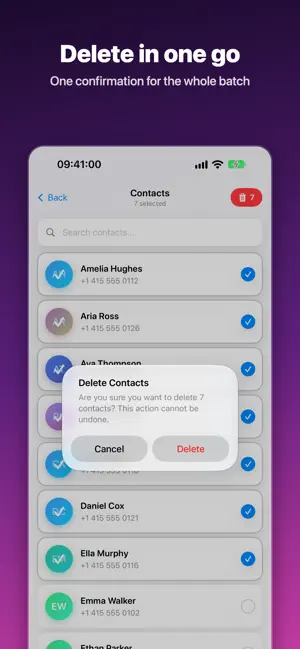

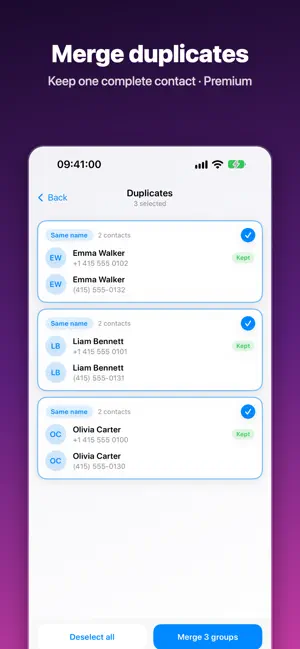
About ContactsDelete: Bulk Cleaner
Select many contacts and delete them in one go. ContactsDelete helps you clean up a crowded address book, with a recycle bin that lets you undo mistakes. Deleted the wrong person? Nothing is lost right away. Deleted contacts go to History, a 30-day recycle bin, where you can restore them to your address book or remove them for good. What you can do: - Search by name or phone number - Select several contacts and delete them with one confirmation - Restore deleted contacts from History within 30 days - Find duplicate contacts and merge them: the most complete contact is kept and the copies move to History, so you can undo a merge - Use light or dark mode Free and Premium: - Free: delete up to 5 contacts at a time, with ads - Premium (optional one-time purchase, no subscription): no ads, unlimited delete in one go, History with 30-day recycle bin and duplicate merge - If you bought Premium in an earlier version, it is still yours - You can restore a previous purchase from the app Privacy: your contacts never leave your device. ContactsDelete does not upload, store on a server or share your address book. The free version shows ads from Google AdMob. Where required, the app asks for your consent first, and you can decline personalised ads. iOS 18: if you give the app limited access to contacts, ContactsDelete works with the contacts you choose, and you can change the selection in Settings. Language: the app follows your phone language and is available in 11 languages: English, Turkish, German, Spanish, Portuguese, Japanese, French, Arabic, Ukrainian, Russian and Hindi. To change it, open iOS Settings, scroll to ContactsDelete and choose Language. Questions or feedback? Visit https://yunusgunduz.com/contact.php
What’s new
Version 2.2.1 · Updated October 15, 2026
ContactsDelete now speaks 11 languages: English, Turkish, German, Spanish, Portuguese, Japanese, French, Arabic, Ukrainian, Russian and Hindi. To change the language, open iOS Settings, scroll to ContactsDelete and choose Language. Bought Premium before? It is still yours.
App privacy
The developer, Yunus Gunduz, reported these privacy practices to Apple.
Data Used to Track You
The following data may be used to track you across apps and websites owned by other companies:
- Identifiers: Device ID
- Usage Data: Advertising Data
Data Not Linked to You
The following data, which may be collected but is not linked to your identity, may be used for the following purposes:
- Identifiers: Device ID
- Usage Data: Advertising Data
- Purchases: Purchase History
- Diagnostics: Crash Data
Used for: Third-Party Advertising, App Functionality
Alternatives to ContactsDelete: Bulk Cleaner
Looking for apps like ContactsDelete: Bulk Cleaner? Here are 6 similar apps on the App Store. The highest rated is Merge & Compress PDF: PDFBuddy (5.0/5), and 5 of the 6 are free to download.
-
 xLens: Scan Document Offline
-
 LastFeed
-
 Merge & Compress PDF: PDFBuddy
5.0
Merge & Compress PDF: PDFBuddy
5.0
-
 QR Code Inspector
-
 File Converter - FileSnap
-
 MeDaBlur
| App | Rating | Price | Last updated | Compare |
|---|---|---|---|---|
| ContactsDelete: Bulk Cleaner | 1.0 / 5 (1 rating) | Free | October 15, 2026 | |
| xLens: Scan Document Offline | – | Free | May 5, 2026 | Compare |
| LastFeed | – | Free | Mar 28, 2026 | Compare |
| Merge & Compress PDF: PDFBuddy | 5.0 / 5 (3) | Free | Sep 26, 2026 | Compare |
| QR Code Inspector | – | Free | Jan 17, 2026 | Compare |
| File Converter - FileSnap | – | Free | Oct 1, 2026 | Compare |
| MeDaBlur | – | 0.99 USD | Mar 3, 2026 | Compare |