

Systweak PDF Editor
Shrishail Rana Utilities iPhoneiPadiPod touch
Systweak PDF Editor is a free Utilities app for iPhone and iPad by Shrishail Rana. Rated 5.0/5 from 1 ratings. Requires iOS 14.0. Updated April 9, 2026.
- Rating
- 5.0
- 1 ratings
- Price
- Free
- on the App Store
- Size
- 70 MB
- Age 4+
- Updated
- Apr 9
- 2026 · v1.3
Screenshots


About Systweak PDF Editor
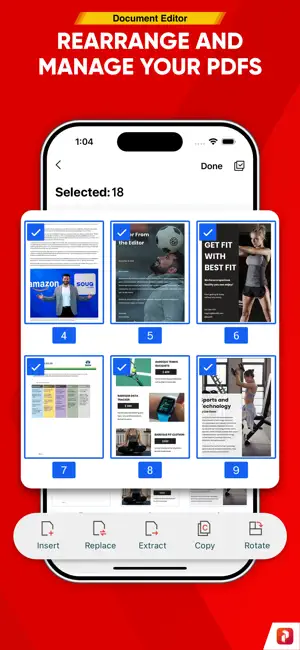
Scan, Edit, Annotate, Protect & Sign PDFs in a Tap Scan, edit, and smartly manage your PDFs with Systweak PDF Editor. This all-in-one, lightweight app lets you scan, edit, annotate, create, sign, protect, and fill forms in PDF documents, all on the go, directly from your iPhone. Import existing PDFs into the app, then read, comment, edit, encrypt, and share them with just a few taps. No more printing, scanning, or switching devices, as everything you need to work with PDF files is right on your iPhone! Key Features: • Edit PDF Content – Add or modify text directly within your PDF. • Create PDF - Create PDF from scratch in different sizes and scanned photos. • Annotate with Ease – Highlight, underline, strikethrough, add notes, etc. • Add Signatures – Draw and insert e-signatures or digital signatures. • Secure PDF – Protect your PDFs with passwords or restrict copying/printing. • Form Filling – Easily fill PDF forms and save them for sharing or printing. • Watermark – Add text/image watermarks for branding or confidentiality. • Page Management – Reorder, rotate, insert, extract, duplicate, or delete PDF pages. • Merge PDF - Combine PDFs to create a single document. • Compress PDF - Optimize PDF and reduce the size of large PDFs. Benefits: Perform All Essential PDF Tasks: • Open and view PDF files quickly with the built-in PDF reader • Scroll, zoom, and search through lengthy documents effortlessly • Adjust page layout with tools like rotate, reorder, or extract pages Annotate PDF Files: • Add comments using sticky notes • Highlight, underline, strikethrough, or freehand draw to mark up content • Collaborate by sharing your marked-up documents instantly Sign Important Documents: • Fill out PDF forms directly by typing into fields • Add a digital signature or upload scanned signature images • Place and resize your signature exactly where needed Secure and Protect PDFs: • Add or remove password protection for sensitive documents • Encrypt files with different levels (128-bit RC4, 128-bit AES, and 256-bit AES) and save or share them, ensuring document privacy Additional Tools • Merge multiple PDF s into one file or split them as required • Compress large PDF files to make sharing easier without losing quality • Add watermarks for branding or verification • Bookmark pages for quick navigation • Mark important files as favorites for easy access anytime All Files Are Stored Locally: Your privacy matters. All documents are saved directly on your device and are never uploaded to our servers or shared with third parties. You have full control of your data. How to Get Started: • Install Systweak PDF Editor on your iOS device. • Open the PDF to work with or create a new PDF document. • Thereafter, using different PDF tools, you can edit, annotate, fill forms, add watermarks, sign, protect, and perform various operations on PDFs. • Save and share (as per the requirement) your final document.
What’s new
Version 1.3 · Updated April 9, 2026
Improvements and minor bug fixes for a smoother user experience on the latest iOS version.
App privacy
The developer, Shrishail Rana, reported these privacy practices to Apple.
Data Not Collected
The developer does not collect any data from this app.
Alternatives to Systweak PDF Editor
Looking for apps like Systweak PDF Editor? Here are 6 similar apps on the App Store. The highest rated is PDF Studio: PDF Converter (5.0/5), and all 6 are free to download.
-
 PDF Studio: PDF Converter
5.0
PDF Studio: PDF Converter
5.0
-
 JPG to PDF: Photo to PDF
5.0
JPG to PDF: Photo to PDF
5.0
-
 Contacts To XLSX, CSV, Outlook
-
 PDF Converter: JPG, Word, Sign
-
 PDF Signer: Fill & Sign Docs
4.5
PDF Signer: Fill & Sign Docs
4.5
-
 DNS Checker: IP & SSL Tools
| App | Rating | Price | Last updated | Compare |
|---|---|---|---|---|
| Systweak PDF Editor | 5.0 / 5 (1 rating) | Free | April 9, 2026 | |
| PDF Studio: PDF Converter | 5.0 / 5 (2) | Free | Oct 11, 2026 | Compare |
| JPG to PDF: Photo to PDF | 5.0 / 5 (2) | Free | Sep 16, 2025 | Compare |
| Contacts To XLSX, CSV, Outlook | – | Free | Aug 12, 2026 | Compare |
| PDF Converter: JPG, Word, Sign | – | Free | Oct 6, 2026 | Compare |
| PDF Signer: Fill & Sign Docs | 4.5 / 5 (11) | Free | Oct 10, 2026 | Compare |
| DNS Checker: IP & SSL Tools | – | Free | Jul 27, 2026 | Compare |