

Notewise - AI Notes, PDF, Docs
ZIIKR Productivity iPhoneiPadiPod touch
Notewise - AI Notes, PDF, Docs is a free Productivity app for iPhone and iPad by ZIIKR. Rated 4.6/5 from 283 ratings. Requires iOS 26.0.
- Rating
- 4.6
- 283 ratings
- Price
- Free
- on the App Store
- Size
- 431 MB
- Age 4+
- Updated
- Oct 21
- 2026 · v4.1.10
Screenshots


About Notewise - AI Notes, PDF, Docs
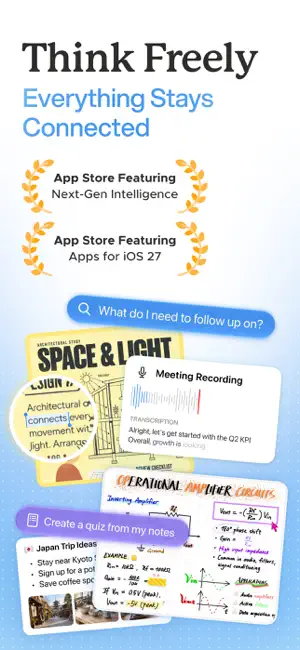
Featured on the App Store. 8M+ downloads. Trusted by millions worldwide. Your meetings, lectures, ideas, and research don’t arrive in one format. Your notes shouldn’t have to either. Notewise brings together what you write, record, draw, read, and save. Capture it once, then find it again, ask about it, learn from it, and build on it. Notewise is an AI note-taking app for iPhone and iPad with handwritten notes, audio recording and transcription, PDF annotation, documents, web sources, and AI search and chat. ■ CAPTURE EVERYTHING IN ONE NOTE • Write, type, or handwrite notes • Sketch ideas and diagrams on a freeform canvas • Record meetings, lectures, conversations, and voice notes • Import 25+ file formats, including PDFs, documents, slides, images, and more • Add website links and bring web research into your notes • Scan paper notes and whiteboards Start with whatever is in front of you. Add things in any order, and keep related notes, recordings, files, and ideas together as you go. ■ SEARCH & ASK ACROSS YOUR NOTES Search handwritten notes, typed text, audio transcripts, PDFs, documents, and images. Ask Notewise AI about the note you’re in or across all your notes. Search the web when you need more context. Answers can cite the notes, recordings, files, and sources behind them, so you can always see where the information came from. Search less. Pick up where you left off and keep thinking. ■ RECORD, TRANSCRIBE & ASK IN REAL TIME Stay focused on the meeting, lecture, or conversation instead of trying to write down every word. • Automatic transcription in 20+ languages • Key points, decisions, and next steps • Ask questions while a meeting or lecture is still happening • Ask across past recordings later • Keep audio, meeting notes, PDFs, and related documents together Meeting notes become more than transcripts. Class notes stay useful long after the lecture ends. ■ WRITE, DRAW & ANNOTATE FREELY Handwrite a page. Draw a diagram. Work through a problem. Mark up a PDF. Move things around until the idea makes sense. Choose from 30+ brushes and tools — including pencil, oil paint, watercolor, highlighter, lasso, tape, shapes, tables, rulers, sticky notes, and more. Start from 20+ templates or create your own, from Cornell notes to meeting notes and custom workflows. ■ TURN NOTES INTO FLASHCARDS, QUIZZES & PODCASTS Good notes don’t all look the same. Turn study notes, meeting notes, or research into AI notes, summaries, flashcards, quizzes, podcasts, and more — using the same material in the format that helps you most. Summarize a recording. Ask questions about a PDF. Search handwritten notes. Find connections across different notes. Sometimes you want AI. Sometimes you just want a blank page. Notewise gives you both. ■ FOR WORK, STUDY & RESEARCH Use Notewise for meeting notes, lecture recording, handwritten and digital notes, voice notes, PDF annotation, research papers, brainstorming, and search across everything you save. On iOS 27, use Siri AI to create, edit, and find information in your notes, or Visual Intelligence to surface related content from what you see. Whether you’re building a company, studying for an exam, researching your next idea, or simply trying to remember what matters, Notewise gives your thinking one place to grow. ■ PRIVACY FIRST Notewise is built by a small, independent team. We don’t sell your data or show ads. Your notes are encrypted, secure, and under your control. ■ TRY NOTEWISE FREE Start with 10 free canvas notes and import your own slides and documents. Explore Notewise with a 7-day free trial, while core features remain free to use. Write. Record. Draw. Remember. Privacy Policy: https://www.notewise.dev/privacy-policy Terms & Conditions: https://www.notewise.dev/terms-conditions
Ratings & reviews
4.6
283 ratings
What’s new
Version 4.1.10 · Updated October 21, 2026
Meet Notewise 4.1 A more complete note-taking system for every way you study and work. More for Every Note • Chat with Audio in Real Time: Ask questions as a meeting or lecture unfolds and stay present • Interactive Tabs with Flashcards: Turn notes into flashcards, podcasts, quizzes and more • Canvas Toolbar: Place the toolbar on any side, including left or right, and set up the Canvas your way • Sidebar: Add, review and rearrange sources and Interactive Tabs in one place. Show AI overviews when you need them, and hide them when you want to focus • Canvas Layout: Improved phone and compact layouts make it easier to sketch ideas anytime, anywhere • Richer Notes: Add images to Text & Audio Notes for visual reference, with your work saved automatically • Canvas Controls: Navigate the Canvas more easily with improved trackpad, mouse & keyboard support • More Sources: Create notes from website links or add links as sources, bringing web research into Notewise Optimized for iOS 27 • Siri AI: Create, edit and find information in your notes with a quick Siri command • Visual Intelligence: See it, find it. Use your camera to identify what you see and find related content in Notewise
App privacy
The developer, ZIIKR, reported these privacy practices to Apple.
Data Linked to You
The following data, which may be collected and linked to your identity, may be used for the following purposes:
- Identifiers: User ID
- Contact Info: Email Address
Used for: Analytics, App Functionality
Data Not Linked to You
The following data, which may be collected but is not linked to your identity, may be used for the following purposes:
- Usage Data: Product Interaction
- Diagnostics: Crash Data, Performance Data
- Purchases: Purchase History
- Contact Info: Name
- User Content: Photos or Videos
Used for: Analytics, App Functionality
Alternatives to Notewise - AI Notes, PDF, Docs
Looking for apps like Notewise - AI Notes, PDF, Docs? Here are 6 similar apps on the App Store. The highest rated is Element Note (4.6/5), and all 6 are free to download.
-
 Element Note
4.6
Element Note
4.6
-
 StarNote: Handwritten Notes
4.6
StarNote: Handwritten Notes
4.6
-
 Notes Writer: PDF, Voice, AI
4.5
Notes Writer: PDF, Voice, AI
4.5
-
 QuickNotes X: Notes, AI & PDF
4.3
QuickNotes X: Notes, AI & PDF
4.3
-
 Flexcil Note & Good PDF Reader
4.4
Flexcil Note & Good PDF Reader
4.4
-
 Noteshelf: AI Notes & PDF
4.6
Noteshelf: AI Notes & PDF
4.6
| App | Rating | Price | Last updated | Compare |
|---|---|---|---|---|
| Notewise - AI Notes, PDF, Docs | 4.6 / 5 (283 ratings) | Free | October 21, 2026 | |
| Element Note | 4.6 / 5 (2,622) | Free | Sep 24, 2026 | Compare |
| StarNote: Handwritten Notes | 4.6 / 5 (117) | Free | Sep 10, 2026 | Compare |
| Notes Writer: PDF, Voice, AI | 4.5 / 5 (7,328) | Free | Oct 20, 2026 | Compare |
| QuickNotes X: Notes, AI & PDF | 4.3 / 5 (3,767) | Free | Sep 9, 2026 | Compare |
| Flexcil Note & Good PDF Reader | 4.4 / 5 (412) | Free | Oct 21, 2026 | Compare |
| Noteshelf: AI Notes & PDF | 4.6 / 5 (7,086) | Free | Oct 21, 2026 | Compare |