

OKIOCAM Live
OKIO LABS, INC. Utilities iPad
OKIOCAM Live is a free Utilities app for iPad by OKIO LABS, INC. Rated 2.0/5 from 3 ratings. Requires iOS 17.0. Updated October 2, 2025.
- Rating
- 2.0
- 3 ratings
- Price
- Free
- on the App Store
- Size
- 4 MB
- Age 4+
- Updated
- Oct 2
- 2025 · v1.0.3
Screenshots


About OKIOCAM Live
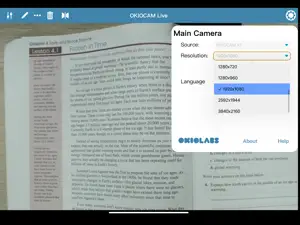
OKIOCAM Live is now available on iPads! The app supports both internal iPad cameras and external OKIOCAM USB cameras. Elevate your presentations with OKIOCAM Live, the first document camera app for iPads designed to bring your ideas to high definition using your OKIOCAM doc cam and share them with your audience. Whether you're a teacher, presenter, or speaker, this powerful tool empowers you to deliver impactful presentations anytime, anywhere with just an iPad and OKIOCAM in hand! - FEATURES - With OKIOCAM & OKIOCAM Live, you can annotate notes, highlight key points, and draw diagrams directly on your visual materials in real-time using your iPad, making your presentations much more visually engaging and interactive. With Airplay, project your iPad screen onto a larger display to captivate your audience - no more fuss with multiple cables and ports. - NEW FEATURES - Take your experience to the next level with these exciting updates: Take Snapshots: Capture high-quality snapshots with a single tap to save and share your moments instantly. Record Videos: Effortlessly record detailed videos for presentations, lessons, or memorable events. Picture-in-Picture (PiP): Leverage two cameras simultaneously for dynamic, dual-view presentations. Perfect for live demonstrations and interactive content creation. Live Broadcasting to RTMP Servers: Stream directly to platforms like YouTube, Facebook, or any RTMP-compatible service with ease. - HOW TO USE - Simply connect your OKIOCAM camera to your iPad using the Type-C adapter included with the camera, and unlock a myriad of features to amplify your presentations using OKIOCAM Live. - SECURITY AND PRIVACY - OKIOCAM Live has no access to your camera feed and video. It simply routes your OKIOCAM camera to your iPad. - WHAT’S MORE - - Supports zero-latency presentations and video streaming at up to 30 fps with a range of resolutions - Virtually rotate and zoom in on any part of your video - No ads in the app and no hidden payments Note: OKIOCAM Live for iPad currently only supports built-in iPad cameras and OKIOCAM USB cameras. - SUPPORT - We’re always happy to support our users and we’d love to help you make the most of OKIOCAM Live or your OKIOCAM. Contact us anytime at support.okiolabs.com About us: https://www.okiolabs.com/ Learn more about OKIOCAM Live (all versions) https://www.okiolabs.com/software/okiocam-live/
What’s new
Version 1.0.3 · Updated October 2, 2025
Fix bugs
App privacy
The developer, OKIO LABS, INC., reported these privacy practices to Apple.
Data Not Collected
The developer does not collect any data from this app.
Alternatives to OKIOCAM Live
Looking for apps like OKIOCAM Live? Here are 6 similar apps on the App Store. The highest rated is Genki Studio (4.5/5), and all 6 are free to download.
-
 Inswan Documate
-
 IPEVO Visualizer
3.1
IPEVO Visualizer
3.1
-
 USB Camera
2.7
USB Camera
2.7
-
 ReBokeh
4.3
ReBokeh
4.3
-
 Genki Studio
4.5
Genki Studio
4.5
-
 USB Camera pro-capture driver
3.2
USB Camera pro-capture driver
3.2
| App | Rating | Price | Last updated | Compare |
|---|---|---|---|---|
| OKIOCAM Live | 2.0 / 5 (3 ratings) | Free | October 2, 2025 | |
| Inswan Documate | – | Free | May 21, 2025 | Compare |
| IPEVO Visualizer | 3.1 / 5 (17) | Free | Sep 29, 2026 | Compare |
| USB Camera | 2.7 / 5 (10) | Free | Oct 14, 2026 | Compare |
| ReBokeh | 4.3 / 5 (32) | Free | Oct 14, 2026 | Compare |
| Genki Studio | 4.5 / 5 (46) | Free | Sep 14, 2026 | Compare |
| USB Camera pro-capture driver | 3.2 / 5 (13) | Free | Aug 10, 2026 | Compare |
Compare OKIOCAM Live with the top alternatives: ratings, updates, ASO score and keyword gaps →