

biiCADo Mobile - CAD App
BAST Ingenieur Informatik UG (haftungsbeschränkt) Productivity iPhoneiPadiPod touch
biiCADo Mobile - CAD App is a free Productivity app for iPhone and iPad by BAST Ingenieur Informatik UG (haftungsbeschränkt). Rated 2.3/5 from 3 ratings.
- Rating
- 2.3
- 3 ratings
- Price
- Free
- on the App Store
- Size
- 74 MB
- Age 4+
- Updated
- Feb 22
- 2025 · v5.0.4
Screenshots


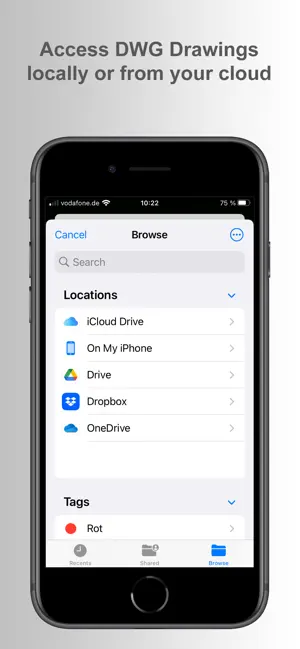

About biiCADo Mobile - CAD App
biiCADo Mobile is a CAD-application, optimized for use in mobile devices such as the iPhone or iPad. The intuitive operation and a variety of CAD Tools enable fast and efficient creation of technical drawings in DWG or DXF format. Create PDF documents of your drawings and send them directly from biiCADo Mobile, to share them with others. TRY biiCADo Mobile FOR FREE: Subscribe to biiCADo Mobile via in-app purchase. You can cancel the subscription within 7 days and do not have to pay anything. General: • Create 2D CAD drawings • Drawing in Inch and metric units • Read and save DWG and DXF Drawings • Access DWG Drawings from cloud (Dropbox, OneDrive, GoogleDrive …) via iOS Files App • Create PDF Documents • Undo / Redo any number of times Supported geometry elements which can be created and edited: • Point • Line • X-Line • Polyline, Rectangle, Polygon, Donut • Arc, Circle, Ellipse, Elliptical Arc, Spline • Text, Multiline Text • Hatch, Solid • Create Block, insert Block, Block attributes Dimensions • Horizontal, Vertical, Aligned • Radius, Diameter • Angular, Coordinates • Tolerance, Leader lines • center marks Edit Drawing: • Power Edit (Access to all element properties) • Grips • Delete, copy, move • Rotate, scale, mirror • Trim, extend • Chamfer, Fillet • Offset Supported fonts: • txt • isocp Tools for precise drawing: • Object snaps • Ortho mode • Grid view • Grid snap Supported Presettings (add, delete, edit): • Layer • Linetype • Text style • Dimension style • Point style Free mode is great for viewing DWG or DXF drawings. To access the features described above, you will need to either upgrade to a Lifetime License or have a valid subscription. For subscriptions: • Subscriptions are billed either monthly or annually. • Billing is done through your Apple ID account (iTunes account). • Your subscription will automatically renew unless you cancel it at least 24 hours before the end of the current billing period. • You can manage or cancel your subscription at any time through your account settings in the App Store. Privacy policy: https://www.bast2i.com/biicado_mobile/privacy-policy.html Terms of use: https://www.bast2i.com/biicado_mobile/terms-of-use.html
What’s new
Version 5.0.4 · Updated February 22, 2025
Added Trim / Extend command
App privacy
The developer, BAST Ingenieur Informatik UG (haftungsbeschränkt), reported these privacy practices to Apple.
Data Not Collected
The developer does not collect any data from this app.
Alternatives to biiCADo Mobile - CAD App
Looking for apps like biiCADo Mobile - CAD App? Here are 6 similar apps on the App Store. The highest rated is Auto RC: Structural Design (4.5/5), and all 6 are free to download.
-
 VinaCAD - View & Edit DWG
1.0
VinaCAD - View & Edit DWG
1.0
-
 Auto RC: Structural Design
4.5
Auto RC: Structural Design
4.5
-
 CADraw
2.9
CADraw
2.9
-
 Convert PDF to AutoCad
4.5
Convert PDF to AutoCad
4.5
-
 iPocket Draw Lite
3.6
iPocket Draw Lite
3.6
-
 iDesign
2.6
iDesign
2.6
| App | Rating | Price | Last updated | Compare |
|---|---|---|---|---|
| biiCADo Mobile - CAD App | 2.3 / 5 (3 ratings) | Free | February 22, 2025 | |
| VinaCAD - View & Edit DWG | 1.0 / 5 (1) | Free | Oct 1, 2026 | Compare |
| Auto RC: Structural Design | 4.5 / 5 (6) | Free | Oct 7, 2026 | Compare |
| CADraw | 2.9 / 5 (10) | Free | Feb 8, 2026 | Compare |
| Convert PDF to AutoCad | 4.5 / 5 (68) | Free | Jan 10, 2024 | Compare |
| iPocket Draw Lite | 3.6 / 5 (16) | Free | Aug 3, 2026 | Compare |
| iDesign | 2.6 / 5 (87) | Free | Oct 17, 2026 | Compare |