

Convert PDF to AutoCad
Tu Phan Productivity iPhoneiPadiPod touch
Convert PDF to AutoCad is a free Productivity app for iPhone and iPad by Tu Phan. Rated 4.5/5 from 68 ratings. Requires iOS 11.0. Updated January 10, 2024.
- Rating
- 4.5
- 68 ratings
- Price
- Free
- on the App Store
- Size
- 8 MB
- Age 4+
- Updated
- Jan 10
- 2024 · v4.9
Screenshots
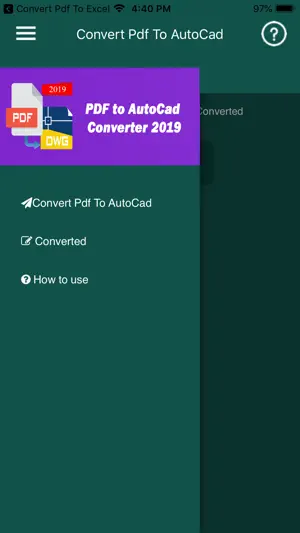
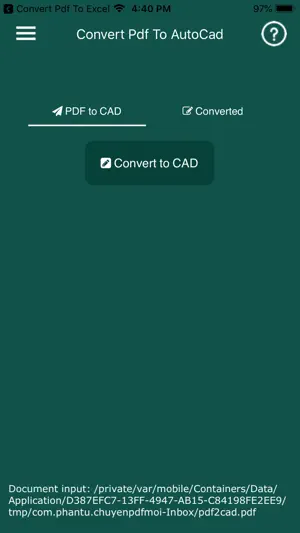


About Convert PDF to AutoCad
Convert PDF to editable DWG file very easily. The conversion quality will be very nice and crystal clear; lines and arcs are removable or editable, same as the native AutoCAD drawing Convert PDF to AutoCAD DWG either in an application or a powerful app. The drawing will contain texts, lines, polylines, splines and images. Anyone who works with AutoCAD software will have to convert PDFs sooner or later turning plans into useable files for editing. That can be a laborious process but PDF to DWG Converter exists to automate the process and reduce workload. With some powerful features this software can be trusted to convert cleanly or at least leave you with editable files. PDF to DWG Converter is an Ideal AutoCAD Companion. Convert Quickly and with Accuracy. PDF to DWG Converter may not look like much but it?s a pretty powerful bit of kit. Though the UI could be nicer it?s very easy to use. You can convert any version of PDF file to DWG format very quickly. A Useful Design Tool Though it?s not used for design itself PDF to DWG Converter is a great companion tool for designers who may need to streamline their process and increase productivity. PDFs can be notoriously tricky to convert without losing all their formatting so this software is very useful. It?s a little complex but they do provide a guide for beginners. Converts vector drawings in PDF to editable DWG
Ratings & reviews
4.5
68 ratings
What’s new
Version 4.9 · Updated January 10, 2024
Fix current version can not convert file!
App privacy
The developer, Tu Phan, reported these privacy practices to Apple.
Data Not Linked to You
The following data, which may be collected but is not linked to your identity, may be used for the following purposes:
- Location: Precise Location
- Identifiers: Device ID
- Usage Data: Advertising Data
Used for: Third-Party Advertising, Developer’s Advertising or Marketing, Analytics
Alternatives to Convert PDF to AutoCad
Looking for apps like Convert PDF to AutoCad? Here are 6 similar apps on the App Store. The highest rated is ARES Touch: DWG Viewer & CAD (4.7/5), and all 6 are free to download.
-
 DWG View - CAD Viewer & Editor
2.0
DWG View - CAD Viewer & Editor
2.0
-
 CADraw
2.9
CADraw
2.9
-
 ARES Touch: DWG Viewer & CAD
4.7
ARES Touch: DWG Viewer & CAD
4.7
-
 PDF to DWG CAD Converter
4.7
PDF to DWG CAD Converter
4.7
-
 ZWCAD Mobile - Mobile CAD
4.3
ZWCAD Mobile - Mobile CAD
4.3
-
 Autodesk Vault Mobile
4.4
Autodesk Vault Mobile
4.4
| App | Rating | Price | Last updated | Compare |
|---|---|---|---|---|
| Convert PDF to AutoCad | 4.5 / 5 (68 ratings) | Free | January 10, 2024 | |
| DWG View - CAD Viewer & Editor | 2.0 / 5 (7) | Free | Aug 27, 2026 | Compare |
| CADraw | 2.9 / 5 (10) | Free | Feb 8, 2026 | Compare |
| ARES Touch: DWG Viewer & CAD | 4.7 / 5 (156) | Free | Oct 7, 2026 | Compare |
| PDF to DWG CAD Converter | 4.7 / 5 (3) | Free | Sep 11, 2026 | Compare |
| ZWCAD Mobile - Mobile CAD | 4.3 / 5 (305) | Free | Jul 1, 2026 | Compare |
| Autodesk Vault Mobile | 4.4 / 5 (12) | Free | Sep 3, 2026 | Compare |