

Grab HD Video Frames - VidGrab
Jordan Zeleny Photo & Video iPhoneiPadiPod touchMac
Grab HD Video Frames - VidGrab is a free Photo & Video app for iPhone and iPad by Jordan Zeleny. Rated 4.4/5 from 98 ratings. Requires iOS 16.0.
- Rating
- 4.4
- 98 ratings
- Price
- Free
- on the App Store
- Size
- 40 MB
- Age 4+
- Updated
- Jul 27
- 2026 · v1.3.0
Screenshots
About Grab HD Video Frames - VidGrab
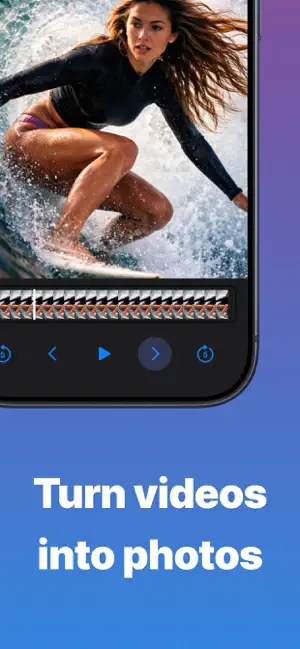
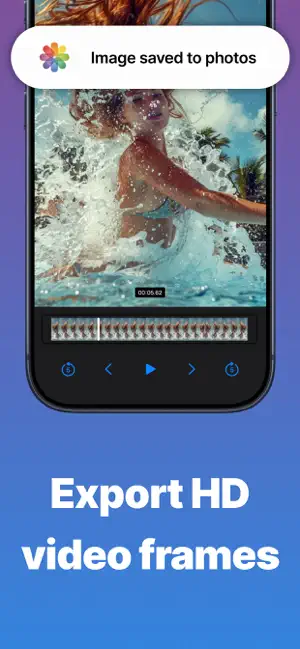
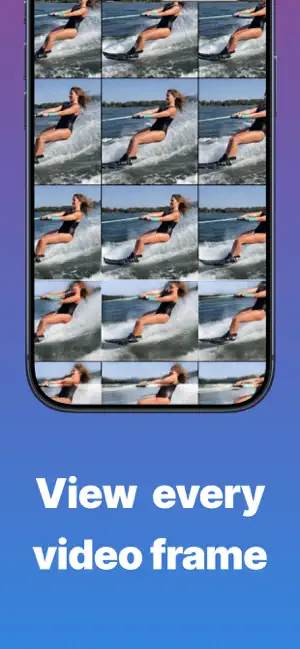
VidGrab – Save Perfect Frames From Video Turn any video into high-quality still images in seconds. VidGrab makes it easy to scrub through your videos frame by frame, save the exact moment you want, and enhance it with AI upscaling up to 4K. Whether it's action shots, sports clips, slow-motion moments, or the perfect freeze frame, VidGrab gives you precise control with a simple, focused workflow. VidGrab is free to download and use. Some features are limited on the free plan, and an optional Premium subscription (auto-renewing, purchased in-app) unlocks everything — details below. Two Powerful Views Player View • Play and pause video smoothly • Skip forward or back 1 frame at a time • Jump 5 frames for faster navigation • Save the exact frame you see All Frames View • Instantly view every frame in the video • Pinch to zoom between 2, 3, and 4 columns • Scroll and select the best shots • Save multiple frames quickly 4K AI Upscaler (Premium) • Enhance any frame — or any photo from your library — with AI • Upscale up to 4K for crystal-clear detail • Compare original and upscaled side by side before saving Features • Save high-quality frames from any video • Frame-accurate controls for precision • Simple, distraction-free interface • Export images in full resolution • Perfect for sports, action, creators, and highlights Free vs Premium VidGrab is a free app with in-app purchases. Here's exactly what you get: Free • Save a limited number of frames • Exports include a small VidGrab watermark • Browse and preview every frame with no limits Premium (auto-renewing subscription) • Unlimited frame saves • Watermark-free exports • 4K AI upscaling for frames and photos Payment is charged to your Apple Account at confirmation of purchase. Subscriptions renew automatically unless cancelled at least 24 hours before the end of the current period. Manage or cancel anytime in your Apple Account settings. Designed for speed. Built for precision. CONTACT: [email protected] TERMS OF USE: https://www.apple.com/legal/internet-services/itunes/dev/stdeula/ PRIVACY: https://sites.google.com/view/vidgrab
Ratings & reviews
4.4
98 ratings
What’s new
Version 1.3.0 · Updated July 27, 2026
Added AI upscale feature. Bug fixes and performance improvements.
App privacy
The developer, Jordan Zeleny, reported these privacy practices to Apple.
Data Not Linked to You
The following data, which may be collected but is not linked to your identity, may be used for the following purposes:
- Purchases: Purchase History
- User Content: Other User Content, Photos or Videos
- Identifiers: Device ID
- Other Data: Other Data Types
Used for: Analytics, App Functionality
Alternatives to Grab HD Video Frames - VidGrab
Looking for apps like Grab HD Video Frames - VidGrab? Here are 6 similar apps on the App Store. The highest rated is Video to Pic: Frame Grabber (4.7/5), and all 6 are free to download.
-
 Grab Picture - Video converter
4.2
Grab Picture - Video converter
4.2
-
 Frame Grab
4.4
Frame Grab
4.4
-
 Frame Picker - Photo Grabber
4.2
Frame Picker - Photo Grabber
4.2
-
 Video to Pic: Frame Grabber
4.7
Video to Pic: Frame Grabber
4.7
-
 AI Frame Grabber: Video to Pic
4.5
AI Frame Grabber: Video to Pic
4.5
-
 Video to Photo: High Quality
4.6
Video to Photo: High Quality
4.6
| App | Rating | Price | Last updated | Compare |
|---|---|---|---|---|
| Grab HD Video Frames - VidGrab | 4.4 / 5 (98 ratings) | Free | July 27, 2026 | |
| Grab Picture - Video converter | 4.2 / 5 (1,823) | Free | Apr 9, 2026 | Compare |
| Frame Grab | 4.4 / 5 (96) | Free | Aug 14, 2026 | Compare |
| Frame Picker - Photo Grabber | 4.2 / 5 (37) | Free | Aug 17, 2026 | Compare |
| Video to Pic: Frame Grabber | 4.7 / 5 (1,160) | Free | Sep 25, 2026 | Compare |
| AI Frame Grabber: Video to Pic | 4.5 / 5 (33) | Free | Sep 5, 2026 | Compare |
| Video to Photo: High Quality | 4.6 / 5 (438) | Free | Sep 21, 2026 | Compare |