

Frame Grab
Tranquillity Base Photo & Video iPhoneiPadiPod touch
Frame Grab is a free Photo & Video app for iPhone and iPad by Tranquillity Base. Rated 4.4/5 from 96 ratings. Requires iOS 17.5. Updated August 14, 2026.
- Rating
- 4.4
- 96 ratings
- Price
- Free
- on the App Store
- Size
- 7 MB
- Age 4+
- Updated
- Aug 14
- 2026 · v2.69
Screenshots

About Frame Grab
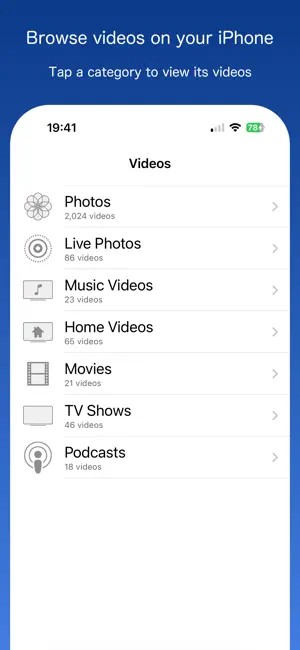
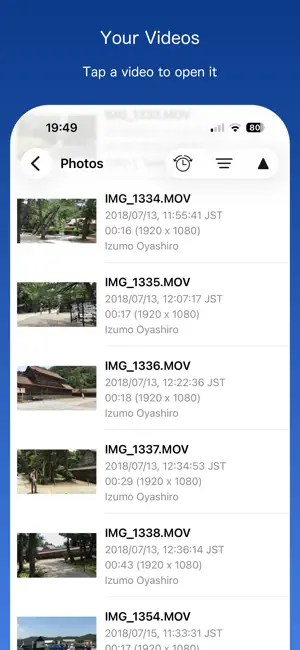
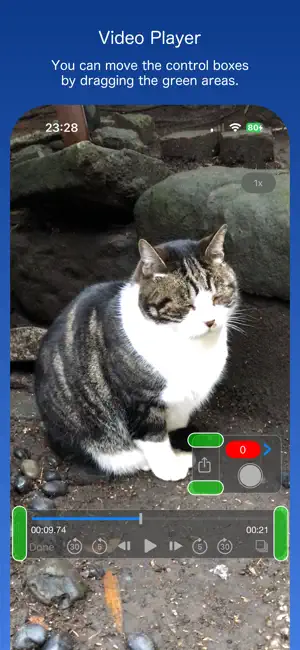
Frame Grab makes it easy to capture and share any moment from videos stored on your device as still images in JPEG format. It supports not only videos stored in the Photos app, but also those in the Music, Podcasts, and TV apps, as long as they are downloaded to your device. ◇◇◇ How to Use ◇◇◇ ◆When you launch the app, a list of video categories appears: Photos, Live Photos, Music Videos, Home Videos, Movies, TV Shows, and Podcasts. ◆Tap a category to view its videos, then tap a video to open the player view. ◆Move the playhead to the desired frame. Use the buttons on either side of the play button to step forward or backward one frame at a time. ◆Save Option 1: Tap the Share button to save the displayed frame to the Photos app, or share it with other apps and services. ◆Save Option 2: Tap the gray circle button to temporarily save the displayed frame to the Queue. Repeat this for other frames as needed. When you’re ready, tap the red badge showing the number of queued items to open the Queue and save multiple frames at once to the Photos app, or share them with other apps and services. ◇◇◇ Settings ◇◇◇ ◆Live Photos: Choose whether to show Live Photos videos. ◆Quality: Low, Low-Mid, Hi-Mid, High ◆Size: Actual size of original video Half size of original video Maximum 1920, 960 or 640 pixels ◆Location Info: Choose whether to embed location data as Exif metadata in the extracted photos. Applies only if the video contains location information. ◆Date-Time Info: Choose whether to embed the shooting date and time as Exif metadata in the extracted photos. ◇◇◇ Other Features ◇◇◇ ◆Playback Speed: 0.5x, 1.0x, 1.25x, 1.5x, 2x ◆Continuous Grabbing: Extract multiple frames at user-defined intervals and save them to the Queue. ◇◇◇ Note ◇◇◇ ◆No recording feature included. ◆Protected videos — such as movies downloaded from the Apple TV Store — cannot be displayed. ◆Images in the Queue may be cleared when either the app or the OS is updated. ◆Videos recorded on iPhone or iPad store only the location where the recording started. Images extracted from the same video will contain the same location information.
Ratings & reviews
4.4
96 ratings
What’s new
Version 2.69 · Updated August 14, 2026
• Fixed some bugs
App privacy
The developer, Tranquillity Base, reported these privacy practices to Apple.
Data Used to Track You
The following data may be used to track you across apps and websites owned by other companies:
- Identifiers: Device ID
- Usage Data: Advertising Data, Other Usage Data
Data Not Linked to You
The following data, which may be collected but is not linked to your identity, may be used for the following purposes:
- Identifiers: Device ID
- Usage Data: Advertising Data, Other Usage Data
- Diagnostics: Performance Data, Crash Data
Used for: Third-Party Advertising, Analytics, App Functionality
Alternatives to Frame Grab
Looking for apps like Frame Grab? Here are 6 similar apps on the App Store. The highest rated is Video To Photo / Image (4.8/5), and all 6 are free to download.
-
 Grab Picture - Video converter
4.2
Grab Picture - Video converter
4.2
-
 Frame Grabber
4.6
Frame Grabber
4.6
-
 Video to Photo: High Quality
4.6
Video to Photo: High Quality
4.6
-
 Video To Photo / Image
4.8
Video To Photo / Image
4.8
-
 Video to Pic: Frame Grabber
4.7
Video to Pic: Frame Grabber
4.7
-
 Grabz: Video Frame Grabber
4.5
Grabz: Video Frame Grabber
4.5
| App | Rating | Price | Last updated | Compare |
|---|---|---|---|---|
| Frame Grab | 4.4 / 5 (96 ratings) | Free | August 14, 2026 | |
| Grab Picture - Video converter | 4.2 / 5 (1,823) | Free | Apr 9, 2026 | Compare |
| Frame Grabber | 4.6 / 5 (3,239) | Free | Apr 14, 2025 | Compare |
| Video to Photo: High Quality | 4.6 / 5 (438) | Free | Sep 21, 2026 | Compare |
| Video To Photo / Image | 4.8 / 5 (410) | Free | May 15, 2026 | Compare |
| Video to Pic: Frame Grabber | 4.7 / 5 (1,160) | Free | Sep 25, 2026 | Compare |
| Grabz: Video Frame Grabber | 4.5 / 5 (157) | Free | Apr 3, 2026 | Compare |
Compare Frame Grab with the top alternatives: ratings, updates, ASO score and keyword gaps →