

ProShift – Shift Calendar
Viktor Leongard Utilities iPhoneiPadiPod touch
ProShift – Shift Calendar is a free Utilities app for iPhone and iPad by Viktor Leongard. Requires iOS 15.6. Updated November 2, 2026.
- Price
- Free
- on the App Store
- Size
- 104 MB
- Age 12+
- Updated
- Nov 2
- 2026 · v1.4.0
Screenshots


About ProShift – Shift Calendar
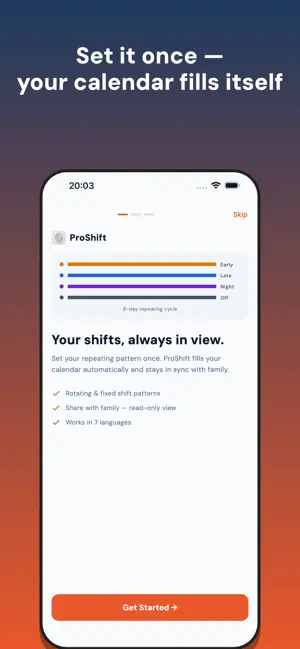
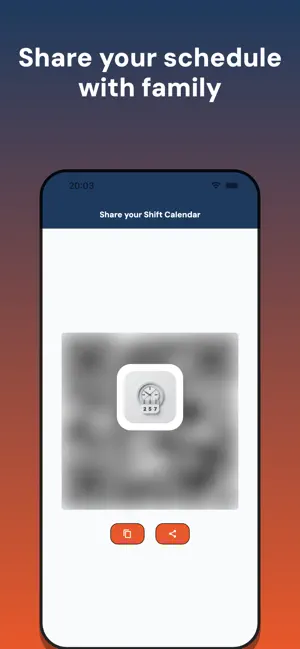
ProShift turns your rotating work schedule into a calendar you can read at a glance. Set your shift pattern once and ProShift fills in every day automatically — no more counting weeks ahead in your head. Built for shift workers: nurses, factory and warehouse teams, police and fire, hospitality, drivers, security, healthcare and anyone on a rotating roster. WHY PROSHIFT Set it once — build your repeating pattern (early, late, night, off… in any order and length) and your whole calendar fills itself in. Read it at a glance — each shift shows as a colour plus a letter, so it's easy to scan and works for color-blind users too. Choose tinted, lettered or classic day styles. Change a single day — swap one day to a different shift, or add a one-off like "Free day", "Training" or "Holiday" without touching your pattern. Re-use your custom days whenever you need them. Add notes — jot a reminder on any day (doctor's appointment, pick up the kids, overtime). Share with family — let your partner or family follow your schedule with a read-only view, shared in seconds with a QR code. Share as a picture — send your month as an image to anyone — even people who don't use ProShift. Public holidays — see official holidays for your country right on the calendar. Light & dark mode — comfortable to check day or night. Talk to the developer — send feedback or report a bug from inside the app and read the developer's reply right there. Works in 7 languages — English, German, Spanish, Russian, Japanese, Chinese and Korean. HOW IT WORKS 1. Build your pattern and pick a start date. 2. ProShift projects it across the whole calendar. 3. Tap any day to see the shift, add a note, or override just that day. 4. Swipe up and down to move between months. Your schedule stays in sync, and sharing is always read-only — the people you share with can see your shifts but can't change them. ProShift is free to use, supported by ads. Plan your roster, stop guessing, and always know when you're working.
What’s new
Version 1.4.0 · Updated November 2, 2026
Share your schedule as a picture. • Share your month as an image (card or grid) — send it via WhatsApp, Messages or email • Send feedback or report a bug from the menu and read the developer's reply in the app • Your shift pattern from setup is now used right away • Every screen now fully translated in all 7 languages • Clearer, easier-to-read buttons, especially in dark mode • Various fixes and improvements
App privacy
The developer, Viktor Leongard, reported these privacy practices to Apple.
Data Not Collected
The developer does not collect any data from this app.
Alternatives to ProShift – Shift Calendar
Looking for apps like ProShift – Shift Calendar? Here are 6 similar apps on the App Store. The highest rated is Amera Solutions (1.0/5), and all 6 are free to download.
-
 CalShift - Shift Work Calendar
-
 Fullsite: Desktop Browser
-
 Easy FTP&SMB Client
-
 NullVault: Secret Photo Vault
-
 Shift Worker Calendar & Alarm
-
 Amera Solutions
1.0
| App | Rating | Price | Last updated | Compare |
|---|---|---|---|---|
| ProShift – Shift Calendar | – | Free | November 2, 2026 | |
| CalShift - Shift Work Calendar | – | Free | May 6, 2026 | Compare |
| Fullsite: Desktop Browser | – | Free | Oct 31, 2026 | Compare |
| Easy FTP&SMB Client | – | Free | Jun 15, 2026 | Compare |
| NullVault: Secret Photo Vault | – | Free | Oct 27, 2026 | Compare |
| Shift Worker Calendar & Alarm | – | Free | Jul 29, 2026 | Compare |
| Amera Solutions | 1.0 / 5 (1) | Free | Nov 12, 2024 | Compare |