

Fullsite: Desktop Browser
Minh Nguyen Utilities iPhoneiPadiPod touch
Fullsite: Desktop Browser is a free Utilities app for iPhone and iPad by Minh Nguyen. Requires iOS 17.0. Updated October 26, 2026.
- Price
- Free
- on the App Store
- Size
- 6 MB
- Age 17+
- Updated
- Oct 26
- 2026 · v1.2
Screenshots

About Fullsite: Desktop Browser
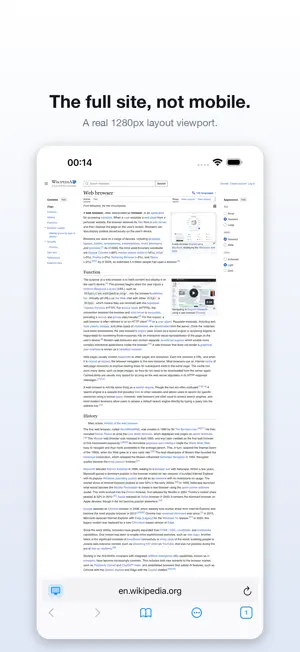
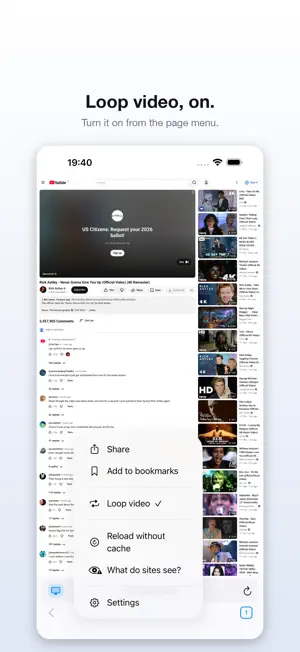
Mobile sites hide things. Buttons that exist on a computer are missing, tables lose columns, and sometimes the content you came for simply is not there. Fullsite fixes that by making websites believe they are talking to a desktop computer. Most "request desktop site" features change one line — the user-agent string — and stop. That fools a server and nothing else: the page still renders through a narrow phone viewport, so every responsive stylesheet takes its mobile branch anyway, and the site still hides what it hides. Fullsite goes after the part that actually decides the layout. It forces a real desktop-width viewport, so the rules that hide content stop matching. It removes the touch interfaces that tell a page it is on a phone. It supplies the request headers a desktop browser sends. And it keeps all of that consistent, so nothing contradicts anything else. WHAT YOU GET • The desktop version of sites that would otherwise force you to mobile • A built-in ad and tracker blocker — over 130,000 rules, on by default • Any tab can be switched to mobile on its own, without changing the others • Tabs that survive being closed, with your place on the page kept • Swipe the address bar to change tabs; pinch out to see them all • Private tabs kept in their own strip, so you never swipe out of private browsing by accident • Bookmarks and history, and a page width you can set yourself • Pages that load faster, because the ads never download SITES ON YOUR OWN NETWORK An intranet page, a router, a NAS, something behind a VPN. Most browsers on a phone fail these silently and leave you with a blank screen. Fullsite tells you what actually went wrong — the name did not resolve, nothing answered on that port, the certificate is not one this device trusts — and does something about it. It will try plain HTTP for a machine on a private network, ask before accepting a certificate from a company's own authority, and remember only that exact certificate, listed in Settings where you can take it back. BUILT FOR SPEED Fullsite is a few megabytes. Blocking runs inside the system networking layer with no JavaScript per request, so pages get faster, not slower. HONEST ABOUT LIMITS No browser on iOS can be undetectable — Apple requires every browser to use the same web engine, and a determined site can still find signals. Fullsite closes the ones that decide your layout, which is what changes what you see. You can check any page yourself: "What do sites see?" shows exactly which signals are still reachable. FULLSITE PRO — REMOVE THE ADS Fullsite is free and supported by ads of its own. Fullsite Pro removes every one of them. • Fullsite Pro Monthly — 1 month, $1.99 • Fullsite Pro Yearly — 1 year, $9.99, with a 3-day free trial • Fullsite Pro Lifetime — one payment, $19.99, no subscription Payment is charged to your Apple Account at confirmation of purchase. A subscription renews automatically unless it is cancelled at least 24 hours before the end of the current period; your account is charged for renewal within 24 hours of the end of that period. You can manage or cancel a subscription in your Apple Account settings after purchase. Any unused part of a free trial is forfeited when you buy a subscription. Terms of Use: https://fullsite-5hy.pages.dev/terms/ Privacy Policy: https://fullsite-5hy.pages.dev/privacy/
What’s new
Version 1.2 · Updated October 26, 2026
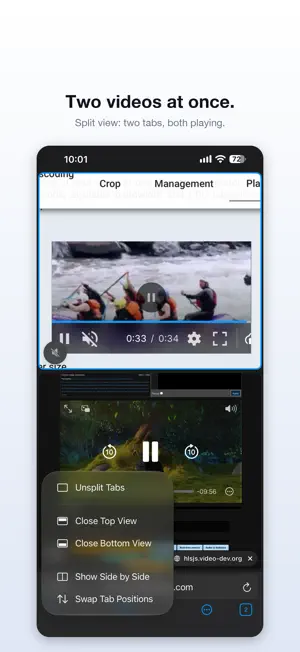
Split view: two tabs on one screen. Long-press a tab and choose "New Split View with Current Tab". Stacked on an upright iPhone, side by side on iPad and in landscape. Two videos at once: in a split, both pages keep playing. The page without the sound plays muted, and the speaker button moves the sound between them. Also new: • Search suggestions in the address bar (can be turned off in Settings) • The start page shows your most visited sites • Long-press a link to open it in a new, background, private or split tab • Short tips the first time you meet a new feature • Drag tabs in the iPad tab strip to reorder them • Smoother tab swiping on iPhone
App privacy
The developer, Minh Nguyen, reported these privacy practices to Apple.
Data Used to Track You
The following data may be used to track you across apps and websites owned by other companies:
- Identifiers: Device ID
- Usage Data: Advertising Data
Data Linked to You
The following data, which may be collected and linked to your identity, may be used for the following purposes:
- Identifiers: Device ID
- Usage Data: Advertising Data
Used for: Third-Party Advertising
Alternatives to Fullsite: Desktop Browser
Looking for apps like Fullsite: Desktop Browser? Here are 6 similar apps on the App Store.
-
 Happy Browser by WokCode
-
 HootArk Browser
-
 Wayline Browser
-
 Waypoint Web Browser
-
 Capsule Browser
-
 Show Browser.
| App | Rating | Price | Last updated | Compare |
|---|---|---|---|---|
| Fullsite: Desktop Browser | – | Free | October 26, 2026 | |
| Happy Browser by WokCode | – | Free | Aug 18, 2026 | Compare |
| HootArk Browser | – | Free | Sep 4, 2026 | Compare |
| Wayline Browser | – | Free | Oct 2, 2026 | Compare |
| Waypoint Web Browser | – | Free | Sep 15, 2026 | Compare |
| Capsule Browser | – | Free | Oct 18, 2026 | Compare |
| Show Browser. | – | Free | Oct 22, 2026 | Compare |