

Audio Editor - AI Music Editor
Beijing Beibeitan Technology Co., Ltd. Music iPhoneiPadiPod touch
Audio Editor - AI Music Editor is a free Music app for iPhone and iPad by Beijing Beibeitan Technology Co., Ltd. Rated 4.3/5 from 1,233 ratings.
- Rating
- 4.3
- 1.2K ratings
- Price
- Free
- on the App Store
- Size
- 137 MB
- Age 4+
- Updated
- Sep 24
- 2026 · v1.5.6
Screenshots


About Audio Editor - AI Music Editor
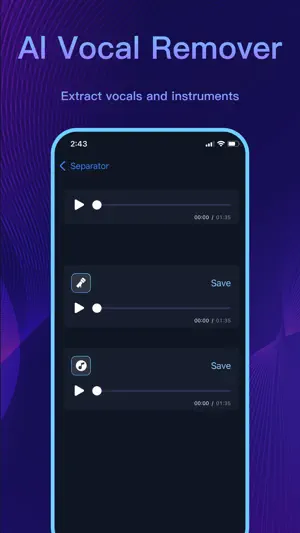
Audio Editor is a powerful audio editor. It is also the best place to listen, share, and organize your work-in-progress music. [Audio Editor] · Audio mixing · Fade in and Fade out · Change audio volume · Change tone and tempo · Change audio speed · Custom equalizer · Undo/Redo, Support unlimited times of undo and redo · Balance , Support R-CH and L-CH settings [Collaborative Setlists] · Organize your tracks into projects and folders, which are synced across iPhone and Web on all your devices. · Share links to your music with friends. See who listens and manage access to your projects. · Record and nurture your inspiration whenever it strikes. Drag and drop files and folders directly from your desktop onto our web app. · Our encryption is on par with Dropbox and SoundCloud to protect your music. We are aiming to be the most secure place for unreleased music. [AI Vocal Separator] · Employs machine learning to isolate vocal and instrumental stems. No need to upload files or wait in line, all AI processing is done locally on your device. [Sound Effects] · Pitch: Rising and falling, change the voice into that of "Lolita" and "uncle" and so on within one second · Reverb: Room, living room and church, etc., switch the scenario as one wishes · Distortion: Electronic, echo and metal, etc., feel different audio · Delay: Support max 2s delay special-effects; a single can also have chorus · Equalizer: Bass boost and human voice resonance, etc., custom equalizer with 10 sections of frequency. It makes your audio voice clear, high pitch transparent and low pitch "rhythmic" [Add Music to Videos] · Add Unlimited Photos and Videos to your Project · Multiple Music Tracks: Add unlimited background audio tracks, music & voice to your video. · Trim Audio & Video · No Watermark · Videos are exported without compression · No distorted videos on social networks · Share Videos: Share your content on Tiktok, Snapchat, Instagram & Facebook, and more. [Powerful import and export methods] · Supporting Wi-Fi import and export, direct import from other applications, direct use of the album's video and mobile music library [Setting as ringtone] · With this amazing ringtone cutter, you can trim music and cut every part of your favorite ringtone. The powerful ringtone cutter contains so many functions. Come and explore what this ringtone cutter can bring to you! [Voice Changer] · Explore endless creative possibilities by altering your voice with voice change feature. Transform your tone, pitch, and timbre to create unique characters or enhance vocal performances. [Sync Your Project] · Background sync automatically updates your projects.Use on all device: iPhone, iPad &desktop and supports all major platforms: Google driver, iCloud and more. • You can then delete projects from your phone and save space. It has never been easier to create your own creative performance! The application is perfect for: • Lovers of music • Podcast producer • Music students and teachers • Especially for users who are familiar with Audacity or Audition • Drummers • Singers • Bassists • Guitarists • Pianists • Karaoke enthusiasts • Social Media Content Creators • Youtube and TikTok video secondary creation Terms of Use: https://www.ibbtan.com/voiceup/terms.html Privacy Policy: https://www.ibbtan.com/voiceup/privacy-policy.html About Audio Editor Pro subscriptions: Audio Editor Pro Unlimited subscription is billed weekly or annually at the rate corresponding to the selected plan. Subscriptions automatically renews unless auto-renew is turned off at least 24 hours before the end of the current period Account will be charged for renewal within 24-hours prior to the end of the current period, and identify the cost of the renewal.Subscriptions may be managed by the user and auto-renewal may be turned off by going to the user's Account Settings after purchase.
Ratings & reviews
4.3
1.2K ratings
What’s new
Version 1.5.6 · Updated September 24, 2026
Added a page to the onboarding pages
App privacy
The developer, Beijing Beibeitan Technology Co., Ltd., reported these privacy practices to Apple.
Data Used to Track You
The following data may be used to track you across apps and websites owned by other companies:
- Location: Coarse Location
- Identifiers: Device ID
- Usage Data: Product Interaction, Advertising Data, Other Usage Data
- Diagnostics: Other Diagnostic Data
Data Linked to You
The following data, which may be collected and linked to your identity, may be used for the following purposes:
- Location: Coarse Location
- Identifiers: Device ID
- Usage Data: Product Interaction, Advertising Data, Other Usage Data
- Diagnostics: Other Diagnostic Data
Used for: Third-Party Advertising, App Functionality
Data Not Linked to You
The following data, which may be collected but is not linked to your identity, may be used for the following purposes:
- Diagnostics: Crash Data
Used for: Analytics, App Functionality
Alternatives to Audio Editor - AI Music Editor
Looking for apps like Audio Editor - AI Music Editor? Here are 6 similar apps on the App Store. The highest rated is SoundLab - Audio Editor (4.6/5), and all 6 are free to download.
-
 Audio Editor : Audiolab
4.4
Audio Editor : Audiolab
4.4
-
 Audio Editor - Music editor
4.5
Audio Editor - Music editor
4.5
-
 SoundLab - Audio Editor
4.6
SoundLab - Audio Editor
4.6
-
 Music Editor - Audio Editor
4.5
Music Editor - Audio Editor
4.5
-
 MP3 Converter : music editor
4.4
MP3 Converter : music editor
4.4
-
 Mp3 Cutter - M4a, Music Cutter
4.5
Mp3 Cutter - M4a, Music Cutter
4.5
| App | Rating | Price | Last updated | Compare |
|---|---|---|---|---|
| Audio Editor - AI Music Editor | 4.3 / 5 (1,233 ratings) | Free | September 24, 2026 | |
| Audio Editor : Audiolab | 4.4 / 5 (3,911) | Free | Sep 29, 2026 | Compare |
| Audio Editor - Music editor | 4.5 / 5 (30,619) | Free | Oct 18, 2026 | Compare |
| SoundLab - Audio Editor | 4.6 / 5 (14,618) | Free | Sep 3, 2026 | Compare |
| Music Editor - Audio Editor | 4.5 / 5 (1,744) | Free | Oct 28, 2026 | Compare |
| MP3 Converter : music editor | 4.4 / 5 (1,520) | Free | Jun 18, 2026 | Compare |
| Mp3 Cutter - M4a, Music Cutter | 4.5 / 5 (3,661) | Free | Oct 27, 2026 | Compare |