

Audio Editor - Music editor
苏娟 陈 Music iPhoneiPadiPod touchApple Watch
Audio Editor - Music editor is a free Music app for iPhone and iPad by 苏娟 陈. Rated 4.5/5 from 30,367 ratings. Requires iOS 15.0. Updated October 2, 2026.
- Rating
- 4.5
- 30.3K ratings
- Price
- Free
- on the App Store
- Size
- 66 MB
- Age 4+
- Updated
- Oct 2
- 2026 · v2.1.01
Screenshots



About Audio Editor - Music editor
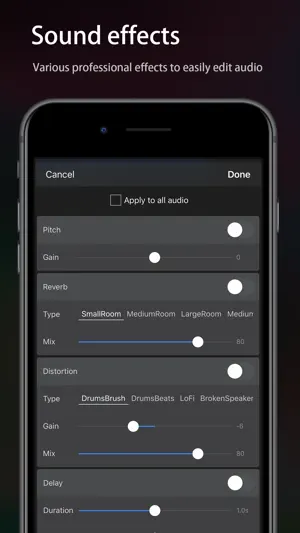
[Audio Editor] A simple and powerful audio editing tool. It can complete the professional audio clips work easily on iPhone and iPad [Edit] -「Splicing and sound mixing」: One-key switching; support free drag, easy to operate -「 Record 」: Support wired or wireless (AirPods and Pro) earphones and in-ear monitor; support accompaniment play; -「 Cut」: Cut the audio fast and freely -「 Rate 」: 0.2 times ~ 4 times, control the playback speed freely -「 Balance 」: Support R-CH and L-CH settings -「 Fade 」: 1s~5s, set the fade-in fade-out as one wishes -「Loop」: Extend the audio "tile" to any duration [Effects] -「Pitch」: Rising and falling, change the voice into that of "Lolita" and "uncle" and so on within one second -「Reverb」: Room, living room and church, etc., switch the scenario as one wishes -「Distortion」: Electronic, echo and metal, etc., feel different audio -「Delay」: Support max 2s delay special-effects; a single can also have chorus -「Equalizer」: Bass boost and human voice resonance, etc., custom equalizer with 10 sections of frequency. It makes your audio voice clear, high pitch transparent and low pitch "rhythmic" [Player] -「Streaming Playback」: Supports SMB, WebDAV, Navidrome, and Audio Station, letting you enjoy music from multiple sources anytime -「Synced Lyrics」: Supports synchronized line-by-line and word-by-word lyrics -「Multi-Source Music Library」: Manage music from NAS, servers, and local cache in one place -「Equalizer」: Includes multiple built-in EQ presets and a customizable 10-band equalizer -「Smart Caching」: Supports manual or automatic song caching, so you can keep listening without a network connection -「Play History」: Automatically records recently played and most-played songs, making your favorite music easy to find [Characteristics] -「Audio Toolbox」: Noise reduction, vocal enhancement, vocal/accompaniment separation... -「Setting as ringtone」: Set the audio as the phone ringtone -「Format conversion」: Support many audio formats with free conversion, such as mp3, m4a, m4r, wav, aiff, etc. -「Audio import」: Support more than 6 ways to import audio: Video extract, WiFi, UTI, Apple music, file and clipboard -「Auto-draft」: Autosave the draft with more efficient re-editing -「Undo/Redo」: Support unlimited times of undo and redo -「Tag group」: Set the color mark to group the audio easily -「Delete/Withdraw」: Provide "repentance" operation after the audio is deleted * The APP is carefully optimized to offer comprehensive features at just one-third the size of similar products. It also includes a built-in storage management feature, allowing efficient file management and maintaining minimal storage usage. [Contact us] Mail: [email protected] Your suggestion is very important to me, you can contact me using the feedback in the app. Automatic renewal statement: 1. Payment: "Continuous monthly / year" products are auto-renewable products. After confirming the purchase, you will be charged from your Apple iTunes account; 2. Renewal: 24 hours before the expiration of your subscription period, Apple will automatically deduct the charge from your ITunes account, and the validity period of "Remove ads" will be automatically extended after success; 3. If you need to cancel the automatic renewal, please turn off the automatic renewal manually in the Apple ID account settings at least 24 hours before the subscription period expires. No charge will be made after closing. Terms of Service: http://common.iuuapp.com/terms_service_env1_audio.html Privacy Policy: http://common.iuuapp.com/privacypolicyv1_audio.html
Ratings & reviews
4.5
30.3K ratings
What’s new
Version 2.1.01 · Updated October 2, 2026
New [Player] Supports SMB, WebDAV, Navidrome, and Audio Station, allowing you to enjoy music from various sources anytime; Centrally manage music from NAS, servers, and local cache.
App privacy
The developer, 苏娟 陈, reported these privacy practices to Apple.
Data Used to Track You
The following data may be used to track you across apps and websites owned by other companies:
- Identifiers: Device ID
Data Not Linked to You
The following data, which may be collected but is not linked to your identity, may be used for the following purposes:
- Identifiers: Device ID
- Diagnostics: Crash Data, Performance Data
- User Content: Photos or Videos, Audio Data
Used for: Third-Party Advertising, Analytics, App Functionality
Alternatives to Audio Editor - Music editor
Looking for apps like Audio Editor - Music editor? Here are 6 similar apps on the App Store. The highest rated is EZAudioCut - Audio Editor Lite (4.9/5), and all 6 are free to download.
-
 Audio Editor : Audiolab
4.4
-
 Mp3 Cutter - M4a, Music Cutter
4.5
-
 Music Editor - Audio Editor
4.5
-
 SoundLab - Audio Editor
4.6
-
 Audio Editor - Music Mixer
4.6
-
 EZAudioCut - Audio Editor Lite
4.9
| App | Rating | Price | Last updated | Compare |
|---|---|---|---|---|
| Audio Editor - Music editor | 4.5 / 5 (30,367 ratings) | Free | October 2, 2026 | |
| Audio Editor : Audiolab | 4.4 / 5 (3,819) | Free | Sep 29, 2026 | Compare |
| Mp3 Cutter - M4a, Music Cutter | 4.5 / 5 (3,662) | Free | Jul 20, 2026 | Compare |
| Music Editor - Audio Editor | 4.5 / 5 (1,720) | Free | Sep 30, 2026 | Compare |
| SoundLab - Audio Editor | 4.6 / 5 (14,478) | Free | Sep 3, 2026 | Compare |
| Audio Editor - Music Mixer | 4.6 / 5 (11,418) | Free | Jun 18, 2026 | Compare |
| EZAudioCut - Audio Editor Lite | 4.9 / 5 (7,722) | Free | Sep 18, 2026 | Compare |