

PaperScorer Scanner
NowTwo, LLC Education iPhoneiPadiPod touch
PaperScorer Scanner is a free Education app for iPhone and iPad by NowTwo, LLC. Rated 5.0/5 from 1 ratings. Requires iOS 16.4. Updated September 16, 2026.
- Rating
- 5.0
- 1 ratings
- Price
- Free
- on the App Store
- Size
- 69 MB
- Age 4+
- Updated
- Sep 16
- 2026 · v6.0.1
Screenshots



About PaperScorer Scanner
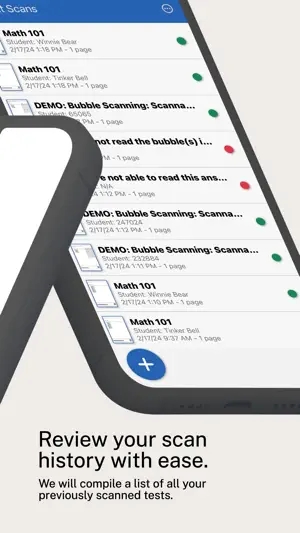
PLEASE NOTE: This app will ONLY work with testing sheets printed from the PaperScorer web app. You will need to create a PaperScorer account through our website to print new testing sheets. This app will NOT work with any other testing sheets printed from another company. This app is ONLY used for scanning already printed sheets. PaperScorer is a full service bubble scanning platform that empowers teachers to quickly and easily create bubble sheets, scan bubble sheets and review the data. We have deep integrations with a number of powerful LMS platforms; Canvas, Blackboard, Google Classrooms, Classify Learning, and much more. Let us do the heavy lifting for you. Once you scan sheets with your iOS smartphone or tablet, we will send auto scored data directly into assignments or tests created on those platform. This application will work on any Apple iOS smartphone or tablet released in the last 3-4 years. You will not have to worry about buying expensive scanning equipment. Simply use your own smart phone to scan completed sheets using the PaperScorer app. You can manage assessments online through our teacher app. This app is very powerful and easy to use when creating/managing classes and assessments. Teachers will be able to create assessments with the following question types; single select, multi select, numeric response and written response. Once assessments are completed, teachers will use the iOS scanning app to get score data into our system. Our bubble sheets on printed on standard 8.5x11 sheets of paper. There is no need to buy special paper. You can use any standard printer to print sheets where students can fill in their ID, or you can print sheets with student information already pre-filled. Furthermore, our iOS app will automatically detect our sheets to make it really easy to scan completed tests. Once scanning is complete, you can review the results online using our detailed reports. PaperScorer allows teachers to add common core standards to any question, and the teacher app will support tagging questions to slice data differently. Teachers can also export the data to review scanned information within an external reporting tool.
What’s new
Version 6.0.1 · Updated September 16, 2026
- Performance improvements. - Stability improvements.
App privacy
The developer, NowTwo, LLC, reported these privacy practices to Apple.
Data Not Linked to You
The following data, which may be collected but is not linked to your identity, may be used for the following purposes:
- Usage Data: Product Interaction
- Diagnostics: Crash Data, Performance Data, Other Diagnostic Data
- Identifiers: Device ID
Used for: Analytics, App Functionality
Alternatives to PaperScorer Scanner
Looking for apps like PaperScorer Scanner? Here are 6 similar apps on the App Store. The highest rated is MarkSheet: answer sheet (4.8/5), and all 6 are free to download.
-
 MarkSheet: answer sheet
4.8
MarkSheet: answer sheet
4.8
-
 Exam Reader-Optical Test Grade
3.3
Exam Reader-Optical Test Grade
3.3
-
 Examica for Teachers
4.5
Examica for Teachers
4.5
-
 Answer Sheet with Overview
-
 ScanGrader
-
 OMR Sheet Scanner
| App | Rating | Price | Last updated | Compare |
|---|---|---|---|---|
| PaperScorer Scanner | 5.0 / 5 (1 rating) | Free | September 16, 2026 | |
| MarkSheet: answer sheet | 4.8 / 5 (24) | Free | Aug 20, 2026 | Compare |
| Exam Reader-Optical Test Grade | 3.3 / 5 (12) | Free | Sep 28, 2026 | Compare |
| Examica for Teachers | 4.5 / 5 (13) | Free | Mar 25, 2026 | Compare |
| Answer Sheet with Overview | – | Free | May 9, 2024 | Compare |
| ScanGrader | – | Free | May 6, 2025 | Compare |
| OMR Sheet Scanner | – | Free | Sep 25, 2026 | Compare |