

Answer Sheet with Overview
Ryosuke Yamamoto Education iPhoneiPadiPod touch
Answer Sheet with Overview is a free Education app for iPhone and iPad by Ryosuke Yamamoto. Requires iOS 16.4. Updated October 25, 2026.
- Price
- Free
- on the App Store
- Size
- 55 MB
- Age 4+
- Updated
- Oct 25
- 2026 · v2.0.0
Screenshots



About Answer Sheet with Overview
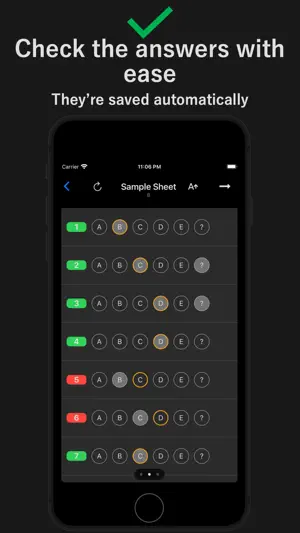
"I got it right, but I wasn't really sure." "Preparing an answer sheet every time I study is a hassle." "I want to see which questions I got right or wrong at a glance." "I want to review just the questions I missed." Bring a digital answer sheet to your everyday study sessions. Answer Sheet with Overview works alongside your own workbooks and past exam papers. Mark your answers, enter the correct answers from your answer key, and check your results on iPhone or iPad. ■ Remember where you hesitated Flag uncertain answers with "?". Even when you get a question right, the flag helps you revisit answers you guessed or weren't confident about. ■ Use the same sheet again and again Your answers and the answer key are saved automatically. Reuse your sheets as you work through the same workbook or past paper multiple times. ■ See your results at a glance Check your correct answer count, accuracy, and the result for each question in one overview. Tap a question number to jump straight to that question. ■ Create sheets to match your materials Set the number of questions and choose letters, numbers, or Japanese katakana for your answer choices. You can select multiple answers per question and edit a sheet's title and settings after creating it. ■ Practice under exam conditions Set a time limit for timed practice, or turn the timer off to study at your own pace. Make review and organization easier with Pro: • Focus on the questions you want to review Show only questions you got wrong or flagged with "?". Include answers you got right but weren't sure about, so they don't get overlooked. • Organize sheets into folders Group sheets by subject or workbook. Create and rename folders, and move sheets between them. • Adjust mark size Choose an answer bubble size that's comfortable to read and tap. • Set automatic resets for each sheet Choose whether to clear your answers and "?" flags, the answer key, or both when you tap "Back to home". • Study without ads Enjoy an ad-free study screen. Core features are free to use. Pro is available as a one-time in-app purchase.
What’s new
Version 2.0.0 · Updated October 25, 2026
Bug fixes and stability improvements.
App privacy
The developer, Ryosuke Yamamoto, reported these privacy practices to Apple.
Data Used to Track You
The following data may be used to track you across apps and websites owned by other companies:
- Usage Data: Advertising Data
Data Linked to You
The following data, which may be collected and linked to your identity, may be used for the following purposes:
- Usage Data: Advertising Data
Used for: Third-Party Advertising
Alternatives to Answer Sheet with Overview
Looking for apps like Answer Sheet with Overview? Here are 6 similar apps on the App Store. The highest rated is PaperScorer Scanner (5.0/5), and all 6 are free to download.
-
 Mark Sheet App "Smart Mark"
-
 MarkSheet: answer sheet
4.8
-
 AnsSheet Lite
-
 sheetMaker -create MarkSheet-
-
 PaperScorer Scanner
5.0
-
 Exam Reader-Optical Test Grade
3.3
| App | Rating | Price | Last updated | Compare |
|---|---|---|---|---|
| Answer Sheet with Overview | – | Free | October 25, 2026 | |
| Mark Sheet App "Smart Mark" | – | Free | Dec 4, 2023 | Compare |
| MarkSheet: answer sheet | 4.8 / 5 (24) | Free | Aug 20, 2026 | Compare |
| AnsSheet Lite | – | Free | Dec 30, 2025 | Compare |
| sheetMaker -create MarkSheet- | – | Free | Jul 26, 2025 | Compare |
| PaperScorer Scanner | 5.0 / 5 (1) | Free | Oct 20, 2026 | Compare |
| Exam Reader-Optical Test Grade | 3.3 / 5 (12) | Free | Oct 20, 2026 | Compare |