

Scrolla: Screen Time Control
Lily Hughes Utilities iPhoneiPadiPod touch
Scrolla: Screen Time Control is a free Utilities app for iPhone and iPad by Lily Hughes. Requires iOS 18.0. Updated August 30, 2026.
- Price
- Free
- on the App Store
- Size
- 48 MB
- Age 4+
- Updated
- Aug 30
- 2026 · v2.1
Screenshots


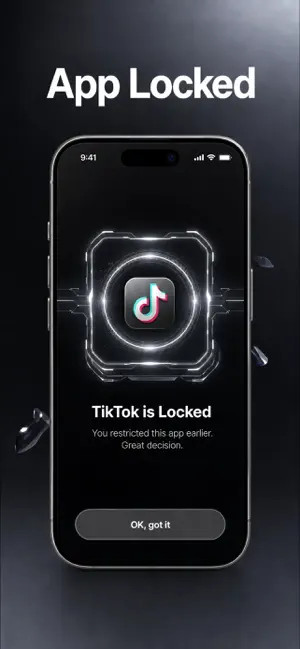

About Scrolla: Screen Time Control
Need to quickly regain control of your attention? Scrolla: Screen Time Control combines an app blocker with a focus timer, helping you make room for work, rest and real life. Choose what should stay out of reach, set a focus period, and let the app support the choice you have made. Screen time control works best when it fits your routine rather than fighting it. Use a short session before a task, a longer block while studying, or a simple pause when the day feels too full. - Block distracting apps before you begin - Set a focus timer for one task - Create a screen time control routine - Reduce interruptions during work sessions - Protect time for reading and study - Pause habitual scrolling when needed - Adjust access from the settings - Support calmer phone habits for kids - Keep family routines easier to follow - Make digital boundaries feel more inclusive - Return to selected apps after focus - Build a safer daily phone routine Start with one clear decision. Select the apps that tend to pull you away from the moment, then choose how long you want to stay focused. There is no need to redesign your whole day at once. A few intentional blocks can make screen time easier to notice and easier to change. HOW SCROLLA FITS YOUR DAY Scrolla: Screen Time Control is designed for everyday moments when your phone competes with something more important. Use it before opening a book, beginning a workout, joining a meeting or settling down for the evening. The aim is not to remove your phone from your life. It is to give you a practical way to decide when certain apps should wait. A focus timer adds a visible endpoint to each session. That can make a difficult task feel more manageable and give you a natural moment to review your next step. App blocking helps reduce the first impulse to check a feed, message or game. Together, these tools create a simple screen time control method that you can repeat across your day. Your routine may change from one day to the next. Scrolla: Screen Time Control can be used for a single quiet interval or as part of a regular plan. Keep the approach flexible. Use a brief block when you need to clear your head, then choose a longer period when concentration matters more. The same setup can support focused living at home, during study or between daily commitments. The app is also suitable for people who want clearer boundaries without complicated systems. Parents can introduce a screen time control habit for kids, while families can agree on calmer phone-free periods. Adjust the approach in your own way, review it in the settings, and keep only the limits that make sense for your routine. A subscription unlocks the paid version of Scrolla: Screen Time Control and its available app-blocking and focus tools. It renews automatically until you stop it; cancellation is managed through your account settings. Use of the app is subject to the applicable Terms of Use and Privacy Policy: https://docs.google.com/document/d/1PNw8oyyBCaZecNo5uASzUDlM9MCBbL13RKpu7dO-fhE/edit?usp=sharing https://docs.google.com/document/d/1CmEeXj6zo79ZNOTCWU1mDaRFUDvF-OjJYmCXUasw_-4/edit?usp=sharing
What’s new
Version 2.1 · Updated August 30, 2026
This update brings bug fixes, stability improvements, and small interface refinements throughout the app.
App privacy
The developer, Lily Hughes, reported these privacy practices to Apple.
Data Used to Track You
The following data may be used to track you across apps and websites owned by other companies:
- Identifiers: User ID, Device ID
- Usage Data: Product Interaction
Data Not Linked to You
The following data, which may be collected but is not linked to your identity, may be used for the following purposes:
- Identifiers: User ID, Device ID
- Usage Data: Product Interaction
Used for: Analytics
Alternatives to Scrolla: Screen Time Control
Looking for apps like Scrolla: Screen Time Control? Here are 6 similar apps on the App Store. The highest rated is Jacana Scam Protection (5.0/5), and all 6 are free to download.
-
 Jacana Scam Protection
5.0
Jacana Scam Protection
5.0
-
 Copy My Data Switch Transfer
4.9
Copy My Data Switch Transfer
4.9
-
 Securify: Mobile Security
4.5
Securify: Mobile Security
4.5
-
 FindMyGear: Smart Detector
4.3
FindMyGear: Smart Detector
4.3
-
 QR Code Reader: Batch Scanner
5.0
QR Code Reader: Batch Scanner
5.0
-
 AppLock - Lock & Guard Private
4.5
AppLock - Lock & Guard Private
4.5
| App | Rating | Price | Last updated | Compare |
|---|---|---|---|---|
| Scrolla: Screen Time Control | – | Free | August 30, 2026 | |
| Jacana Scam Protection | 5.0 / 5 (4) | Free | Oct 28, 2026 | Compare |
| Copy My Data Switch Transfer | 4.9 / 5 (7) | Free | Aug 31, 2026 | Compare |
| Securify: Mobile Security | 4.5 / 5 (8) | Free | Oct 29, 2026 | Compare |
| FindMyGear: Smart Detector | 4.3 / 5 (76) | Free | Mar 8, 2026 | Compare |
| QR Code Reader: Batch Scanner | 5.0 / 5 (30) | Free | Sep 4, 2026 | Compare |
| AppLock - Lock & Guard Private | 4.5 / 5 (1,417) | Free | Apr 24, 2026 | Compare |