

Gboard - G-Force Dashboard
仕华 罗 Utilities iPhoneiPadiPod touch
Gboard - G-Force Dashboard is a free Utilities app for iPhone and iPad by 仕华 罗. Requires iOS 15. Updated October 29, 2026.
- Price
- Free
- on the App Store
- Size
- 8 MB
- Age 4+
- Updated
- Oct 29
- 2026 · v1.3.2
Screenshots
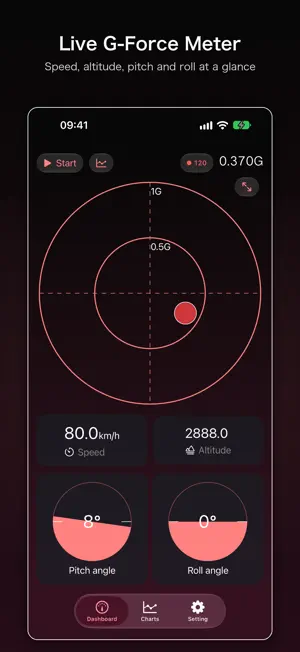


About Gboard - G-Force Dashboard
Gboard turns your iPhone or iPad into a compact car dashboard. • Live dashboard — G-force (acceleration), max G, speed, altitude, pitch, roll and yaw • Full-screen gauges — five layouts: Dual Dials, HUD Bars, Minimal, Attitude and 3D Attitude Ball, with screen mirroring and orientation lock • HUD reflection mode — mirror the display horizontally, vertically or both and boost brightness automatically, so the reflection on your windshield reads correctly • Live charts — six scrolling graphs for GPS and motion-sensor data, with pinch to zoom and drag to pan • Recording and playback — record a drive, save it on your device and replay every curve from the history list • CarPlay — see speed, altitude, G-force and attitude on your car's screen, and control recording from there • Live Activity — follow G-force, speed and more on the Lock Screen, in the Dynamic Island and on the CarPlay Dashboard while recording • Metric or imperial units, plus in-app language switching No instrument cluster? Mount the phone at the windshield and use the full-screen gauges or HUD reflection mode as a head-up display — ideal for cars such as the Tesla Model 3 and Model Y, which have no display in front of the driver. Data at a glance: • Acceleration — the device's current acceleration in G (9.80665 m/s²) • Speed and altitude — measured in real time with GPS • Pitch, roll and yaw — relative to the moment you tap Start For accurate readings, mount the phone in the car before starting. Gboard is a driving aid for reference only and does not replace your vehicle's instruments.
What’s new
Version 1.3.2 · Updated October 29, 2026
Gboard 1.3.2 brings: • New full-screen gauges — switch between five layouts: Dual Dials, HUD Bars, Minimal, Attitude and 3D Attitude Ball • 3D Attitude Ball — a real 3D sphere with horizon and bank scale that turns live with your device's pitch and roll • HUD reflection mode — mirror the display horizontally, vertically or both, with automatic brightness boost, so the reflection on your windshield reads correctly • Orientation lock — rotate to landscape or portrait and lock it to suit your mount • New yaw readout, plus support for more iOS versions
App privacy
The developer, 仕华 罗, reported these privacy practices to Apple.
Data Not Linked to You
The following data, which may be collected but is not linked to your identity, may be used for the following purposes:
- Identifiers: Device ID
- Usage Data: Product Interaction
- Diagnostics: Crash Data, Performance Data, Other Diagnostic Data
- Location: Precise Location
Used for: Analytics, App Functionality
Alternatives to Gboard - G-Force Dashboard
Looking for apps like Gboard - G-Force Dashboard? Here are 6 similar apps on the App Store. The highest rated is CPU Dasher Mobile Master Tools (4.7/5), and all 6 are free to download.
-
 landMeter Car
4.3
-
 PeakG - G-Force & Motion Meter
4.0
-
 Next Car Dashboard
4.1
-
 Gauges: Speedometer & Sensors
4.6
-
 Off-Road Inclinometer
4.6
-
 CPU Dasher Mobile Master Tools
4.7
| App | Rating | Price | Last updated | Compare |
|---|---|---|---|---|
| Gboard - G-Force Dashboard | – | Free | October 29, 2026 | |
| landMeter Car | 4.3 / 5 (66) | Free | Jan 16, 2024 | Compare |
| PeakG - G-Force & Motion Meter | 4.0 / 5 (2) | Free | Oct 19, 2026 | Compare |
| Next Car Dashboard | 4.1 / 5 (37) | Free | Oct 26, 2026 | Compare |
| Gauges: Speedometer & Sensors | 4.6 / 5 (3,080) | Free | Oct 21, 2026 | Compare |
| Off-Road Inclinometer | 4.6 / 5 (789) | Free | May 4, 2026 | Compare |
| CPU Dasher Mobile Master Tools | 4.7 / 5 (990) | Free | Oct 21, 2026 | Compare |