

CPU Dasher Mobile Master Tools
培培 邢 Utilities iPhoneiPadiPod touch
CPU Dasher Mobile Master Tools is a free Utilities app for iPhone and iPad by 培培 邢. Rated 4.7/5 from 990 ratings. Requires iOS 15.0.
- Rating
- 4.7
- 990 ratings
- Price
- Free
- on the App Store
- Size
- 41 MB
- Age 4+
- Updated
- Oct 21
- 2026 · v3.0.3
Screenshots
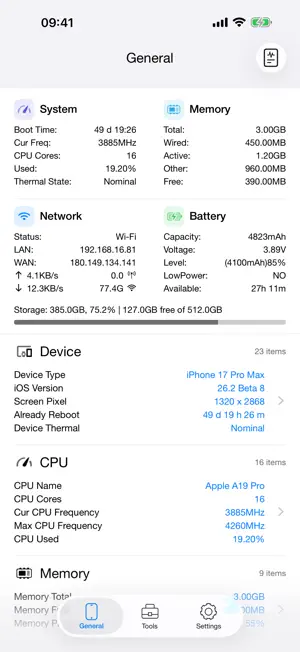
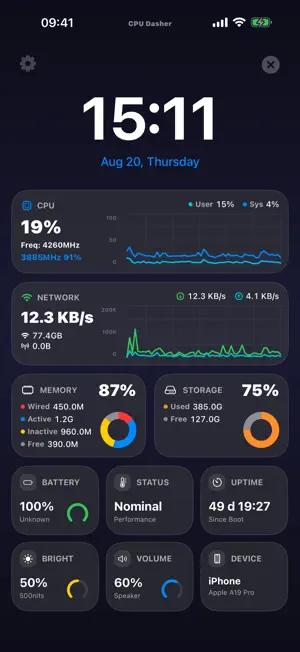
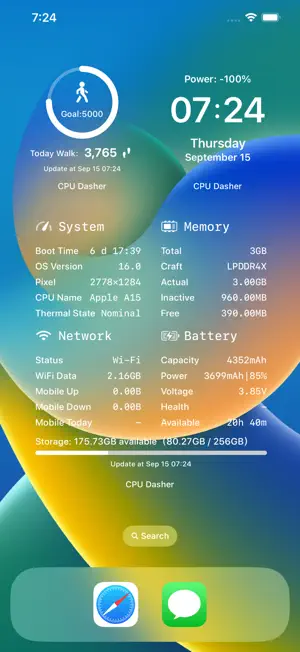

About CPU Dasher Mobile Master Tools
CPU Dasher Master ! is a versatile assistant to view device information Mainly divided into some sections 1, Equipment information 2, CPU information 3, Memory information 4, Battery information 5, Network information 6. Quick view of widgets 7. Widget skin customization 8. Common tools: heart rate test, network tool, noise test, make a decision, traffic statistics, screen test, etc. This is the current App Store rare, you can easily view the device information, detailed parameters of the device to be aware of, jia driving safety. The key is: the current frequency, memory details, detailed battery, network information is updated in real time. wow! HealthKit: Step count and distance widgets, you need to authorize the App to obtain HealthKit data permission before displaying your step count and exercise distance data today.
Ratings & reviews
4.7
990 ratings
What’s new
Version 3.0.3 · Updated October 21, 2026
- Compatible with iOS 27, iPhone Duo and the new iPhone 18 models - New settings for the info panel: open the info panel directly on app launch and support always-on display - Added iPerf3 network throughput test with TCP uplink/downlink, parallel streams, real-time charts and result sharing - Added multiple new network tools and optimized the experience of existing tools - Improved estimated battery runtime, real-time/history chart switching and report export, supporting HTML, PDF and image formats - Fixed various stability and UI display issues Note: After the app update, widgets such as those on the Today View may fail to load or disappear. Restart your device to restore them. Here are our recent updates: - Optimized the Dhrystone benchmark - Added a time-range data usage statistics widget - Home Screen widgets support refreshing by tapping specific areas - Added Night Vision (not available on devices without a LiDAR scanner) - Added Scheme URLs for opening tools, available on the tool configuration page - Large hardware info widgets support data usage display - Home Screen widgets support custom fonts - Added a toggle for week number display on calendar widgets - Added the Tile Panel widget - Calendar widgets show reminders for statutory holidays and compensatory workdays - Added simulated transparent widget backgrounds - Added new widgets including step counter - Hardware info widgets can display router names (location permission for widgets is required) - Added a battery level display toggle for time and calendar widgets - Home Screen widgets support skin configurations (old widgets still work; widget skins are independent) - Optimized data usage statistics (adding a data usage Home Screen widget on iOS 14 improves accuracy) - Added over ten downloadable fonts - Noise test supports saving test results - Further optimized data usage statistics accuracy - Added heart rate measurement feature Please submit your questions and suggestions through the in-app feedback form.
App privacy
The developer, 培培 邢, reported these privacy practices to Apple.
Data Used to Track You
The following data may be used to track you across apps and websites owned by other companies:
- Identifiers: Device ID
Data Linked to You
The following data, which may be collected and linked to your identity, may be used for the following purposes:
- Identifiers: Device ID
Used for: Third-Party Advertising
Data Not Linked to You
The following data, which may be collected but is not linked to your identity, may be used for the following purposes:
- Diagnostics: Crash Data, Performance Data, Other Diagnostic Data
- Location: Precise Location, Coarse Location
Used for: Analytics, App Functionality
Alternatives to CPU Dasher Mobile Master Tools
Looking for apps like CPU Dasher Mobile Master Tools? Here are 6 similar apps on the App Store. The highest rated is CPU Detector - Hardware Info (4.6/5), and all 6 are free to download.
-
 Mobile Master-CPU Master
4.5
Mobile Master-CPU Master
4.5
-
 悬浮时间-悬浮秒表悬浮窗控时助手
4.4
悬浮时间-悬浮秒表悬浮窗控时助手
4.4
-
 CPU Detector - Hardware Info
4.6
CPU Detector - Hardware Info
4.6
-
 Lirum Device Info 2
4.0
Lirum Device Info 2
4.0
-
 AIDA64
4.6
AIDA64
4.6
-
 充电功率助手 - 专注手机充电助手
4.1
充电功率助手 - 专注手机充电助手
4.1
| App | Rating | Price | Last updated | Compare |
|---|---|---|---|---|
| CPU Dasher Mobile Master Tools | 4.7 / 5 (990 ratings) | Free | October 21, 2026 | |
| Mobile Master-CPU Master | 4.5 / 5 (1,242) | Free | Oct 4, 2026 | Compare |
| 悬浮时间-悬浮秒表悬浮窗控时助手 | 4.4 / 5 (140) | Free | Oct 19, 2026 | Compare |
| CPU Detector - Hardware Info | 4.6 / 5 (427) | Free | Jun 16, 2026 | Compare |
| Lirum Device Info 2 | 4.0 / 5 (290) | Free | Oct 11, 2026 | Compare |
| AIDA64 | 4.6 / 5 (2,342) | Free | Oct 21, 2026 | Compare |
| 充电功率助手 - 专注手机充电助手 | 4.1 / 5 (64) | Free | Sep 20, 2026 | Compare |