

Audio Recorder with Trigger
Philip Braham Utilities iPhoneiPadiPod touch
Audio Recorder with Trigger is a paid Utilities app for iPhone and iPad by Philip Braham. Rated 1.0/5 from 1 ratings. Requires iOS 17.6.
- Rating
- 1.0
- 1 ratings
- Price
- 12.99 USD
- on the App Store
- Size
- 3 MB
- Age 4+
- Updated
- Oct 28
- 2026 · v16.3
Screenshots

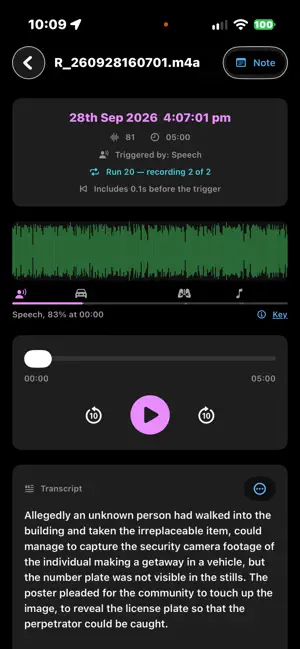


About Audio Recorder with Trigger
Recorder with trigger is the ultimate recording app. It will start recording when a trigger level of sound is reached (or just start it manually) or in Dictaphone mode recording takes place as long as the record button is held down. Options to stop recording after a time interval or when the sound level drops. Recordings are geo-tagged so the location of the recording can be seen on a map. Put the recordings into colour groups and show all their locations. Add notes to a recording. Share the recordings. Use in the car. Recording will start when you shout! KEY FEATURES: - High quality voice recording. - Record immediately or wait for trigger - Pre-record automatically so the you hear before the trigger sound (adjustable) - Record for a certain time, until the ambient sound drops or until stopped manually - Automatically set to wait for a sound to start recording again - Dictaphone note-taking mode - View waveform of recording - Record songs, lectures, speeches etc. - Transcribe recordings. Recordings with speech are written out automatically, so you can search for what was said. Just start talking: it records, and writes it down. - Search transcripts for a word or phrase in a recording - A timer to keep track of your recording time. - Use it to monitor your sleep talk! - Best quality - Play, pause, stop audio files. - Send / Share your recording. - Delete or upload your recording right from the app. - Add notes to your recordings. - Save / pause / resume / abort the recording process control - Background recording - Automatically recognise recordings. For example a dog barking, a door slamming - Smart recorder, automatic recording - Join recordings into one - Trim recordings - Geo-tagged Recordings: Recordings are geo-tagged so the location of the recording can be seen on a map. Every recording automatically includes your location. This makes it ideal for journalists, travellers, and professionals who want detailed location context for every sound clip. Recorder with Trigger: Set trigger level to record high quality voice recordings. Recording starts when a trigger level of sound is reached. Say goodbye to missed moments! Set a trigger threshold, and Recorder with Trigger will automatically begin recording whenever the surrounding sound exceeds that level and can stop when the level drops. Dictaphone Recordings: In Dictaphone mode recording takes place as long as the record button is held down. This audio recording app allows you to easily capture notes and memos by voice, as well as record meetings, lectures, interviews, and everyday sounds. Instead of writing notes by hand, simply record everything you need, from quick to-do lists to important memos using speech. Colour Group recordings Put the recordings into colour groups and show all their locations. Add notes to a recording. Group all your vocal recordings into defined categories. Mark your favourite talks and memos. Place recordings, choose colours and folders. Achieve clear and sharp sound. Map View of Recordings See all your geo-tagged recordings displayed on an interactive map, either on its own or the whole group. Tap any pin to instantly see the notes. Recordings can also be shown on the Maps app. Share Recordings Easily Share your recordings quickly through email, or social apps. Export them for transcription, editing, or storage — all in a few taps. Export Why Choose Recorder with Trigger? Voice Recorder Audio Memos is more than just a simple recorder, it’s a powerful, automatic voice recorder with sound timer & trigger, location tagging, and intuitive organisation. Capture everything that matters automatically, efficiently, and in quality sound. PRIVATE Everything happens on your phone. Sound recognition and transcription run on the device, and nothing is uploaded. No account, no subscription, no ads. Transcription needs iOS 26 or later. From Realtime Software, an independent Australian developer. Questions or ideas? Use 'Email us' in Settings.
What’s new
Version 16.3 · Updated October 28, 2026
Fixed bug that slowed down the controls when there are around 1000 recordings. Add count to the recording list. Fixed bug in 24 hour display when time is 12 am.
App privacy
The developer, Philip Braham, reported these privacy practices to Apple.
Data Not Collected
The developer does not collect any data from this app.
Alternatives to Audio Recorder with Trigger
Looking for apps like Audio Recorder with Trigger? Here are 6 similar apps on the App Store. The highest rated is Export Reminders: CSV/PDF/Docx (5.0/5), and 5 of the 6 are free to download.
-
 QuietCase
-
 Noise Recorder - Pro
-
 Peak Sound Recorder : Owl Rec.
-
 Morse Decoder AI
2.0
-
 LuvMe
-
 Export Reminders: CSV/PDF/Docx
5.0
| App | Rating | Price | Last updated | Compare |
|---|---|---|---|---|
| Audio Recorder with Trigger | 1.0 / 5 (1 rating) | 12.99 USD | October 28, 2026 | |
| QuietCase | – | Free | Aug 27, 2026 | Compare |
| Noise Recorder - Pro | – | Free | Oct 27, 2026 | Compare |
| Peak Sound Recorder : Owl Rec. | – | Free | Oct 4, 2026 | Compare |
| Morse Decoder AI | 2.0 / 5 (4) | 2.99 USD | Jan 8, 2024 | Compare |
| LuvMe | – | Free | Sep 24, 2026 | Compare |
| Export Reminders: CSV/PDF/Docx | 5.0 / 5 (10) | Free | Oct 23, 2026 | Compare |