

DoseKeeper: Medication Manager
Alex Parrales Health & Fitness iPhoneiPadiPod touchApple Watch
DoseKeeper: Medication Manager is a free Health & Fitness app for iPhone and iPad by Alex Parrales. Rated 3.0/5 from 2 ratings. Requires iOS 26.1.
- Rating
- 3.0
- 2 ratings
- Price
- Free
- on the App Store
- Size
- 176 MB
- Age 12+
- Updated
- Oct 26
- 2026 · v4.5
Screenshots



About DoseKeeper: Medication Manager
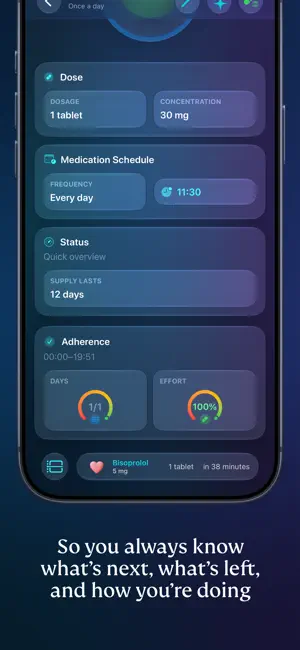
DoseKeeper: The Smarter Way to Manage Your Medications Take Control of Your Health Effortlessly Manage your medications with clarity. DoseKeeper helps you stay on schedule, keep everything organized, and review your progress in seconds, all in a private, thoughtfully designed app. Why DoseKeeper? Everything you need to manage your medications and well-being, thoughtfully designed in one calm, cohesive experience. From clear organization to intelligent insights, DoseKeeper brings comfort and control to your daily care. Smart Medication Tracking and Expiry Alerts Track doses with a clear schedule and history, manage batch-based inventory, see where you are in each blister pack, and receive early alerts before medicines expire. Adherence Insights You Can Tune See how consistent you are with your treatment. DoseKeeper shows full days with complete adherence and overall effort as a percentage, with options for timeframe, indicator style, and flexible or strict modes. Personalized Dose Reminders Create reminders that match your real schedule, including different times or days for each medicine. Use the Timing Assistant to plan doses that repeat every few hours from a chosen start time, and mark medicines that need food or specific times of day. Comprehensive Health Diary Write freely about your day and log symptoms, side effects, and moods in a dedicated diary. Link entries to medicines to spot patterns or export an entry as a PDF when you need to share it. When Apple Intelligence is available, DoseKeeper can generate a short summary and helpful tags on device so you can focus on your experience, not formatting. Quick Answers with App Shortcuts Use App Shortcuts to quickly add medicines, log a dose, check what is scheduled for a specific day, see remaining stock, review missed doses, or forecast refills without digging through the app. Several more shortcuts are available so you can ask DoseKeeper for what you need and get an immediate answer. PDF Reports You Control Export your medicine inventory, medication log, trends summary, and blood pressure reports as PDF files. Use filters for specific medicines, people, and date ranges so you can share or save only what you need. Blood pressure reports use selected data from Apple Health, including blood pressure, heart rate, resting heart rate, and workouts. DoseKeeper asks for Apple Health access only when you choose to build a blood pressure report, and Health data is used only to create that report context. Quick Access with NFC Assign NFC tags to medicines so you can open DoseKeeper, see details, or log a dose with a single tap. Critical Alerts Use critical alerts for scheduled medicines so time-sensitive reminders reach you even when Do Not Disturb or Focus is turned on. Post-Intake Alarms and Live Activity After you log a medicine, start a post-intake alarm for a chosen waiting time or let DoseKeeper decide based on your history. A Live Activity shows the time since your last dose on the Lock Screen and in the Dynamic Island. Secure and Private DoseKeeper is designed for complete privacy, with no ads and no tracking. Your information stays yours, and your schedule stays on time. Get Started for Free Use DoseKeeper at no cost with up to 3 medicines and 2 scheduled doses. When your routine grows, DoseKeeper Pass unlocks unlimited medicines and scheduling plus advanced features such as blister notes, diary highlights, TrueForm icons, powerful filters, daily progress indicators, and detailed reports. For more information, please review our Privacy Policy: https://www.dosekeeper.com/privacy and Terms of Use: https://www.apple.com/legal/internet-services/itunes/dev/stdeula/
What’s new
Version 4.5 · Updated October 26, 2026
• DoseKeeper now supports iPhone Duo, with adaptive layouts and side-by-side navigation that make better use of wider and resizable displays. • Spotlight now includes Diary entries and scheduled doses, making them easier to find and open directly in DoseKeeper. • Missed-dose and post-intake reminders now support specific times or countdowns, with more reliable scheduling and tracking. • New Siri integrations in iOS 27 let you open medicines, search your collection, and create Diary entries. • Appearance introduces Balanced and Glass card styles, giving you more control over how content looks throughout DoseKeeper. • New Solid, Harmony, and Essence list styles let you customize how your theme's colors appear on iPhone.
App privacy
The developer, Alex Parrales, reported these privacy practices to Apple.
Data Not Collected
The developer does not collect any data from this app.
Alternatives to DoseKeeper: Medication Manager
Looking for apps like DoseKeeper: Medication Manager? Here are 6 similar apps on the App Store. The highest rated is Lumi - Mood Journal & Diary (5.0/5), and all 6 are free to download.
-
 Liftr Workout & Gym Planner
4.5
Liftr Workout & Gym Planner
4.5
-
 Lumi - Mood Journal & Diary
5.0
Lumi - Mood Journal & Diary
5.0
-
 TOM Medication & Pill Reminder
4.5
TOM Medication & Pill Reminder
4.5
-
 Poky: GLP-1 Peptide Tracker
4.6
Poky: GLP-1 Peptide Tracker
4.6
-
 MedControl: Pill & Health Log
4.1
MedControl: Pill & Health Log
4.1
-
 SnapCare:Supplement Scanner
3.0
SnapCare:Supplement Scanner
3.0
| App | Rating | Price | Last updated | Compare |
|---|---|---|---|---|
| DoseKeeper: Medication Manager | 3.0 / 5 (2 ratings) | Free | October 26, 2026 | |
| Liftr Workout & Gym Planner | 4.5 / 5 (139) | Free | Oct 24, 2026 | Compare |
| Lumi - Mood Journal & Diary | 5.0 / 5 (12) | Free | Oct 10, 2026 | Compare |
| TOM Medication & Pill Reminder | 4.6 / 5 (20) | Free | Jun 15, 2026 | Compare |
| Poky: GLP-1 Peptide Tracker | 4.6 / 5 (76) | Free | Oct 19, 2026 | Compare |
| MedControl: Pill & Health Log | 4.1 / 5 (14) | Free | Oct 15, 2026 | Compare |
| SnapCare:Supplement Scanner | 3.0 / 5 (3) | Free | Feb 20, 2026 | Compare |