

OpenCCman Open Chinese Convert
伟 葛 Utilities iPhoneiPadiPod touchMac
OpenCCman Open Chinese Convert is a free Utilities app for iPhone and iPad by 伟 葛. Requires iOS 15.0. Updated October 1, 2026.
- Price
- Free
- on the App Store
- Size
- 21 MB
- Age 4+
- Updated
- Oct 1
- 2026 · v2.1
Screenshots


About OpenCCman Open Chinese Convert
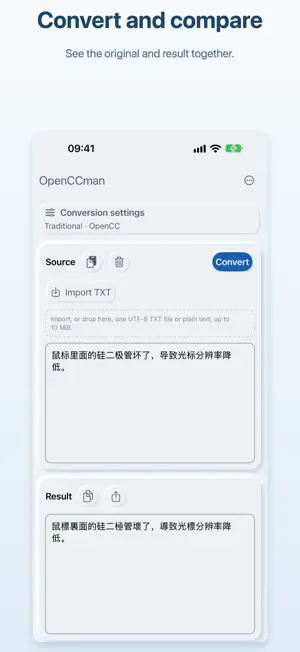
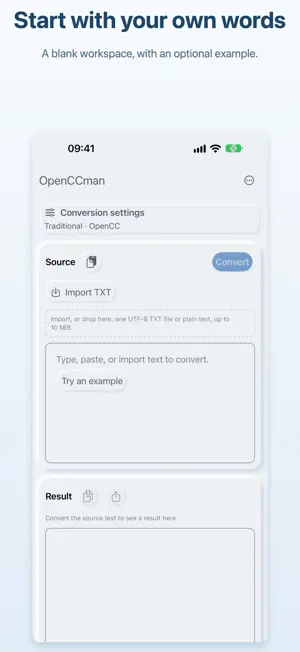
Convert Chinese text on iPhone and iPad, and add script conversion to your own Shortcuts workflows. OpenCCman brings local text conversion, TXT files and a native source/result workspace together. Choose Simplified Chinese, OpenCC Traditional, Taiwan Standard with Taiwan idioms, or Hong Kong Traditional. Advanced character-variant and regional wording options remain available. Simplified output is not a complete reverse conversion of Taiwan-specific vocabulary. Start with a blank draft, paste your text, or fill in an example when you need one. Compare source and result side by side or stacked on iPad. The compact iPhone Convert button leaves more room for reading. Clear Source asks before removing the current source and result. On iOS and iPadOS 16 or later, the free Convert Chinese Text action accepts text and one of four presets, then returns the result to the next Shortcuts action. Connect it to clipboard or file actions without changing an open draft. It does not use the homepage daily allowance; text input is limited to 10 MiB in UTF-8. Import or drop one UTF-8 TXT file up to 10 MiB, including files with a BOM. Copy or share the result, or export the latest successful conversion as UTF-8 TXT without a BOM. Line endings, blank lines and Unicode text are preserved. Save Big5 or GBK files as UTF-8 first. Batch files and files over 10 MiB are not supported on iPhone or iPad, including with Pro. Free users can complete 12 successful homepage conversions per day. Importing, exporting and changing presets do not count. Lifetime Pro is a one-time purchase that removes the homepage limit and in-app recommendations. View purchase status or restore purchases in Settings. Powered by OpenCC, text conversion runs locally on your device. OpenCCman requires iOS or iPadOS 15 or later. Open source under the MIT license: https://github.com/gewill/OpenCCman
What’s new
Version 2.1 · Updated October 1, 2026
Convert Chinese text as part of your Shortcuts workflows, and start each new draft with a clean workspace. • Free Convert Chinese Text action on iOS and iPadOS 16 or later: choose from four presets and pass the result to the next action without using your homepage daily allowance. • New workspaces start blank. An optional example is available when you need it. • Clear Source asks for confirmation before removing the current source and result. • Updated app icon and launch visuals. The launch transition respects Reduce Motion and is skipped when VoiceOver is enabled.
App privacy
The developer, 伟 葛, reported these privacy practices to Apple.
Data Not Linked to You
The following data, which may be collected but is not linked to your identity, may be used for the following purposes:
- Purchases: Purchase History
- Usage Data: Product Interaction
Used for: Analytics, App Functionality
Alternatives to OpenCCman Open Chinese Convert
Looking for apps like OpenCCman Open Chinese Convert? Here are 6 similar apps on the App Store. The highest rated is CMCalc (4.6/5), and 5 of the 6 are free to download.


| App | Rating | Price | Last updated | Compare |
|---|---|---|---|---|
| OpenCCman Open Chinese Convert | – | Free | October 1, 2026 | |
| CC Converter | – | Free | Apr 28, 2026 | Compare |
| Simple Dict Mobile Pro | 1.0 / 5 (1) | 0.49 USD | Jul 26, 2026 | Compare |
| CMCalc | 4.6 / 5 (7) | Free | Feb 13, 2026 | Compare |
| AIZINE | – | Free | Jul 30, 2026 | Compare |
| LangCat | 3.7 / 5 (3) | Free | Feb 2, 2025 | Compare |
| Bousai Map | – | Free | Jun 30, 2026 | Compare |