
Point Blurr Background Filter
Jordan Zeleny Photo & Video iPhoneiPadiPod touchMac
Point Blurr Background Filter is a free Photo & Video app for iPhone and iPad by Jordan Zeleny. Rated 4.6/5 from 10 ratings. Requires iOS 15.0.
- Rating
- 4.6
- 10 ratings
- Price
- Free
- on the App Store
- Size
- 33 MB
- Age 4+
- Updated
- Apr 23
- 2025 · v1.1.7
Screenshots


About Point Blurr Background Filter
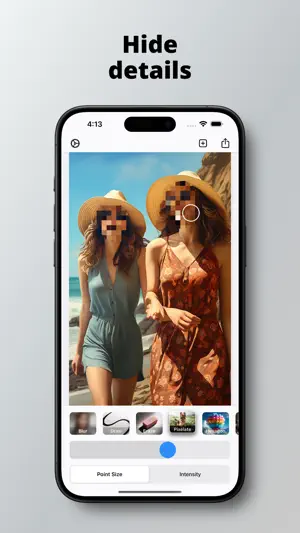
Welcome to Point Blurr, your go-to destination for enhancing images with unmatched precision and creativity. Our app offers a dynamic cursor feature that allows you to accurately blur specific areas on your photos, screenshots, and more, giving you the artistic freedom to modify images as you wish. KEY FEATURES: Versatile Editing Tools: Explore a plethora of editing options with Point Blurr. Our tools range from drawing and pixelating to erasing. Experiment with unique effects like hexagon, sepia, vignette, color invert, exposure, and monochrome to elevate your images. Dynamic Cursor Control: Adjust your cursor size effortlessly with our user-friendly slider. This feature enables detailed editing, ensuring your artistic vision is perfectly realized. Intensity Slider: Customize the strength of each effect with our intensity slider. Gain full control over your edits, allowing for either subtle touches or bold transformations. Effortless Export: When your masterpiece is complete, exporting your work is just a tap away. We've simplified the process to save and share your edited images. User-Friendly Interface: Designed for both novices and pros, Point Blurr’s interface is intuitive and easy to navigate, providing a seamless editing experience. High-Quality Output: We ensure the integrity of your original images is maintained, offering high-resolution outcomes suitable for printing, sharing, or further editing. WHY CHOOSE POINT BLURR? Diverse range of editing tools to fulfill all your creative desires. Intuitive controls suitable for all skill levels. Ensures high-quality results without compromising image integrity. Quick and easy adjustments with user-friendly sliders. Instant export feature for efficient sharing and saving. Elevate your image editing game with Point Blurr – where precision meets creativity. Download now and start transforming your images into stunning works of art! TERMS OF USE: https://www.apple.com/legal/internet-services/itunes/dev/stdeula/ CONTACT: [email protected] If you enjoyed using this app, please leave us a rating!
Ratings & reviews
4.6
10 ratings
What’s new
Version 1.1.7 · Updated April 23, 2025
Bug fixes and performance improvements.
App privacy
The developer, Jordan Zeleny, reported these privacy practices to Apple.
Data Not Linked to You
The following data, which may be collected but is not linked to your identity, may be used for the following purposes:
- Purchases: Purchase History
Used for: Analytics, App Functionality
Alternatives to Point Blurr Background Filter
Looking for apps like Point Blurr Background Filter? Here are 6 similar apps on the App Store. The highest rated is Blur Photo Editor - Point Blur (5.0/5), and all 6 are free to download.
-
 Blur Photo Editor - Point Blur
5.0
Blur Photo Editor - Point Blur
5.0
-
 Point Blur
5.0
Point Blur
5.0
-
 Photo Editor Face Blur Maker
-
 Photo Background Blur: Blurify
4.0
Photo Background Blur: Blurify
4.0
-
 Mosaic & Blur - photo editor
4.8
Mosaic & Blur - photo editor
4.8
-
 Photo Blur: Background Effect
4.7
Photo Blur: Background Effect
4.7
| App | Rating | Price | Last updated | Compare |
|---|---|---|---|---|
| Point Blurr Background Filter | 4.6 / 5 (10 ratings) | Free | April 23, 2025 | |
| Blur Photo Editor - Point Blur | 5.0 / 5 (3) | Free | Oct 14, 2025 | Compare |
| Point Blur | 5.0 / 5 (3) | Free | Aug 14, 2026 | Compare |
| Photo Editor Face Blur Maker | – | Free | Oct 31, 2025 | Compare |
| Photo Background Blur: Blurify | 4.0 / 5 (9) | Free | Nov 12, 2024 | Compare |
| Mosaic & Blur - photo editor | 4.8 / 5 (34) | Free | Jan 13, 2026 | Compare |
| Photo Blur: Background Effect | 4.7 / 5 (31) | Free | Sep 14, 2026 | Compare |