

LingoLog: Vocabulary Builder
Hideaki Misawa Education iPhoneiPadiPod touch
LingoLog: Vocabulary Builder is a free Education app for iPhone and iPad by Hideaki Misawa. Rated 1.0/5 from 1 ratings. Requires iOS 26.0.
- Rating
- 1.0
- 1 ratings
- Price
- Free
- on the App Store
- Size
- 29 MB
- Age 4+
- Updated
- Oct 6
- 2026 · v3.0.2
Screenshots



About LingoLog: Vocabulary Builder
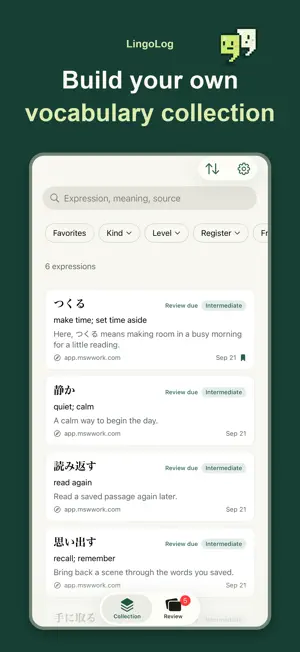
Reading Japanese, Korean, Spanish or another language you're learning in Safari? When you find an unfamiliar word, select it to look it up with LingoLog. You can see what it means in that sentence, explained in your own language, and save the explanation with the original passage. Open the app later to review the words you looked up. Looking up words and sentences Enable the Safari extension using the guide in the app. Select a word or phrase on a web page, then use LingoLog to look it up and save it. AI explains the meaning using the surrounding text and provides examples and related expressions. Select a whole sentence for a translation, simpler wording, and notes on grammar and vocabulary. Your saved words Each entry keeps the original passage and source alongside the explanation. If you look up the same word in another article, you can keep both explanations. Search your collection, mark favorites, or use filters and sorting to find an entry. You can also select words in the app's examples and explanations to look them up. Flashcard review Review up to five saved words or phrases at a time. Read the original passage, try to recall the meaning, then reveal the answer. Mark whether you remembered it to set the next review date. Daily reminders are optional. Languages You can study English, Japanese, Simplified Chinese, Korean, Spanish, French, German, Italian, Portuguese, Vietnamese, Thai, or Indonesian. Choose your native and learning languages to see explanations in either language or both. The app interface is available in English, Japanese, and Korean. Plans The free plan includes 20 lookups per month. LingoLog Pro includes 500 lookups per month and removes ads. Pro is a monthly or annual auto-renewing subscription. Prices are shown before purchase. You can manage or cancel your subscription in your App Store account settings. Requires iOS 26 or later. New lookups need an internet connection. AI-generated translations and explanations may contain errors. Terms of Use: https://app.mswwork.com/terms-of-service.html Privacy Policy: https://app.mswwork.com/privacy-policy.html
What’s new
Version 3.0.2 · Updated October 6, 2026
When you select a sentence in a Thai article, LingoLog now explains it as a sentence, with a translation and notes.
App privacy
The developer, Hideaki Misawa, reported these privacy practices to Apple.
Data Not Linked to You
The following data, which may be collected but is not linked to your identity, may be used for the following purposes:
- User Content: Other User Content
- Search History: Search History
- Identifiers: User ID
- Contact Info: Email Address
- Usage Data: Other Usage Data
- Diagnostics: Crash Data
Used for: Product Personalization, App Functionality
Alternatives to LingoLog: Vocabulary Builder
Looking for apps like LingoLog: Vocabulary Builder? Here are 6 similar apps on the App Store. The highest rated is iMeanIt (5.0/5), and 4 of the 6 are free to download.
-
 シャドトレ - AI英語シャドーイング
-
 Most Common Korean Words
3.7
Most Common Korean Words
3.7
-
 HanByte
-
 Mastering French Synonyms
-
 iMeanIt
5.0
iMeanIt
5.0
-
 Unblur - Read Japanese
| App | Rating | Price | Last updated | Compare |
|---|---|---|---|---|
| LingoLog: Vocabulary Builder | 1.0 / 5 (1 rating) | Free | October 6, 2026 | |
| シャドトレ - AI英語シャドーイング | – | Free | Oct 7, 2026 | Compare |
| Most Common Korean Words | 3.7 / 5 (3) | Free | Oct 13, 2026 | Compare |
| HanByte | – | Free | Nov 19, 2023 | Compare |
| Mastering French Synonyms | – | 0.99 USD | Feb 17, 2025 | Compare |
| iMeanIt | 5.0 / 5 (1) | 3.99 USD | Oct 19, 2026 | Compare |
| Unblur - Read Japanese | – | Free | Aug 7, 2026 | Compare |