

iMeanIt
Cenk Celik Productivity iPhoneiPadiPod touchMac
iMeanIt is a paid Productivity app for iPhone and iPad by Cenk Celik. Rated 5.0/5 from 1 ratings. Requires iOS 18.6. Updated October 19, 2026.
- Rating
- 5.0
- 1 ratings
- Price
- 3.99 USD
- on the App Store
- Size
- 8 MB
- Age 4+
- Updated
- Oct 19
- 2026 · v0.5.0
Screenshots


About iMeanIt
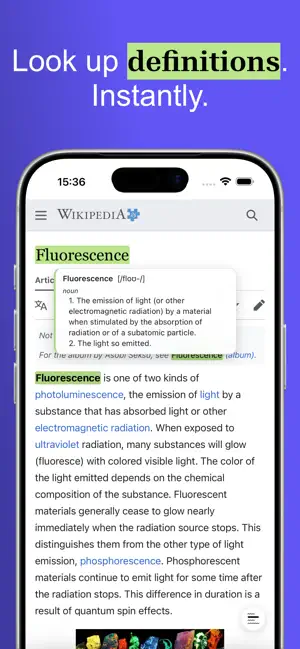
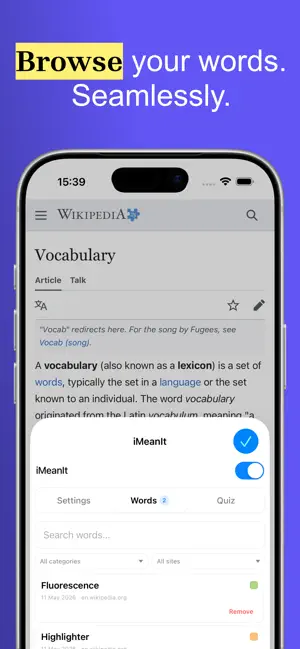
iMeanIt – Highlight Words. Forever. Effortlessly highlight words, look up definitions, add notes, quiz yourself and recall everything directly on any webpage. iMeanIt is a Safari extension that helps you stay organised and learn while browsing. Whether you're building vocabulary, studying or tracking important information, iMeanIt lets you highlight words, look up definitions in 27 languages, add notes and keep them permanently. Your highlights stay visible even after refreshing or revisiting the page. Browse your saved words, filter by category or source site, and test yourself with the built-in quiz. Export your vocabulary as a CSV for flashcard apps or import words from another source. Key Features Highlight words: Quickly highlight any word on any webpage with a tap or double-click Look up definitions: Hover or tap a highlighted word to see its definition, phonetics, examples and synonyms — powered by Wiktionary's 8.5 million-word dictionary Add notes and categories: Tap a highlighted word to add notes, organise words by category and see which site each word came from Word list: Browse, search and manage all your saved words from the popup — filter by category or source site Built-in quiz: Test yourself with flashcard-style review. See the word, reveal the definition, track your score Permanent highlights: Annotations remain visible across pages — even after refreshing or navigating away Undo: Accidentally removed a word? Tap Undo to restore it instantly Export and import: Export your vocabulary as a properly formatted CSV with headers. Import words from CSV files to restore a backup or bring in vocabulary from another source Works with dynamic content: Highlights appear on infinite-scroll pages, single-page apps and lazy-loaded articles Offline definitions: Looked-up definitions are cached locally for instant access — even without an internet connection Quick toggle on iOS: A floating button lets you pause highlighting so you can select and copy text normally, then resume with a single tap Colourblind-friendly palette: Eight highlight colours designed to be distinguishable under all types of colour vision deficiency Local and secure: Your data stays in your browser — no external servers, no tracking Customisable: Edit notes, change highlight colours, switch between 27 languages for definitions How It Works - Tap and hold a word to highlight it - Tap a highlighted word once to see its definition - Tap again to add or edit notes, then Save and Close - Tap and hold a highlighted word to remove the highlight - Use the floating button to pause iMeanIt when you need to copy text What iMeanIt Does NOT Do - No clipboard access: iMeanIt respects your privacy — no access to your clipboard - No external data transmission: All highlight and note data stays local — nothing is sent to external servers. Dictionary lookups and translations are fetched on demand and cached locally - No impact on editors: iMeanIt doesn't interfere with dynamic tools like online word processors, code editors or form fields - No tracking: iMeanIt doesn't track your browsing activity or collect personal data Supported Languages iMeanIt is built for language learners of all backgrounds. Definitions and translations are available in English, Turkish, Spanish, French, German, Chinese (Simplified), Greek, Arabic, Italian, Portuguese, Russian, Japanese, Korean, Hindi, Dutch, Swedish, Polish, Czech, Danish, Finnish, Hebrew, Vietnamese, Thai, Bengali, Tamil, Malay and Indonesian. The app interface is localised in English, Turkish, Japanese and Chinese (Simplified). Definitions powered by Wiktionary via FreeDictionaryAPI.com.
What’s new
Version 0.5.0 · Updated October 19, 2026
iMeanIt 0.5 is our biggest update yet. • A redesigned app, with a step-by-step guide to switching the extension on and a short tour of everything it can do • Highlight phrases and idioms: select several words, then press “Highlight phrase” • Look up the root: “broke” and “breaking” now show the meaning of “break”, across many languages • Learn what you collect: a spaced-repetition quiz with flashcards and fill-in-the-blank cards, plus study streaks • Every word remembers the sentence it came from • Hear how a word is pronounced • Manage your list: sort, select several words, then recolour, categorise or delete them together • Export to your favourite flashcard app, or as CSV with sentences and pages • Highlights no longer change how web pages are laid out, and selecting text on touch screens is smoother Thank you for using iMeanIt!
App privacy
The developer, Cenk Celik, reported these privacy practices to Apple.
Data Not Collected
The developer does not collect any data from this app.
Alternatives to iMeanIt
Looking for apps like iMeanIt? Here are 6 similar apps on the App Store. The highest rated is USMLE QBank: Step 1, 2 & 3 (5.0/5), and all 6 are free to download.
-
 Rubi - Dual Subtitle Player
-
 Japanese Verb Practice
2.2
-
 USMLE QBank: Step 1, 2 & 3
5.0
-
 mySU+
3.0
-
 Language Reactor - Linglass
4.9
-
 AnkÜni Anahtar
| App | Rating | Price | Last updated | Compare |
|---|---|---|---|---|
| iMeanIt | 5.0 / 5 (1 rating) | 3.99 USD | October 19, 2026 | |
| Rubi - Dual Subtitle Player | – | Free | Oct 25, 2026 | Compare |
| Japanese Verb Practice | 2.2 / 5 (6) | Free | Jun 3, 2026 | Compare |
| USMLE QBank: Step 1, 2 & 3 | 5.0 / 5 (4) | Free | Oct 10, 2026 | Compare |
| mySU+ | 3.0 / 5 (3) | Free | May 14, 2026 | Compare |
| Language Reactor - Linglass | 4.9 / 5 (8) | Free | Oct 23, 2026 | Compare |
| AnkÜni Anahtar | – | Free | May 5, 2025 | Compare |
Compare iMeanIt with the top alternatives: ratings, updates, ASO score and keyword gaps →