

Nureva App: Audio device setup
Nureva Inc. Productivity iPhoneiPadiPod touch
Nureva App: Audio device setup is a free Productivity app for iPhone and iPad by Nureva Inc. Requires iOS 16.0. Updated October 26, 2026.
- Price
- Free
- on the App Store
- Size
- 44 MB
- Age 4+
- Updated
- Oct 26
- 2026 · v1.65.0
Screenshots



About Nureva App: Audio device setup
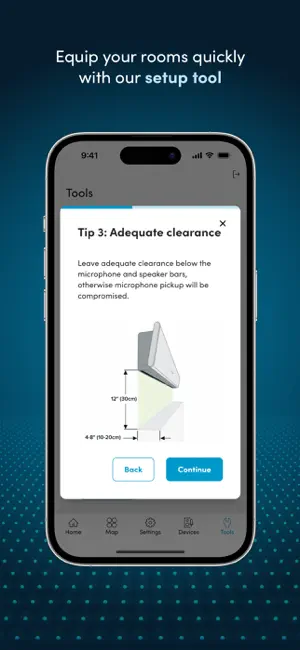
Save IT time and resources with the Nureva® App, which makes setting up HDL audio systems incredibly easy. The app guides you through installation, provides device updates with one click and makes it simple to optimize and customize both the in-room and remote audio experiences. The Nureva App is included with our HDL310 and HDL410 audio systems at no extra charge. These systems are ideal for larger meeting rooms and classrooms, offering both pro AV performance AND plug and play simplicity — an unbeatable combo. This is made possible by patented Microphone Mist™ technology, which fills spaces with thousands of virtual mics and produces sound location data for easy camera tracking and switching. Nureva App features Device setup and updates • Acoustic check — Use an iPhone or iPad to quickly measure room acoustics and get a score to inform your microphone and speaker bar locations, avoiding the hassle of post-installation issues. • Device setup tool — Follow a helpful guide to installing and configuring your HDL310 or HDL410 system. • Coverage map — See sound events in real time to better understand the microphone pickup in your room. • Device updates — Easily update your HDL310 or HDL410 system with a single click of a button. • Static IP — Define a static IP address for your HDL310 or HDL410 system. Advanced audio settings • Teams and Zoom audio settings — Easily apply recommended settings for Teams Rooms and Zoom Rooms. • Dynamic boost — Select a stronger speaker output for noisier spaces and improve the intelligibility of a variety of audio sources. • Adaptive Voice Amplification — Amplify a talker’s voice in the room while still enabling full-room mic pickup so remote participants hear everything. Adaptive Voice Amplification works with a range of external mics, including the headset, handheld, lavalier, gooseneck and omnidirectional types. • Audio processing settings — Change echo reduction, adjust noise reduction or recalibrate your space. • Auxiliary port options — Adjust the auxiliary ports on the connect module for use with other devices. • USB port options — Select the USB speed that matches your host computer or device. • Room control — Allow users to manage simple audio settings without giving access to other app features. Automated camera switching • AI-enabled voice detection — Improve camera switching with an AI-enabled algorithm that cleverly differentiates between human voices and background sounds. • Camera zones — Create up to three zones to automate switching using any brand of USB or HDMI camera. • Room profiles — Add up to three unique room profiles for different camera switching setups. • Integration settings — Easily configure local integrations for cameras and control systems. Troubleshooting • Troubleshooting tools — Download logs or contact support right from the Nureva App. • Network check — Quickly see if you’re experiencing any connectivity issues. • Reset and restart — Return your device to default settings or restart it with a click. • Room status indicators — Spot network and device connectivity issues at a glance. The Nureva App is part of a comprehensive software and services offering designed to keep your rooms running smoothly. When you purchase an HDL310 or HDL410 audio system, you also get Nureva Console (cloud-based management and monitoring), Nureva Developer Toolkit (local and cloud-based APIs) and a 2-year subscription to Nureva Pro (value-added services and support). Explore the Nureva App user guide: https://www.nureva.com/guides/nureva-app
What’s new
Version 1.65.0 · Updated October 26, 2026
Minor fixes and improvements to Nureva App
App privacy
The developer, Nureva Inc., reported these privacy practices to Apple.
Data Not Linked to You
The following data, which may be collected but is not linked to your identity, may be used for the following purposes:
- Usage Data: Product Interaction
- Diagnostics: Other Diagnostic Data
- User Content: Audio Data
- Identifiers: User ID
Used for: Analytics, App Functionality
Alternatives to Nureva App: Audio device setup
Looking for apps like Nureva App: Audio device setup? Here are 6 similar apps on the App Store. The highest rated is Keeper Password Manager (4.9/5), and all 6 are free to download.
-
 Bosch MeasureOn
4.1
Bosch MeasureOn
4.1
-
 TeamViewer QuickSupport
2.9
TeamViewer QuickSupport
2.9
-
 Keeper Password Manager
4.9
Keeper Password Manager
4.9
-
 TeamViewer Remote Control
4.7
TeamViewer Remote Control
4.7
-
 Teleprompter
4.8
Teleprompter
4.8
-
 3D Snap: LiDAR Room Scanner
3.9
3D Snap: LiDAR Room Scanner
3.9
| App | Rating | Price | Last updated | Compare |
|---|---|---|---|---|
| Nureva App: Audio device setup | – | Free | October 26, 2026 | |
| Bosch MeasureOn | 4.1 / 5 (534) | Free | Oct 20, 2026 | Compare |
| TeamViewer QuickSupport | 2.9 / 5 (5,201) | Free | Oct 27, 2026 | Compare |
| Keeper Password Manager | 4.9 / 5 (231,884) | Free | Oct 19, 2026 | Compare |
| TeamViewer Remote Control | 4.7 / 5 (44,893) | Free | Oct 27, 2026 | Compare |
| Teleprompter | 4.8 / 5 (34,356) | Free | Oct 29, 2026 | Compare |
| 3D Snap: LiDAR Room Scanner | 3.9 / 5 (555) | Free | Sep 30, 2026 | Compare |