

ShiftFlow: Track Team Hours
Pixnbit Inc. Business iPhoneiPadiPod touchApple Watch
ShiftFlow: Track Team Hours is a free Business app for iPhone and iPad by Pixnbit Inc. Rated 4.8/5 from 2,335 ratings. Requires iOS 15.0.
- Rating
- 4.8
- 2.3K ratings
- Price
- Free
- on the App Store
- Size
- 186 MB
- Age 4+
- Updated
- Oct 4
- 2026 · v23.0.2
Screenshots

About ShiftFlow: Track Team Hours
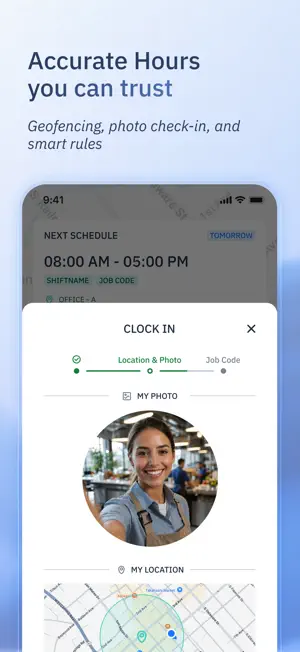
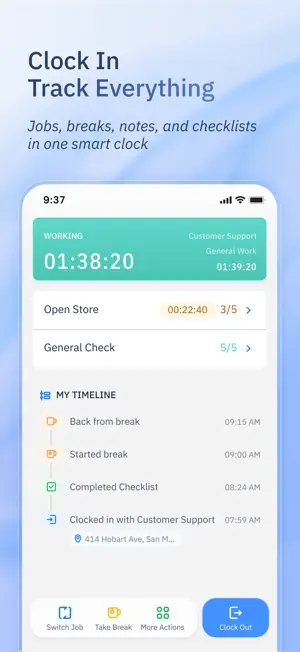
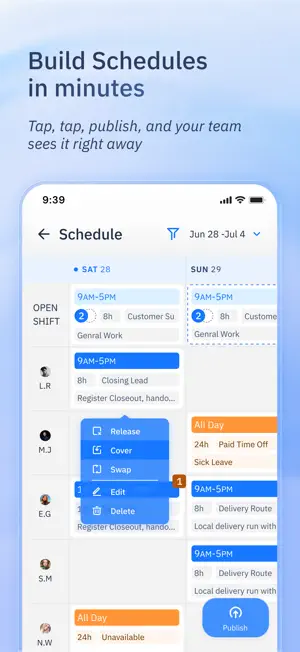
Your team deserves better than messy spreadsheets or clunky and complicated systems. ShiftFlow is a complete time and attendance solution built around how your team actually works. From real-time clock-ins and GPS verification to smart shift scheduling and one-click timesheet exports, we help you save time today — so you can build a stronger business tomorrow. Built for Real Teams, Real Workflows • Get up and running in seconds – No complex setup or onboarding required • Scheduling made simple – Plan shifts and manage availability in one place • Clock-in from anywhere – Use GPS verification, geofencing, and selfie check-ins • Track job codes, earnings, and expenses – Understand where time and money go • Manage time off easily – Approve, decline, or track leave with clarity • Export clean timesheets – Choose CSV or PDF format, filtered by team, job, or date range • Communicate instantly – Team chat, read receipts, and group messaging • Real-time visibility – See who's on the clock at a glance from your home screen What Teams Are Saying “It’s practical, functional, and easy to use.” – Bee. I. g “Good app. Easy to use and friendly. Less paperwork and real-time checking staff attendance.” – BreadNco “Doing payroll just got easy!” – Circle M Ranch “ShiftFlow has been a game-changer for managing our team hours.” – Gloria.WRH “I tried so many others and this one is definitely the best I’ve ever seen.” – J Garoppolo “This app will NOT disappoint. The customer service is amazing.” – Ern Saved by grace “Keeps my work shifts on track — love it!” – danii4358 “I recommend it to every small business owner with employees. It’s amazing!!!” – Deedee Mullen Ready to Simplify Time & Attendance? ShiftFlow is built for real teams who need a reliable, easy-to-use solution for time tracking, scheduling, and payroll. Whether you manage a small crew or a growing workforce, we’re here to help you save time, reduce errors, and focus on what matters most — growing your business. Got questions or ideas? We’d love to hear from you. Contact us at [email protected]. Terms & Conditions: https://www.shiftflow.app/terms-conditions
Ratings & reviews
4.8
2.3K ratings
What’s new
Version 23.0.2 · Updated October 4, 2026
Color-Code Your Schedule: Add color tags to scheduled shifts for a clearer view of personal calendars, team calendars, and the scheduler. See what’s what at a glance. Fix A Forgotten Clock-Out: If someone forgets to clock out, managers can end their punched shift at an earlier time. Keep recorded hours aligned with when work actually stopped. Find The Right Job Code Fast: Search job codes by name or description, or find them through a linked work site’s name and address. Less scrolling, faster selections. Permissions In One Place: Check location, camera, and notification access from App Preferences. Quickly spot and restore any permission that’s switched off. Your Time Clock, On Your Wrist: Clock in, clock out, and start or end breaks from Apple Watch when your team’s requirements allow. Add a timer to your watch face to keep time in view. Feel Your Team’s Pulse: Team Pulse widgets put who’s in and out, staffing coverage, and each person’s work and break timeline on your Home Screen. Stay on top of the day at a glance. Team Radar On Your Home Screen: View your team’s locations and work sites on a Home Screen map. You can also see how many people are working or on break.
App privacy
The developer, Pixnbit Inc., reported these privacy practices to Apple.
Data Linked to You
The following data, which may be collected and linked to your identity, may be used for the following purposes:
- Contact Info: Email Address, Name
Used for: App Functionality
Data Not Linked to You
The following data, which may be collected but is not linked to your identity, may be used for the following purposes:
- Identifiers: User ID
- Usage Data: Product Interaction
- Diagnostics: Crash Data, Performance Data
- Location: Precise Location, Coarse Location
- User Content: Photos or Videos
Used for: Analytics, App Functionality
Alternatives to ShiftFlow: Track Team Hours
Looking for apps like ShiftFlow: Track Team Hours? Here are 6 similar apps on the App Store. The highest rated is Invoice Maker for Contractors (4.8/5), and all 6 are free to download.
-
 Doc Scanner PDF, Convert & OCR
4.7
Doc Scanner PDF, Convert & OCR
4.7
-
 Invoice Maker for Contractors
4.8
Invoice Maker for Contractors
4.8
-
 VOMO: Transcribe Audio to Text
4.5
VOMO: Transcribe Audio to Text
4.5
-
 PDF Scanner Document Converter
4.5
PDF Scanner Document Converter
4.5
-
 Call Recorder & Voice Memos ◦
4.4
Call Recorder & Voice Memos ◦
4.4
-
 eSign: Digital Signature Maker
4.8
eSign: Digital Signature Maker
4.8
| App | Rating | Price | Last updated | Compare |
|---|---|---|---|---|
| ShiftFlow: Track Team Hours | 4.8 / 5 (2,335 ratings) | Free | October 4, 2026 | |
| Doc Scanner PDF, Convert & OCR | 4.7 / 5 (478) | Free | Sep 21, 2026 | Compare |
| Invoice Maker for Contractors | 4.8 / 5 (224) | Free | Oct 3, 2026 | Compare |
| VOMO: Transcribe Audio to Text | 4.5 / 5 (385) | Free | Oct 7, 2026 | Compare |
| PDF Scanner Document Converter | 4.5 / 5 (542) | Free | Sep 17, 2026 | Compare |
| Call Recorder & Voice Memos ◦ | 4.4 / 5 (375) | Free | Jul 29, 2025 | Compare |
| eSign: Digital Signature Maker | 4.8 / 5 (147) | Free | Jan 22, 2026 | Compare |